Need a Career Lifeline? Explore the world of MOOCs

MOOCs-1

These days everyone has something to say about online courses and websites. There is so much of buzz about how these courses are becoming the top choice of professionals around the world who are dealing with time crunch. Thus, there is no doubt regarding the fact that online courses are quite useful for the masses. How they can help your career?

According to an estimate, more than 4 million people from around the world have made 22 million registrations for free classes at Coursera.org, which happens to be the largest provider of Massively Open Online Courses. This goes on to show how popular e-learning has become in the current times. Besides, world’s top universities including Stanford, MIT are competing with each other to offer free Massive Open Online Courses to anybody who has internet access.

Here are some reasons why online courses are such a rage for working professionals:

Diversity of Topics:

There are courses for every possible topic that you can imagine. Whether it is a hobby like photography, or a singing, or something as serious and sophisticated as nanotechnology, you can find courses for all of these on various online platforms. And what more, many of these courses are accredited from top universities.

Flexibility of timings:

A professional is always running on tight deadlines. Ask any white collar professional and he would always want some extra time for completing a project. It will be too much to expect professionals in such cases to take time out for regular classes. This is where these online courses win their case. Almost every course and the site offering them provide this option of “time-travelling” i.e you can travel in time according to your wishes to learn your favorite topic. There is no strict time window to cover a particular topic.

Highly focused:  

The biggest benefit of pursuing an online course for a professional is its conciseness. You can cut the crap and directly concentrate on the relevant parts. For example, if you are working in the analytics industry and all that you are concerned about is learning to use Google analytics, you can focus on courses that teach Google analytics instead of learning the entire history of digital marketing and web analytics. This will not only save a lot of time but also help you to remain focused.

So how exactly can you make the most of these online courses?

Set some definite goals

With the mind boggling number of courses at your disposal, the world of MOOC can leave a person totally dazed and confused. The best way to avoid getting lost is to define your end goal, which you want to achieve and determine which classes or courses will help you achieve them. Those of you think that MOOC are less tough and easy should double check their facts. You will be surprised to know that online courses are just as rigorous as their university counterparts. In fact, a University of Pennsylvania study reveals that only 4% of students who register for a MOOC actually goes on to complete it.

Search for the perfect course

There is endless number of resources where you can find a course for your requirement. However, always trust only the most reliable and which has a credible community following. The current dominating platforms include Coursera, Udacity and edX. These have the largest catalogue of courses which meet the most varied demands of professionals. Each platform has its own strengths and it is good to know which platform excels at what. Udacity is known for its best-in-class computer science and math courses. edX has a slight inclination towards science, technology and math. There are MOOC search engines such as MOOCSE and Class Central for your help as well.

Review what you have learnt and add to your resume

Once you complete your classes, it’s time to review whatever you have learnt.   Figure out the ways in which you can add them to your CV to make the best impact. You can add these skills under a separate tab such as Professional Development or Extra Competencies. You can also add these newly learned skills to your LinkedIn profile. LinkedIn also offers you the opportunity to automatically display badges from completed MOOCs on your profile.

Although the world of MOOCs is still evolving and many employers still don’t give them the attention they deserve, one should not doubt their efficacy. Pursuing an online course or e-learning is certainly one of the best and economic ways of keeping your skills updated and learning new skills.

This article is written by:

Saurabh Tyagi. Saurabh is a blogger with interests in various new media technologies. He made a radical shift from his core engineering degree to this world of internet. He provides advice on how to formulate a resume by providing resume samples as well.

5 Most Common Myths About Virtual Learning

5-myths

As computers become more commonplace, they are revolutionizing almost every aspect of human life. One aspect of life which computers are impacting is the way people learn. The penetration of computers into the learning sphere has led to a rise in something called “virtual learning”.


Virtual learning is basically the use of computers to deliver instruction to learners or students. Unlike traditional learning which involves physical interaction between students and teachers, virtual learning doesn’t involve physical instruction. It uses computer software or an internet connection to facilitate the interaction.


This type of learning can take the form of computer-based learning (where a student receives instruction from a computer installed software). It can involve remote online learning (where a student receives instruction from a teacher via the internet). It also involves interactions between learners through online communication platforms as they share experiences and collaborate on learning projects. Virtual learning is also referred to as digital learning or “e-learning”.


As virtual learning becomes increasingly popular, so do myths about it. Some of these myths are simple misperceptions. Debunking them is essential to enjoy the full benefits of virtual learning. Some of these common myths are the following:


Myth #1: Virtual Learning Primarily Involves Spending Time At A Computer


The fact that learning takes place through the computer doesn’t mean that students will necessarily spend all their time at a computer. Depending on the subject of the study, students can carry out activities like library research, drawing, lab experiments, social interactions and collaborative projects. Some virtual schools even organize periodic school trips for learning purposes.


The bottom line is that despite the fact that virtual learning mostly takes place through computers, it is not the only format through which actual learning can occur.


Myth #2: Virtual Learning Is Fundamentally Teacher-Less


The idea here is that virtual learning eliminates the need for teachers. This is a misconception for two reasons. First of all, virtual curricula are typically developed or adapted by certified teachers. As such, even automated learning software involve an input from teachers at a certain point.


Secondly, there are situations in which the physical presence of a teacher figure is inevitable. This is true, especially where young children are involved. They may need someone to offer guidance, demonstrations and supervision. This someone may be termed a Learning Coach or may even be a parent. However, the role they will play is that of a teacher. Therefore, claiming that virtual learning eliminates the need for physical teachers is quite erroneous.


Myth #3: Virtual Learning Is All About Technology


Most people imagine that virtual learning succeeds or fails on technology. The assumption is that once you have the right technology in place, everything will work out perfectly. This couldn’t be further from the truth.


The fact is that technology is simply a conduit for learning. The most important aspect is the curriculum or material which is being learned. As such, the main focus should be in finding the best way of passing the material in a manner which is fun, effective and understandable for the learner. Unless this is considered, all the technology in the world will not make people better learners.


Myth #4: Virtual Learning Limits Social Interaction


Social interaction has always been a key component of the learning process. In the traditional classroom setting, interaction is guaranteed by the proximity that students have to each other. In a virtual learning environment, such proximity isn’t obvious. As such, there is a common assumption that social interaction tends to be limited for students who learn virtually. This isn’t at all true. In a virtual environment, social interaction occurs via IM, email, Skype and social media platforms. Besides that, there are opportunities which are created for face-to-face interactions between students and teachers. For instance, some virtual schools organize school trips, as well as collaborative programs in which students can meet and share their experiences.


Myth #5: Virtual Learning Is Best Suited For The Homeschooled


Virtual learning has always been considered something of an alternative for standard traditional learning. As such, most virtual schools tend to focus on recruiting those who are homeschooled. In doing this, they end up missing an opportunity of recruiting students who haven’t been home schooled.


The simple fact is that almost anyone can benefit from a virtual learning program. Those who are home schooled may be more likely to sign up for these programs. However, even non-homeschooled students can benefit from it. This is the reason why many educational institutions provide virtual learning programs for their students – even those who attend traditional classrooms.


In a nutshell, these are the 5 most common myths about virtual learning. These myths can form perceptual blockages which can limit the potential benefits of this type of learning. As such, debunking them is a critical step towards unleashing the full potential of this new type of learning.

Take Control Over Your Sales

Take-control-over-sales (1)
For institutions who constantly purchase and sell items, managing inventory can be just as crucial as managing finance. And if you thought tracking all your institution purchases were hard, tracking outgoing items and their invoicing can be even harder.

Introducing ‘Sales in Inventory’, a feature part of the Inventory plugin that enables institutions to easily record and track items they sell. From student uniforms to textbooks to sports equipment, now sell any item and let Fedena do the rest of the work. And what good would it be to make all those sales and not know the status and value of the items sold. Fedena generates comprehensive sales reports that help you keep track of your store sales, the availability of items, and the amount collected for each item.

Workflow to set up and to track items sold
Flowchart

Who can manage items for sale

Fedena administrators have complete privileges over the ‘Sales in Inventory’ feature. Administrators can set up items for sale, create sales invoices, as well as generate sales reports. Fedena offers the following inventory privileges that can be assigned to employees.

Privilege Control
Employee Manager Inventory Setup items for sale and generate sales reports.
Manage Inventory Control the complete Inventory module, which includes all activities connected with ‘Sales in Inventory’.
Inventory Basics Set up items for sale.
Inventory Sales Create sales invoices and generate sales reports.

Step 1 – Create an item category

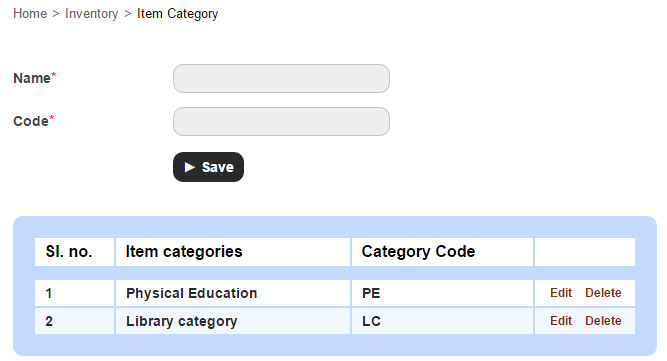
The first step would be to create the item categories under with each item can be recorded and sold.

  1. At the top of your dashboard, click the module access icon > Administration > Inventory > Item Category to open the Item Category page.
    1
  2. Enter the name and category code, and then click the Save button.

Step 2 – Record a sellable store item

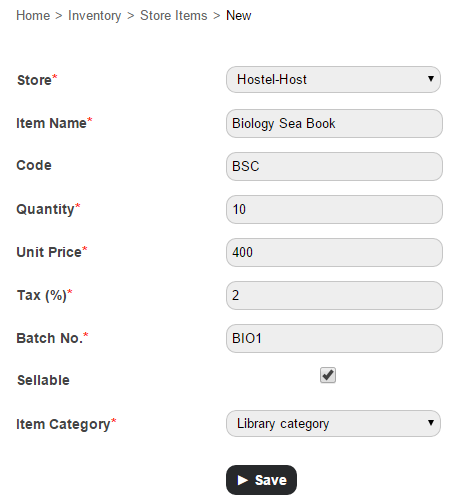
  1. At the top of your dashboard, click the module access icon > Administration > Inventory > Store Items to open the Store Items page.
  2. In the top right, click the New button.
    2
  3. Enter the item details.
  4. Select the Sellable checkbox.
  5. Select an item category.
  6. Click the Save button.

Step 3 – Advertise and sell the item

Now that you’ve recorded the items to be sold, how do you let everyone know that a sale is on? The answer is right in front of you – Fedena. You can use Fedena to seamlessly communicate to your students, parents, and employees. Some of the best ways would be to:

  • Use the News module to announce to the whole institution that a sale is on.
  • Use the SMS or Email module to send a message.
  • SMS and Email settings not configured? Not to worry. Use Fedena’s internal messaging system to send out a quick note.
  • Already have discussion groups setup in Fedena? Use the Discussion module to share the message.

Step 4 – Create a sales invoice for the items sold

Complete your sale by creating a sales invoice and issuing a copy to your customer.

  1. At the top of your dashboard, click the module access icon > Administration > Inventory > Billing to open the Invoice page.
  2. In the top right, click the New button.
    3
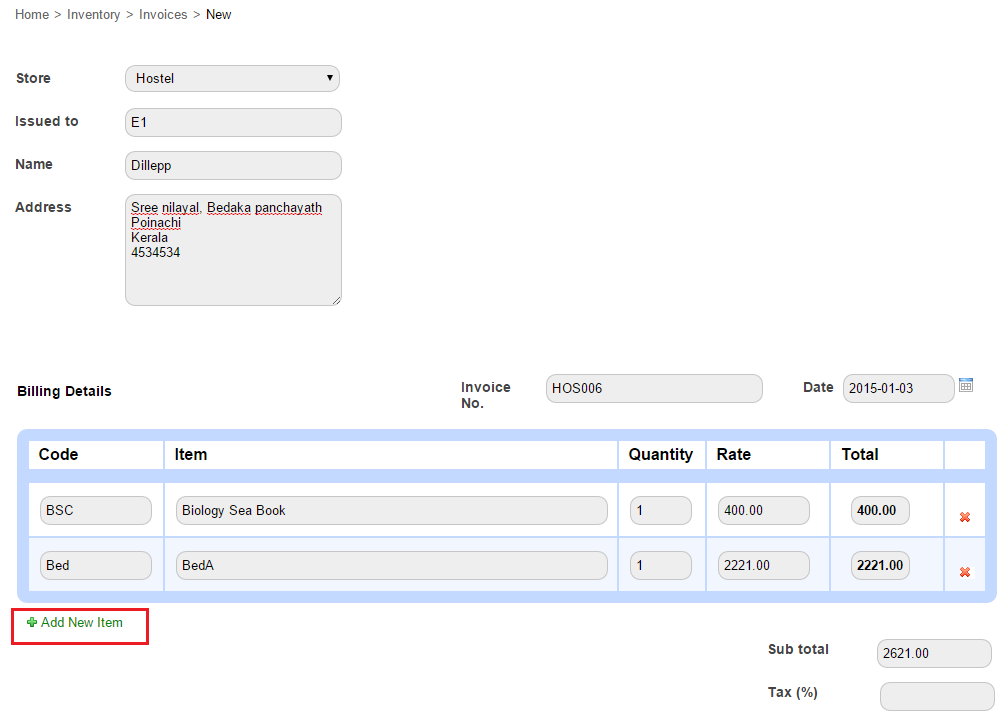
  3. In the Store field, select the store to which the item belongs.
  4. In the Issued to field, enter the Fedena user ID to search and select the user. The Name field and Address field automatically populates the user information.
    Note: If the customer is not a Fedena user, you can manually enter the customer’s name and address.
  5. Enter the billing details. You can search for the item using the item code or item name. If required, you can create an invoice for more than one item clicking Add New Item.
  6. In the Tax (%) field, enter the item(s) tax.
    4
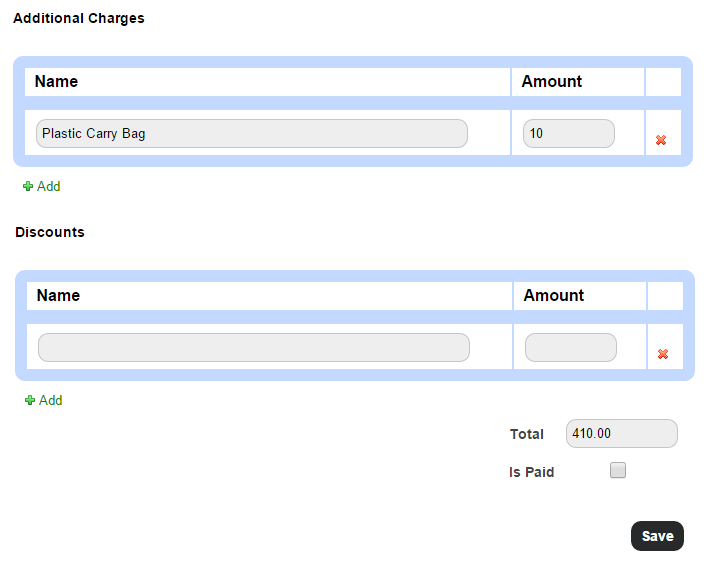
  7. Enter any additional charges or discounts applicable. The Total is the amount to be paid by the customer.
  8. Select the Is Paid checkbox if the item is paid for.
    Note: You can create an invoice even if the item(s) is not paid for. When you later receive the payment, you can edit the invoice, select the Is Paid checkbox, and then save the invoice.
  9. Click the Save button to create the invoice.
    5
  10. Click Print to print the invoice.

You can always print the invoice at a later time as well. Go the Invoice page (module access icon > Administration > Inventory > Billing), and then search and select the invoice to print.
Step 5 – Generate sales reports

Use the following reports to know how your sales team has performed:

  • Item-wise Report
  • Day-wise report
  • Invoice Report

Item-wise Report

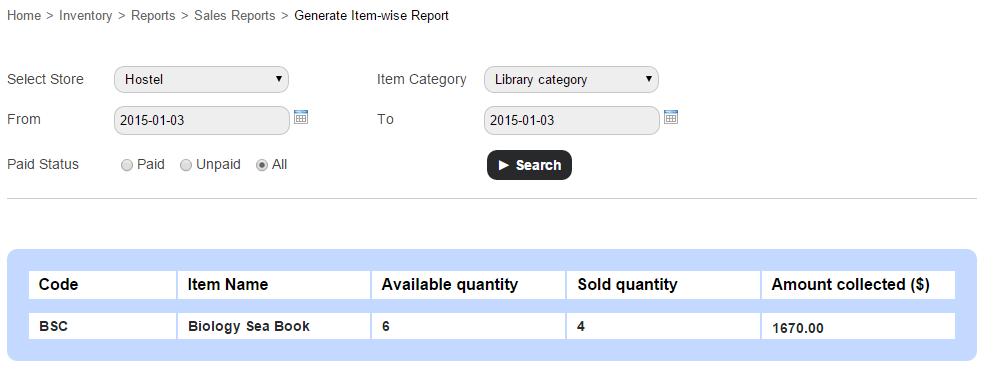
Use the Item-wise Report to view the availability of items and the amount collected for each item.

At the top of your dashboard, click the module access icon > Administration > Inventory > Reports > Sales Reports > Item-wise Report.

6

Day-wise Report

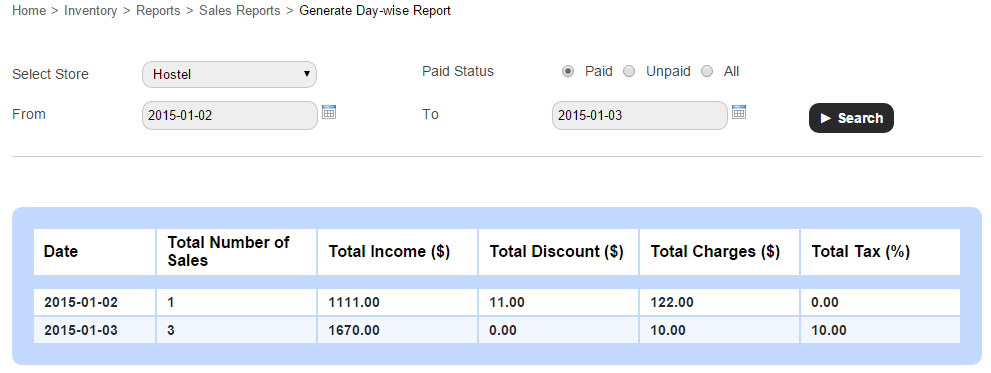
Use the Day-wise Report to view the amount collected and the total number of sales made by each store on the specified date(s).

At the top of your dashboard, click the module access icon > Administration > Inventory > Reports > Sales Report > Day-wise Reports.

7

Invoice Report

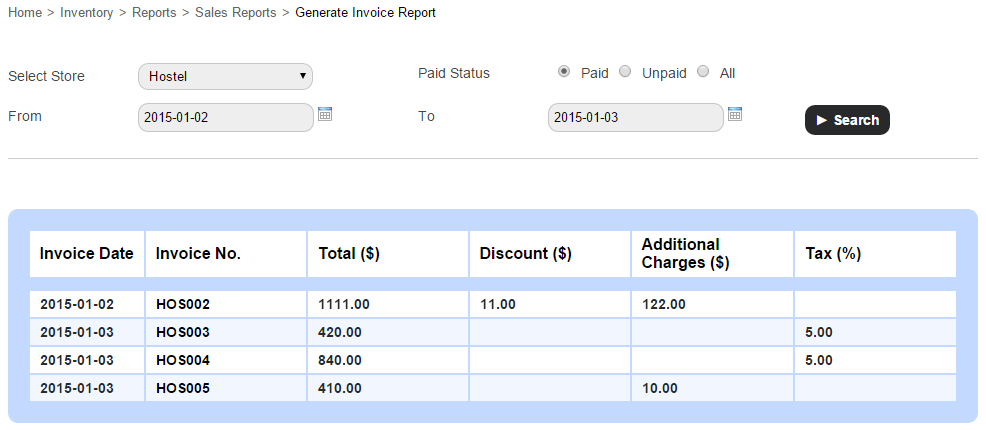
Use the Invoice Report to view the list of invoices together with their details for the specified date(s).

At the top of your dashboard, click the module access icon > Administration > Inventory > Reports > Sales Report > Invoice Reports.
8

You can also click on an invoice number to view the complete invoice details.

So there it is, use Fedena to record and track the items your institution sells and ensure proper financial management and accurate reporting.

The Smart Glasses the Education World Was Waiting for

Smart-Glasses

Google has introduced a new set of eyewear- a mass-market ubiquitous computer known as Google Glass. And no, this isn’t just any pair of cool-looking sunglasses a cool-looking actor can wear and make millions in sales from. It’s real. A computer disguised as an ordinary-looking pair of glasses. Well, sort of ordinary.
Awesome! So What Are the Features?

Google Glass features a sophisticated display with the help of lights, LED, and all sorts of reflection techniques (and of course plenty of sophisticated science) to display a screen-like image in front of the user’s eye. It also includes a touch-pad on the side of the glasses for physical navigation. A voice command is another option if the user’s hands are too busy or wearing any sort of fabric which doesn’t allow touch-control (gloves, mittens, etc). One of the most useful and coolest features is that of the 720p HD camera. Sure enough, this gives all Glass users the ability to capture images and record videos of high quality.

“Ok, Glass, tell me how you can make me a better student?”

Glass won’t answer that for you, but I can. With the help of several applications, Google Glass can make education and studying in the classroom easier. Other than Google’s own free and inbuilt applications such as Google Hangouts, Google Now, Google Plus, and Google Maps, third party developers pitched in to innovate new apps for Google Glass that further enhances its capabilities. How?

  • University Professors, with the help of video recording applications can capture videos during their lesson. Now, the students won’t only have PowerPoint material and textbooks as notes, they can view a video of the lesson from the teacher’s point of view. That way, they haven’t missed out a thing in the lecture!
  • Professors can open a Google Hangout conversation during the lecture and ask students who are shy or unwilling to disturb the class to send their questions in the form of a message right away. The Prof. can answer when the time is right and the method will persuade students to be better participants without any reluctance.
  • Locating the university if you are a new student in a completely foreign country won’t be problem anymore. Google Map through Glass while you’re riding your bicycle will help you reach your university campus on time.
  • During class, sending a note to a friend or asking, “Dude, what’s he sayin’?” won’t be easy, but an IM through Glass will allow the communication without a peep.
  • Forget about taking notes on your notepad now. The Evernote App will allow you to take notes easily during the lecture in your own words. Recording a video of the lecture will certainly help to remind you what you learned in the lecture you attended two months ago.
  • Word Lens is the latest translator app introduced in Nov, 2013. Foreign students, this is certainly good news for you! Translate your instructor’s foreign language to better understand the lectures pronto!
  • Extra classroom content can be viewed during the lecture.
  • A recent application developed by a student called Speech Helper allows you to send text documents and PowerPoint presentations to Glass. This will enable professors as well as students while presenting to read notes and help delivering their speech, presentation, debate, etc.
  • Teachers who are checking and marking assignment, exams, or reports can, after checking and grading the work, record a video of their feedback. They can provide detailed explanations of why their questions were wrong and how to improve them in future.
  • News alerts from CNN or The New York Times will keep students updated with current affairs and be able to participate better in class with the latest information.

The article is written by:

Anais John. She is a career consultant who loves to share her expertise on leadership program, career path. Presently, she’s working for an online service that helps learners who come their way asking, “can you help me do my essay?”

Archiving or Deleting a User Record

Archive
The difference between archiving and deleting an employee or student record is – when you archive an employee or student record, the record moves from the active record list to the former record list. It does not delete the record from Fedena, so you can always find them later using the Advanced Search function. When you delete an employee or student record, all data associated with the record is removed. You cannot restore deleted records.

Who can archive and delete?

Only Fedena administrators and privileged employees can archive and delete employee and student records. For a privileged employee to be able to archive or delete employee records, either Manage Users or HR Basics privilege must be provided. Similarly, to be able to archive or delete student records, either Manage Users, or Admission, or Students Control privilege must be provided.

Archive or delete an employee record

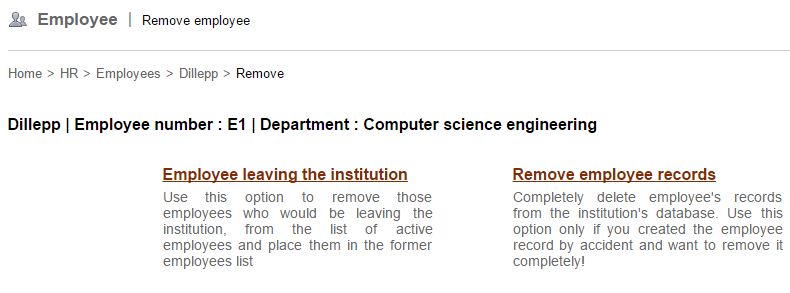
When archiving or deleting an employee record, the following two options are available:

  • Employee leaving the institution – Use this option to archive and move the employee from the active employee list to the archived/former employee list.
  • Remove employee records – Use this option to delete all information associated with the employee. Once deleted, the employee record cannot be restored.

Note: You cannot delete an employee record that has dependencies—such as, subject association, part of a discussion group, and so on—in other Fedena modules. Unless the dependencies are removed, you cannot delete the employee record.

  1. Go to the employee’s profile. You can find the employee using the search bar at the top of your dashboard, or through the Manage Users page (Module access icon > Administration > User).
  2. When you find the employee, click on the employee’s name to view the employee’s complete profile.
  3. In the top right, click the Delete
1

The Remove employee page is displayed.
2

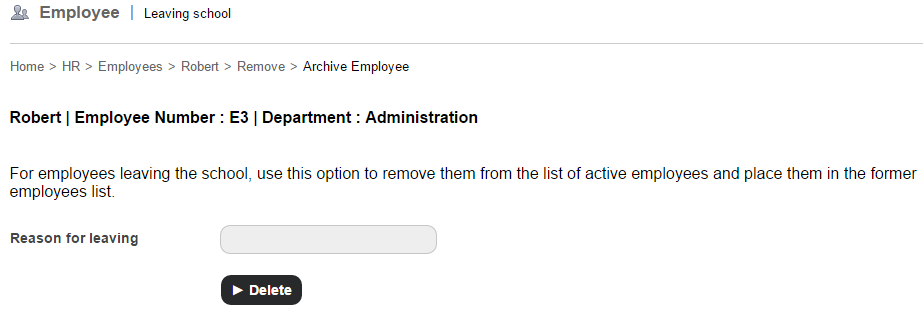
  1. If you want to archive the employee record, select the Employee leaving the institution You must specify the reason for the employee leaving, and then click the Delete button.
    3

If you want to permanently delete the employee record, select the Remove employee records option. A confirmation message is displayed. Click OK to confirm removal.

Archive or delete a student record

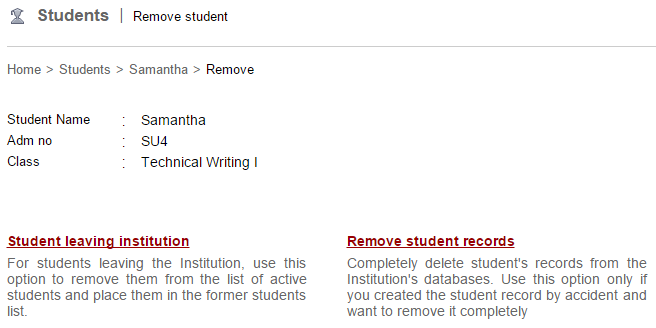
When archiving or deleting a student record, the following two options are available:

  • Student leaving institution – Use this option to archive and move the student from the active student list to the archived/former student list.
  • Remove student records – Use this option to delete all information associated with the student. Once deleted, the student record cannot be restored.

Note: Unlike employees, student records can be deleted even if the student has dependencies in other Fedena modules.

  1. Go to the student’s profile. You can find the student using the search bar at the top of your dashboard, or through the Manage Users page (Module access icon > Administration > User).
  2. When you find the student, click on the student’s name to view the student’s complete profile.
  3. In the top right, click the Delete
    4

The Remove student page is displayed.
5

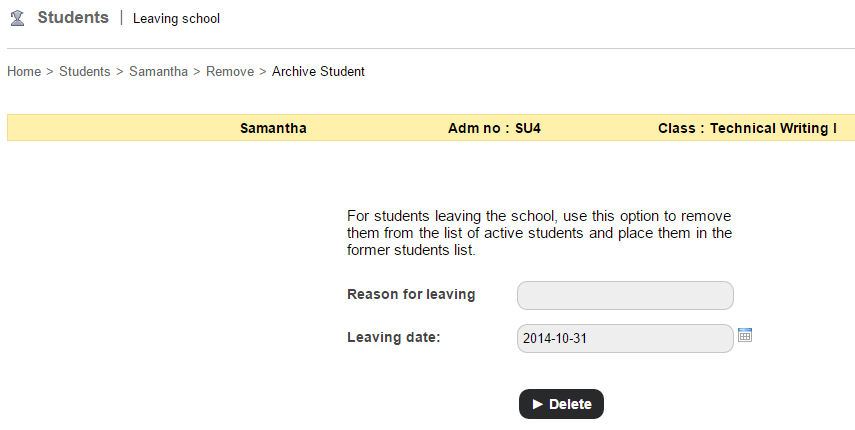
  1. If you want to archive the student record, select the Student leaving institution You must specify the reason for the student leaving and the leaving date, and then click the Delete button. 6

If you want to delete the student record, select the Remove student records option. A confirmation message is displayed. Click OK to confirm removal.

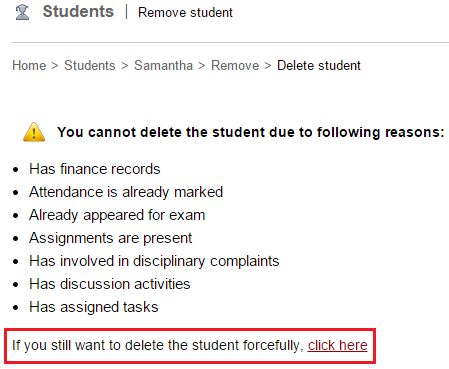
If the student has dependencies in other Fedena modules, a warning message similar to the image below is displayed.
7

If you still want to delete the student record, click the link.

Now that the student record is archived or deleted, you may be wondering what happens to the associated parent record. So here’s what happens:

  • If a student record is archived, the parent record is no more active. However, if the archived student is a sibling, the parent record will remain active.
  • If a student record is deleted, the parent record is also deleted. However, if the deleted student is a sibling, the parent record will not be deleted.

There are many reasons why an institution would want to archive an employee or student record in Fedena. It could be because the employee no longer works at the institution, or the student has moved to another school, but you want to keep their information in Fedena so you can access it at any time. Similarly, there are many reasons why an institution would want to delete an employee or student record permanently. It could be because a duplicate employee or student record was created, or a factitious record was created when learning Fedena, or a record was created accidentally or with incorrect information.

Whatever the reasons may be, Fedena offers the flexibility either to archive the records or to delete the records permanently.

Celebrate this Christmas with the all new Fedena 3.4

Fedena 3.4 for Blog

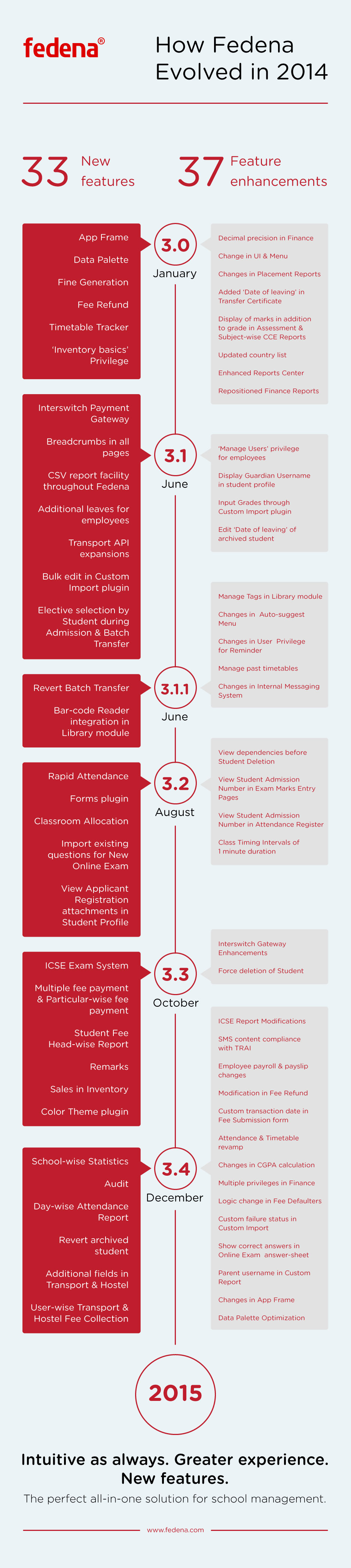
It’s almost Christmas, and we are pleased to present Fedena 3.4, which delivers improved performance and provides further flexibility. We have been listening to your feedback, and this release offers many exciting new features and enhancements, and also includes a significant number of key fixes to Fedena.

To highlight some of the new and enhanced features:

  • Revert an archived or graduated student with all associated settings in just a single click.
  • Customize the type of hostel or transport information to be recorded based on your institution’s requirements.
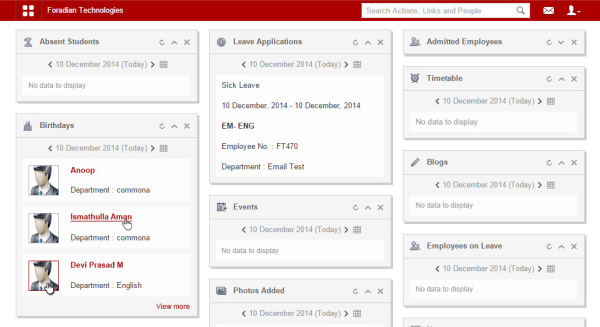
  • Optimized, interactive dashlets that take you right to the information you are looking for.
    New Dashboard (1)
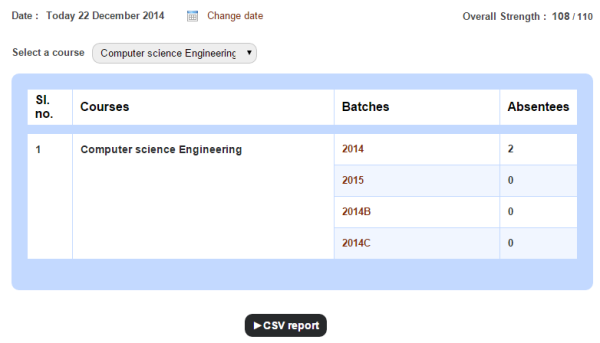
  • A report to easily track the overall student attendance in your institution, as well as for each batch.
    2
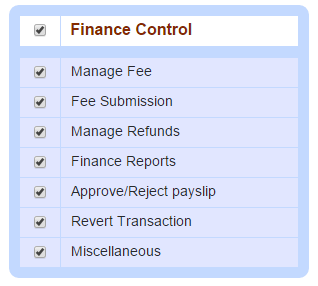
  • Assign various finance privileges to help define employee roles and responsibilities while ensuring security.
    3
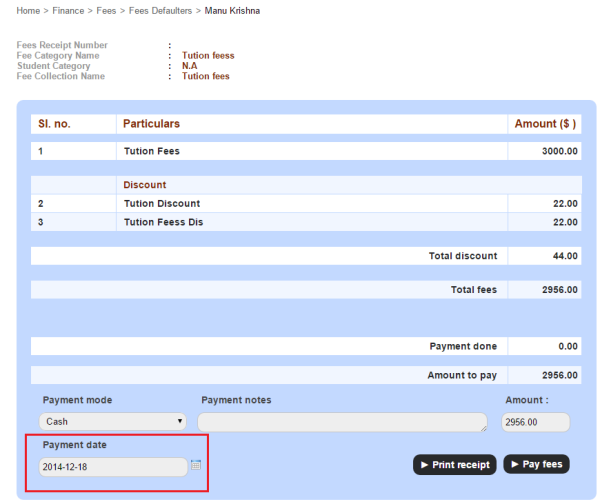
  • Create fee payment transactions for any custom date.
    4
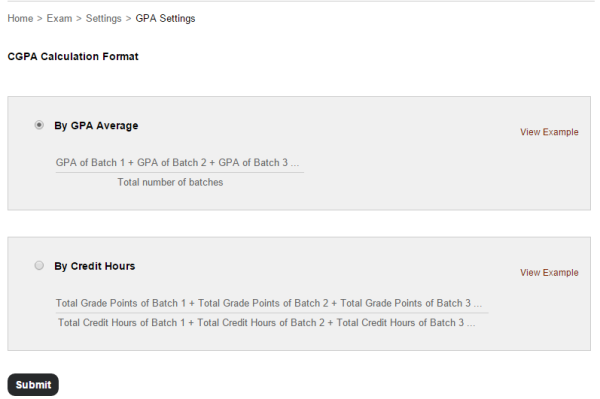
  • Calculate students’ CGPA either By GPA Average or By Credit Hours.
    5
  • Various enhancements to the Timetable module making it easier to create and manage clear and error free timetables.
  • Fedena supports over 20 languages, and now you can add Dutch to the list.

The Foradian elves have been working hard over the past couple of months to advance Fedena and to create an amazing experience for our users. We are excited and are looking forward to you getting your eyes on this major release. We will continue to work hard on addressing more of your feedback as well as introducing new features to make your Fedena experience even better.

We’re eager to hear from you! Write to us at info@fedena.com and let us know your thoughts, questions, and feedback.

We hope you all enjoy a wonderful holiday season, and we’ll see you in 2015 with more great releases.

Tracking Student Fee Payments just got a lot Easier

Finance-Fedena
Monitoring and tracking student fee payments in an institution can be a daunting task for staff in your finance department. To help institutions always be aware of the status of student fee payments and the fee discounts, we have introduced the following three new finance reports as part of Fedena 3.3:

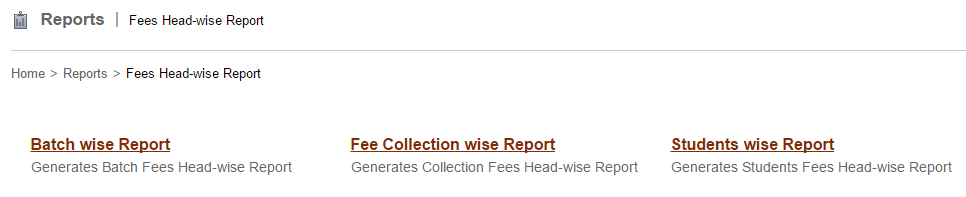
  • Batch wise Report
  • Fee Collection wise Report
  • Students wise Report

Only Fedena administrators and privileged employees (either the View Additional Reports privilege or the Finance Reports privilege must be provided) can view all three reports.

How to access the reports?

If you’ve been provided the View Additional Reports privilege, you can access the reports through the Reports module.

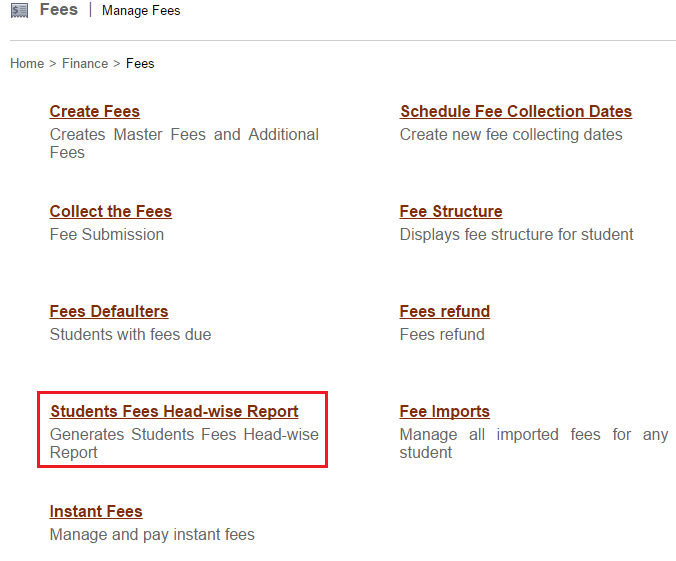
If you’ve been provided the Finance Reports privilege, you can access the reports through the Finance module – Click the module access icon > Administration > Finance > Fees > Students Fees Head-wise Report

1 2

Batch wise Report

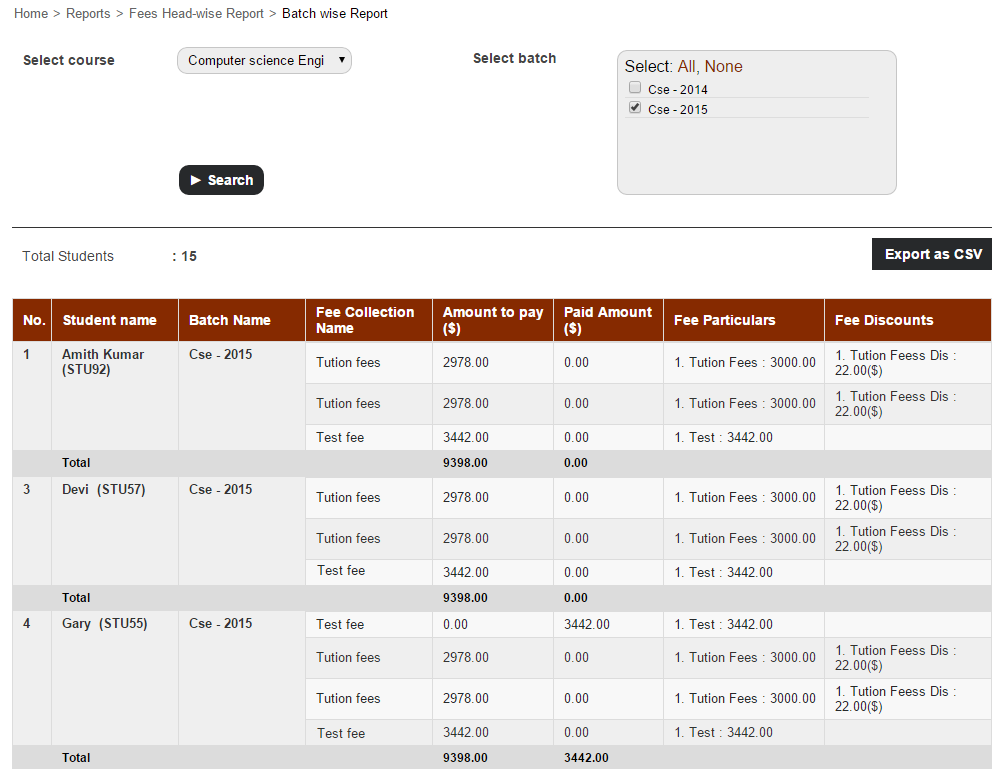
The Batch wise Report displays the amount of fees paid and due for each fee particular, by all students of the selected batch.

To view the report for a particular batch, select a course, and then select the batch and click Search.

3

You can also export the report details as a CSV file.

Fee Collection wise Report

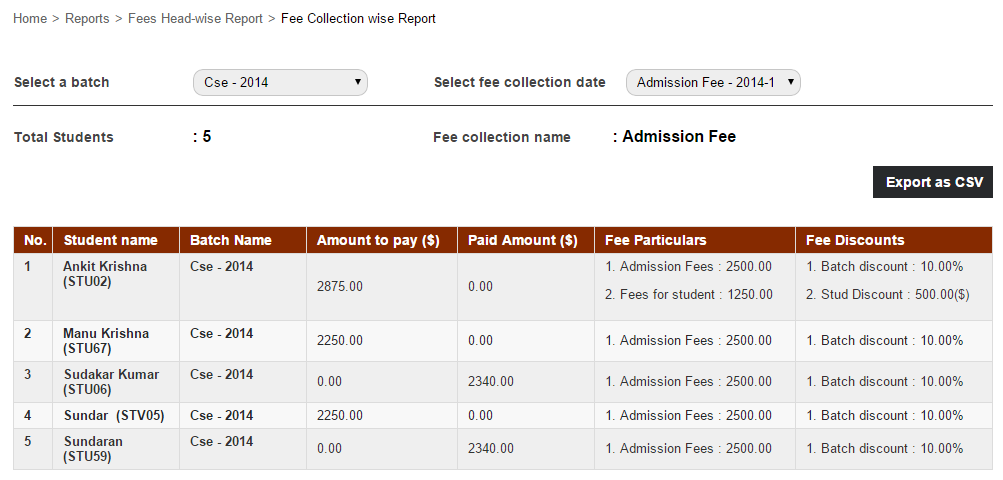
The Fee Collection wise Report displays the amount of fees paid and due for the selected fee collection, by all students of a batch.

To view the report for a particular fee collection, select a batch, and then select the fee collection.

4

You can also export the report details as a CSV file.

Students wise Report

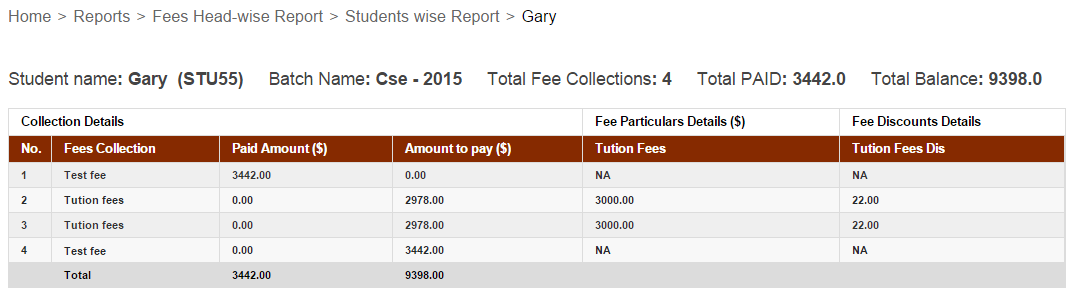
The Students wise Report displays the amount of fees paid and due for each fee particular, by a particular student.

To view the report for a particular student, enter the name or admission number to search.

5

Now that you know how to use the student fee reports, use them to your advantage and track all student fee transactions with the institution and never let a penny slip through your fingers.

Guidelines to Improve Your Child’s Education

Guidelines

Education is one of the key components in a child life. For your child to have the best education there has to be teamwork, cooperation and collaboration between parents, teachers, and the child. If one party in this triangle is absent, then the child’s education is likely to suffer. As a parent, you have a key role to play in your child’s overall life. In his education, you are not just there for homework assistance. It is your responsibility to help your child gain confidence; good self-image and motivation which will help him achieve academic excellence. Even though you are already helpful and supportive to your child, here are some few ways to help your child grow academically.


Reading


You are your child’s first teacher. No matter how busy you are, set aside some time to read to and with your child. Reading to your child encourages him to develop a reading culture. Take some time during the weekends to discuss books, stories and events with your child so that you can test his memory. Start with easier books or short stories until you see that his thinking capacity expanded and start introducing him to biographies and easy to read history texts. Make your reading sessions interesting to always keep the child engrossed.


Teach him through daily experiences


Although the child learned a lot from school, there are so many more ideas that he could gain from home through his everyday activities. If he sees something and asks questions, do not just answer and shun him away. Develop the answers with him and make him understand so that he gains the ability to reason and think. Learn what interests your child and always encourage him to ask questions. Through his, his brain will be active and he will find it easier to think in school.


Keep track of your child’s studies


The biggest mistake that most parents make is leaving school matters to the teachers. Most parents do not even know what their children are learning in school. According to them, their sole responsibility in school is fee payment. Ask your child what he learned in school and always be interested to listen. Visit his school and track his progress as well as his behavior in school. When you show interest and encouragement, your child will have the motivation to keep performing well or even much better. If you notice any problem, make inquiries and help your child to solve it.


Be understanding and encouraging


It is very good to always expect good grades from your child. However, the best way to encourage your child is to be understanding. Although you want him to be among the top students, try to understand his potential first. Just encourage, support and teach him to do his best.


Learn what he is good at and help him make that better. He might not be very good in mathematics, but he can be the best in arts. Help him learn and appreciate his talents. In case you notice any issues in school or at home, simply get your CSA contact to help you solve it and let your child grow physically and academically.


The article is written by:


Ruby Andrew lives in Bristol, UK and is an avid reader and blogger. Since her early years she’s had a passion for writing. Her articles have been published in leading UK newspapers. Her areas of interest are food, reviews (Book/Movie), Travel, Fashion, and Lifestyle.

Foradian Technologies wins IT Innovation Award at Express I.T Awards 2014

itawards-mForadian Technologies has bagged the Express I.T Awards 2014, based on the evaluation criterion design by PwC, Knowledge Support of the Express I.T Award. The awards was received  in the  IT Innovation Award – MSME category, on December 5, 2014 at Marriott Hotel, Whitefield, Bengaluru.


The Express I.T Awards, an initiative of The Financial Express in its 2nd edition looked forward to honour IT initiatives that have helped businesses go beyond the ordinary, benefiting the overall community. The IT Innovation Award category felicitated IT companies that have come up with innovative IT  products or solutions meeting business requirements along with enough market potential demonstrated by the product.


The panel of jury comprised of renowned innovators including Rajan Anandan, VP and MD, Google India; Som Mittal, former President, NASSCOM; Professor Sadagopan, Director, IIIT-Bangalore; T.V. Mohandas Pai, Chairman of Manipal Global Education and R Chandrasekhar, President, NASSCOM.


ExpressITVishwajith A, Co-Founder & Director; Abdul Salam, Co-Founder & Director and Ismathullah Aman, Tech Lead received the award on behalf of Foradian Technologies.


Other winners in the league include Cisco, SAP Labs India, TCS, One97 Communications (Paytm), Adobe, Oracle and Zoho Corp to name a few. In addition, there were two special awards- I.T Lifetime Achievement of the Year went to S. Ramadorai, former Vice-Chairman of Tata Consultancy Services and the I.T Newsmaker of the Year that went to Francisco D’Souza, Chief Executive Officer, Cognizant.

4  Best Learning Gadgets for Your Kids

Gadgets

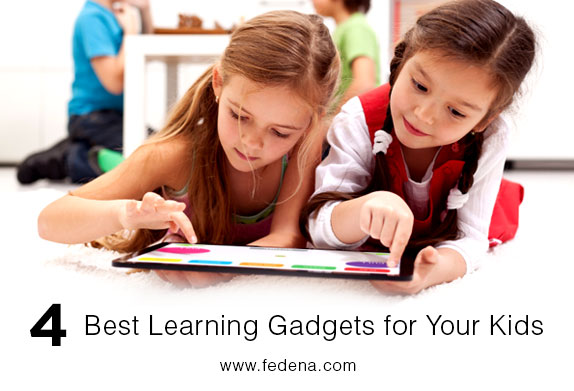
In this modern era, kids no longer wish to have fun with old conventional toys. Nearly all children are absorbed in technology today. They are keen on using the various electronic gadgets and invest most of the time using them. Therefore, we can make their valuable time a lot more useful as well as education friendly with the help of the latest academic gadgets. Most of these gadgets allow your kid to gain an improved knowledge in a simple and playful way.


Let’s take a look at some of the best educational gadgets for your kids:


1. Interactive Book system


Enhance your kid’s love for reading with this interactive e-reading program. It is designed for children aged 3 to 7 years. In this it is possible to watch, hear and read stories, play reading games and look up for different preinstalled books. All these are set up with touchscreen features sensitive enough for your child’s finger. Additionally, you can increase collection of books by download options. This device truly brings books to life for your child.


2. Firefly mobile phone


It’s truly a most essential device for your child to connect at any time with you effortlessly. It is a compact handset for your kid with 5 button keypad together with speed dial keys. The gadget comes with limited contact number storage so that it can be easily managed by your kid and also rejects incoming calls from unidentified numbers. Other features include twelve ringtones, five animations as well as seven LCD backlight display screens. Moreover, it is packed with a variety of games and academic stuff.


3. Laugh and Learn Smilin’ Smart Phone


The Laugh and Learn Smilin’ Smart Phone is an upgraded look on familiar play with a glossy style and fantastic training content. With nine light-up control keys your baby can easily switch on music, songs, enjoyable phrases and audio effects. A real looking role play switch motivates your kid to say hello as well as bye-bye while every light-up button provides many unique content material such as ABC’s, colors, shapes, numbers, weather and more The flashing lights are excellent and the volume level is low enough so that it is not annoying, yet loud enough for children to listen to while messing around with it.


4. Fireman Sam Fun and Learn Tablet


Everyone’s favorite fireman is here to lighten up your Christmas season with this amazing tablet which works like a fun learning help for your kid. Fireman Sam will certainly teach everything regarding colors, numbers and objects, making for a wonderful time-pass as well as a beneficial learning device. This touch-screen tablet features five distinct game settings to select from which include Discovery, Which Character Says What?, Quiz, Let’s Call Different Characters and Find the Characters & Vehicles. It will also educate children about the automobiles they see on the Fireman Sam TV program. An obvious must for every Fireman Sam fan, it is ideal for kids aged 2 and above.


It is the primary duty of every parent to provide their kids with all the indispensable amenities that will eventually help him to become a successful person.


Ruby Andrew’s author bio


Ruby Andrew lives in Bristol, UK and is an avid reader and blogger. Since her early years she’s had a passion for writing. Her articles have been published in leading UK newspapers. Her areas of interest are food, reviews (Book/Movie), Travel, Fashion, and Lifestyle. She works as a guest blogger on her chosen areas of interest and currently writes on behalf of CSA contact number.

Generate ICSE reports with ICSE grading feature by Fedena 3.3

ICSE (1)

In our last post on ICSE grading system feature by Fedena 3.3, we have discussed about the configuration that you need to do before you start using the feature. Once you’re done with the configuration, the next step requires you to enter the marks of students. The feature also allows you to generate reports based on the marks of students. Read the article and find out more on generating ICSE reports.

How to generate ICSE Reports

When you login to your Fedena account, you are required to go to ‘ICSE Reports’ in ‘Examination’.

1
As you can see in the screenshot above, the Reports Center has four options:

Generate Reports: You can generate a report on the student scores entered. Next, you need to select the particular course for which you want to generate the report.

23
View Student Report: To view the report of particular students, you can use this option. It gives you the score card of students.

4
As you can see, this is a report card of a particular student. Likewise, you select other students from ‘Students in this batch’ as marked in the screenshot. A ‘Term’ is used in most ICSE institutions under which the examinations are conducted. Most schools have two terms- Term 1 and Term 2 exams.

Subject-wise Report: Similarly, you can also generate report of students based on subject.

5
Consolidated Report: Get a consolidated report of all the subjects together for students.

6
The consolidated report of students in the particular course and batch.

Note: Generating report is highly flexible and it offers you the option to generate reports on multiple combinations in subject-wise and consolidated report. This means, you are allowed to generate reports based on terms, on internal marks alone or external marks or a combination of both, etc.