Foradian Recognized 15th Fastest Growing and the only ERP Company in Deloitte Technology Fast 50 India List

Deloitte2
Foradian Technologies, the company behind Fedena is elated to announce it has been ranked 15th in the Deloitte Technology Fast 50 India 2014 Awards. The award, standing in its 10th edition, identifies and honour fastest growing companies in India on the basis of their percentage revenue growth in the last three years. And Foradian Technologies, with a CAGR of 323% during this period, made it to the list and has been placed 15th in the list.


The winners from the list comprises of 50 public and private companies from areas of media, technology and telecommunications, who have witnessed the highest rates of revenue growth in the last three years. In the words of Abdul Salam, CFO, Foradian Technologies, “It is a matter of pride for us at Foradian to be part of Deloitte Technology Fast 50 rankings and a testament to our remarkable growth to be ranked amongst top 20 in our first ever ranking. At Foradian we believe in the value that our product delivers to educational institutions. We have updated our product to empower our clients with more scalable and productive ERP solutions.”


15

The Technology Fast 50 India was initiated in the year 2005 in line with similar programs in other countries like the Deloitte Technology Fast 500, established in countries like Africa, North America, Asia, Europe and Middle East. The Indian chapter of the award is currently in its 10th year and is considered to be one of the most acclaimed award and recognition by technology companies in the country.


Other names in the Deloitte Technology Fast 50 India 2014 Awards include Vizury Interactive Solution, Tech Mahindra,  Simplilearn, Zomato Media Pvt Ltd, Happiest minds Technologies, Edurekha and Think and Learn. Foradian Technologies is the only company with an ERP solution in the education sector to make it to the Tech Fast 50 list!

7 Tools to Make Research Paper Writing Easier

7-Tools-for-Research-Paper

Don’t you just love procrastinating the moment when you start writing an important research paper? You’ve already done a preliminary research, but haven’t moved from that point for weeks. When the deadline gets too close, you start getting anxious and desperate to find an easy way out. Don’t worry; there are great online tools that you can use at this point and still end up with a brilliant research paper by the deadline.


Colwiz – This reference manager will accelerate the research process and enable you to sort, cite and share the sources you intend to use. You can use Colwiz to locate relevant articles and manage the notes and references through cloud backup. The best part is that the tool enables you to automatically format the bibliography with over 6500 citation styles.


NinjaEssays – This essay writing service can be useful through all stages of research paper writing: from conceptualizing to researching to writing to editing. You can hire professionals with MA and PhD degrees in the relevant fields of study and rely on their knowledge for faster completion of your research paper. You can hire an expert to provide you with the right resources, edit your paper or help you throughout the writing process.


ReadCube – In order to write a successful research paper, you need to do a lot of reading, managing and citing. With the help of ReadCube, you can progress through the different stages of completion with ease. The tool enables you to import PDF files from your computer and make them searchable. You will also get daily article recommendations based on the library you collect. That’s the best way to get more material without even trying.


Qiqqa – This free reference manager and research manager is one of the most effective tools you could possibly use during research paper writing. It enables you to organize the PDFs you will use for the project, import them into separate libraries, search through them and detect duplicate sources. Quiqqa provides intuitive information about papers, as well as connections between different concepts. You can also use the tool to share library documents, notes and metadata with a selected group of people.


Mendeley – If you were looking for a free tool that helps you manage the writing, research and citation process with ease, then Mendeley will surely make you happy. Mendeley gives you 2GB space for online storage, which is enough to keep all your sources secure in one place. You can access the collected materials online or offline, and annotate on the go by highlighting and adding sticky notes throughout the text. Mendeley also enables you to generate the citations and bibliography in the style you choose.


Citavi – The most difficult part of the research paper writing process is finding your way around the pile of sources you managed to assemble. Thanks to Citavi, you can avoid chaos by saving the important quotations accompanied with proper citation information (including page numbers). Then you can use the tool to insert the quotations and thoughts you saved directly into the document.


EndNote – This powerful tool enables you to collect and manage different reference materials and manage the journals, research papers, essays or books you write. The ability to search through extensive online databases and access full-text articles will enable you to complete your research papers much faster. EndNote also has a collaborative feature that’s perfect for team projects.


Commitment is the most important tool


Now that you have the right apps and websites that will help you write that paper, it’s time to do the actual work. Research paper writing is a challenging task, but the tools we listed above can make it way more interesting. Explore your options and start working on the assignment today!


This article is written by:


Robert Morris is an educator from New York. He is developing new online course on writing for students. His goal is to spread the word that paper writing is an easy task and he shares valuable tips on this topic. Find Robert on Google+.


Introducing the all new ICSE grading system with Fedena 3.3

ICSE

The earlier version of Fedena offered different types of exam grading like the GPA, CWA and CCE. But the new version of the software, Fedena 3.3 has introduced a new core feature called the ICSE grading system which will allow institutions following the ICSE grading pattern with exams and courses. Before using this core feature, you need to know the feature well. Today, we will cover the configuration part that you need to do to use the ICSE grading system feature for your institution.

ICSE Grading- The configuration process

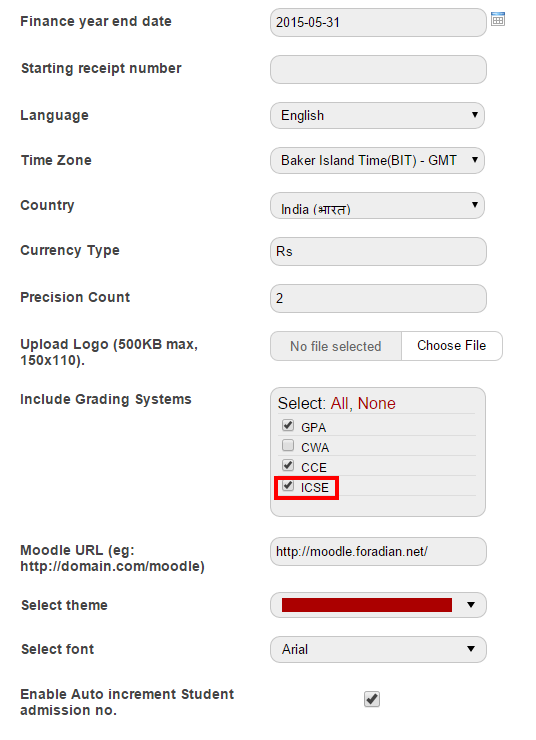
Before you start using the ICSE grading system for examinations in your institution, you need to do some configuration. For this, you need to first go to ‘General Settings’ where you will select ICSE as the grading system.

1

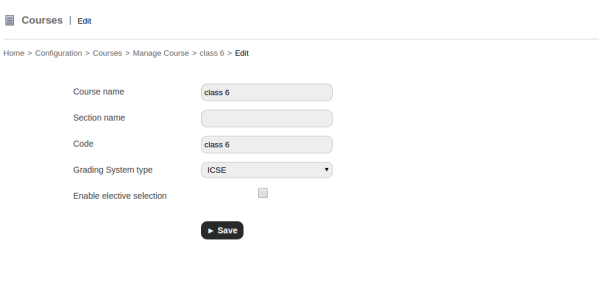
As you can see in the above screenshot, ‘ICSE’ has been selected as one of the grading systems. Before proceeding to the next step you need to upgrade all the relevant existing courses to ICSE grading system.

2
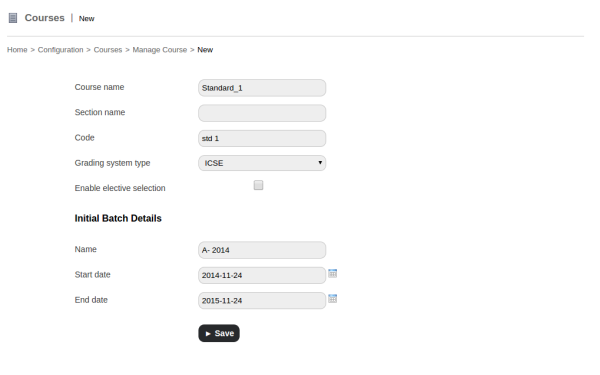
3For all the other new courses, use ICSE as the opted grading system as shown in the screenshot.

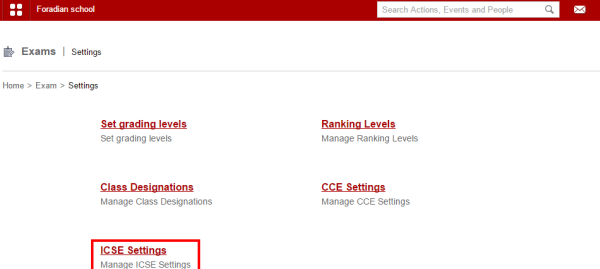
Then comes the part of adding relevant ICSE settings from the Settings part of examination.

4

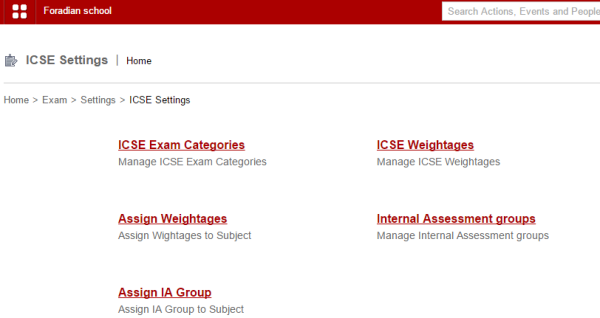
‘ICSE Settings’ will take you to its page where you need to do the configurations.

5

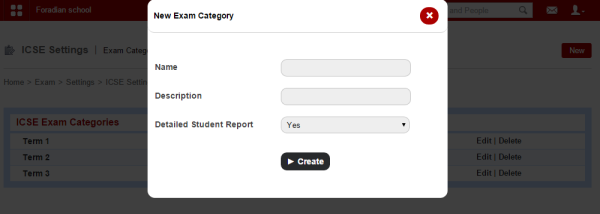
ICSE Exam Categories: This section will let you create new ICSE exam categories. Clicking on the ‘New’ option will let you create new exam categories.

6

Fill in the necessary information to create the new exam category.

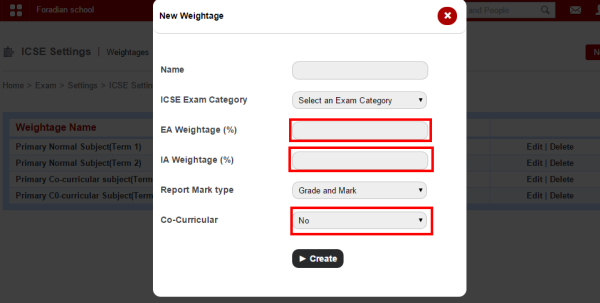
ICSE Weightages: The next step is to create the ‘ICSE Weightages’.

7

Provide with the EA or External Assessment weightage and IA or Internal Assessment Weightage along with option of co-curricular activities (if co-curricular activities are part of any of the weightage.)

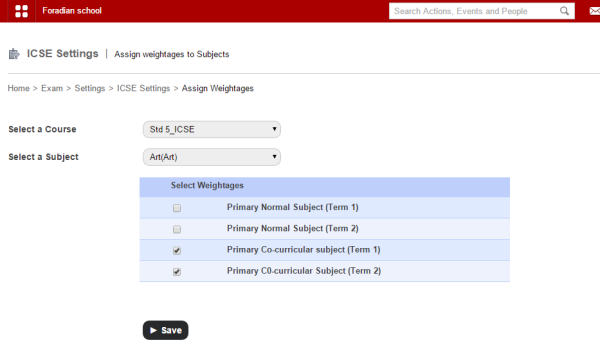
Assign Weightages: The weightages created above has to be assigned to respective batch and for this, you need to select the respective batch and also the subject.

8

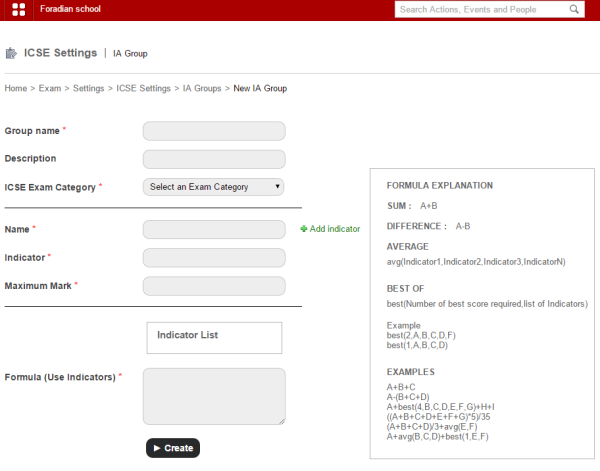
Internal Assessment Groups: Create a new internal assessment group for internal assessment exam.

9

Create the group by filling up the necessary information. Make sure you provide the indicator and the formula. Description of all formula is given in the right-hand side of the page, as shown above in the screenshot.

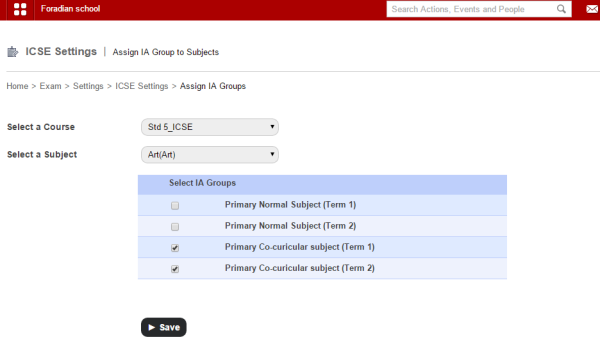
Assign IA Group: Once you are done creating IA group, the next step is to assign the IA group.

10

Assign IA group and you are done with ICSE exam configuration.

In the next article, we will be talking about the ICSE Reports in detail.

What are the Essential Components for Effective E-Learning

E-learning (1)

E-learning is accessing education through educational technology, electronic media, information, and communication technologies. It includes a multiplicity of media, images, animation, video-streaming, satellite, CD-ROM, TV, computer-based learning, intranet/extranet, as well as web-based learning technologies. Both communication systems and information underlie the e-learning process – either on local networks or internet networking. Sometime institutes don’t prefer the e-learning because of the certain expertise skills requirement but with Uzity learning management system you don’t have to worry about any technical expertise. It is the easiest platform all you need just a basic knowledge of working a computer.

 
Institutions
 

The first thing you will need to take into consideration for effective e-learning is the institution you will be using for e-learning. There are many institutions that offer e-learning in different areas of study. However, not all of them are effective in providing this service. If you want to find the best in the industry, you should make use of the following e-learning tips:
 

  • Begin by looking at the reviews provided by previous students about the institution. Positive reviews will mean good performance and negative reviews mean a bad performance.
  • Make sure the institution is accredited by the necessary governing bodies. This will vary from one location to another.
  • Ensure the institution have the courses you want to purse and they are provided at times that are convenient for you. Once you have made sure everything is set, you will need to ensure you have the right hardware requirements.


Requirements

Basically there are two ways you can go about e-learning either by use of internet or compact disk. Both these methods are effective, but they will require different items for them to be effective.


When a compact disk (CD or DVD) is used as the mode of learning, one will require to have a few items. To start with, you will need to have an electronic medium that can be used to play the disk. Since current disks are audio visual, you will need a DVD player and a television set. Alternatively, you can use a desktop computer with speakers or a laptop. Quality speakers are recommended as they will ensure you get the information from the disk in a loud and clear fashion.


Once you have made sure you have the required electronic equipment, you should now search for a good learning environment. Take note that e-learning should be handled just as traditional learning. It is impossible to concentrate in a room where kids are around or in an area that has external noises. If it is hard for you to find a good place to study, you should consider getting a laptop and a pair of headphones. With these items, you can go to a library or a restaurant during your learning hours.


On the other hand, you may find that internet is the mode of e-learning you will be using. In this case, you will need to make sure you have a good computer. Generally, any Pentium four computer that has one gigabyte of memory or more should suffice. However, you will get the best performance from any computer that has a core processing (core 2 duo, core i3 and so forth) and four gigabytes of memory or more. Remember, the faster the computer, the higher the performance.


The next thing to consider is your internet connection. Depending on your location, you should make sure you have a fast and reliable internet connection. Before choosing an ISP (internet service provider), make sure they give you guarantees on their up-times and down-times. The provider with the highest up-time should be considered. Up-times are when the internet connection will be working while down-times are when the same connection will be down. Usually, they provide estimates and inform you when they are undergoing problems or doing maintenance of their system.


Make sure you have the required consultations before you choose to purchase any of the above equipment. You can consult a technician in your area about the computer you will need for your learning process. You may also look at forums on the internet where students talk about computers they use for effective and successful e-learning.


It would also be wise to consult the institution that you will be using for your e-learning. In most cases, they will provide you with the hardware requirements you will need. They will inform you of the best computer to use and what you need to have to make sure your learning process is efficient.

The All New Remarks Module with Fedena 3.3 to Provide Remarks to Students

Remarks_Module

Introducing a new module with Fedena 3.3, Remarks let you provide remarks for each of the student on the basis of performance in different subjects or some common remarks on individual student on any particular exam conducted. The module also allows administrators to provide custom remarks on the students. To know more on the Remarks module, go through the article below.

The Remarks module

The Remarks module can be used in three major forms- as common remarks, subject-wise remarks and custom remarks.

How the three major forms of the module works

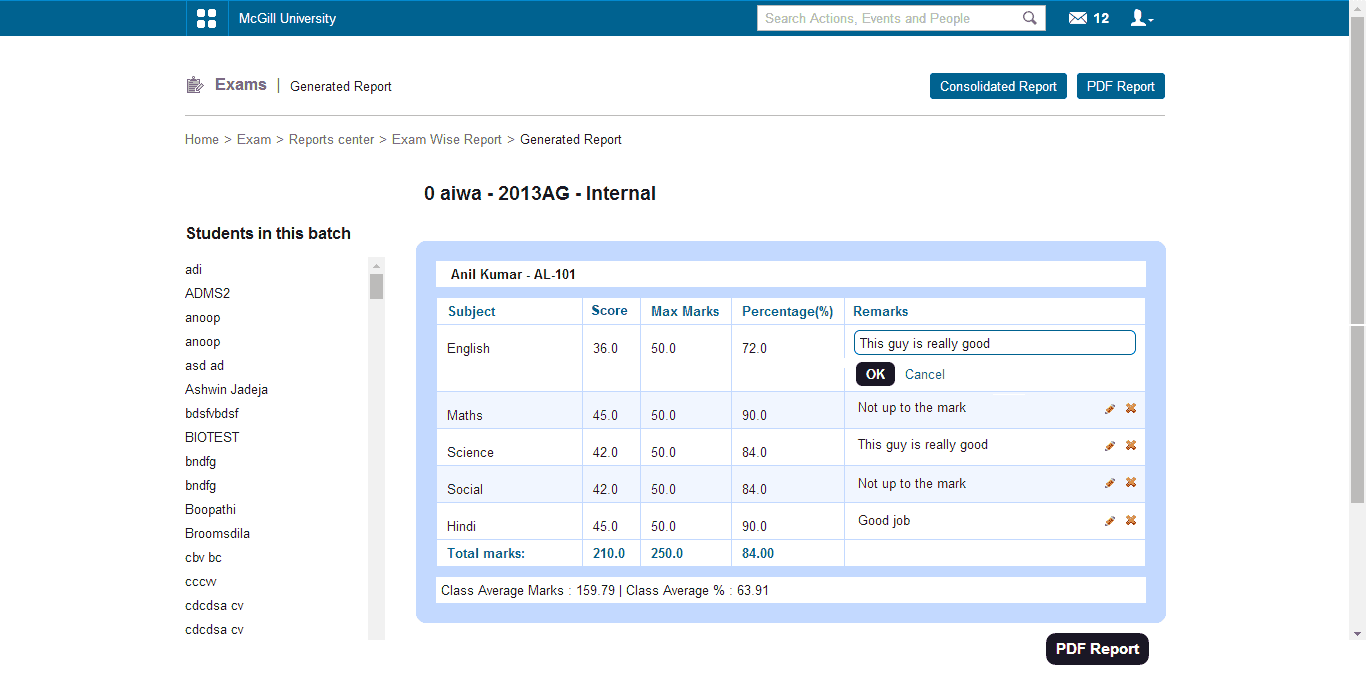
A subject teacher or a tutor of the particular batch has the privilege to provide remarks.Subject teachers can add/modify remarks for those subjects which they teach whereas the tutor can add/modify for all subjects in that batch. For this, you need to go to ‘Exam Management’ in ‘Examination’. Select the particular course and the respective exam as well as the subject to provide remarks for each of the student on the particular subject.

4

As you can see, individual marks are given to each of the student in the respective subject.
2.png

Remarks can also be added for a particular subject from Exam Wise Reports and Student Transcript Page.
To check the report on remarks based on exams, you have to go ‘Exam Wise Reports’ in ‘Exam’ and select the batch and exam group.
3
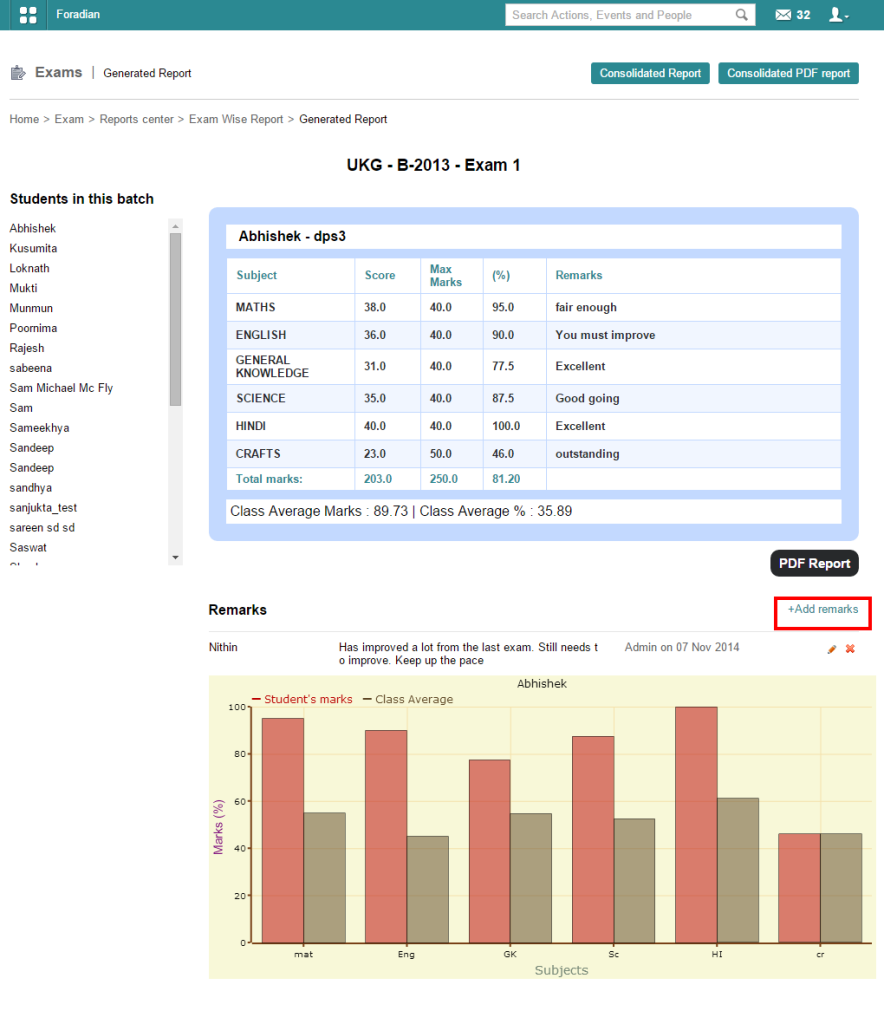
The screenshot above shows the subject wise marks of the particular student. For ‘Common remarks’ on the particular students, you have to click on ‘+Add remarks’ as marked in the screenshot, and add your respective remark for the student. ‘Common remarks’ are helpful when you want to provide with extra remarks for any students on the particular exam the student attended.

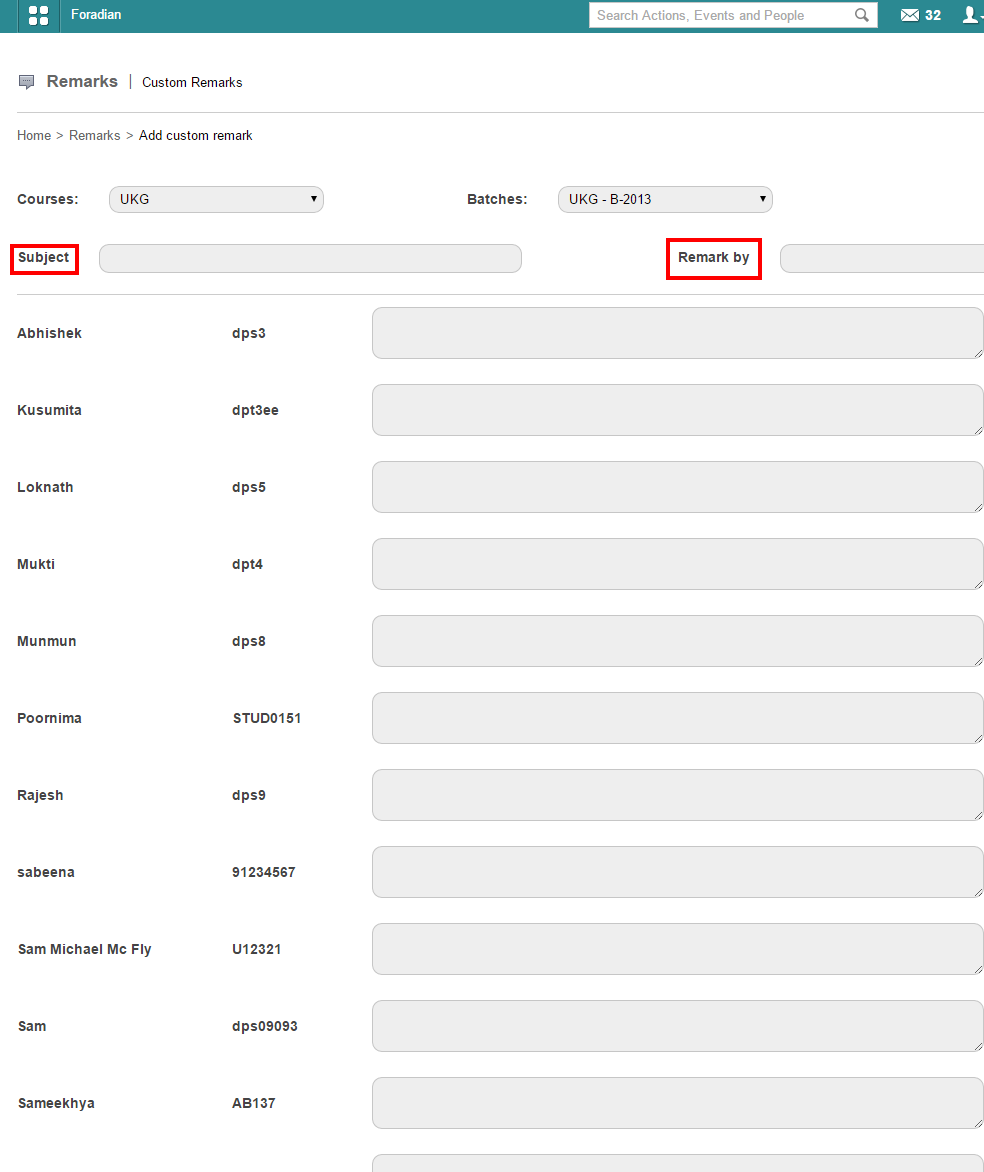
When you are looking forward to provide with custom remarks, you need to go to ‘Remarks’ in ‘Academics’. There is an option to ‘Add custom remark’ which when selected will ask you to select the particular course and batch.

4
For custom remarks, you have to provide the name under whom the remarks are to be published, in the ‘Remark by’ box. Provide with a ‘Subject’ as well before filling up remarks for each of the student. ‘Custom remarks’ are those remarks which are general comments on any student on the overall performance.

PDF report on the remarks can also be extracted.

World Usability Day – Fedena has all Reasons to Celebrate!

Usability-day


How do you define usability? ISO 9241 standard  defines usability as “The extent to which a product can be used by specified users to achieve specified goals with effectiveness, efficiency, and satisfaction is a specified context of use.” What conclusion we can come to is that, usability is all about the ease of use and this ease of use must be defined on the outlines of effectiveness, the ease of learning, the engagement and efficiency it involves. Well, with these characteristics, Fedena is highly usable and its usability is attributed to its features which are especially designed considering users and their context of use in mind. The words of Mr.Anh Pahn from Wellspring International School, a Fedena client,further establishes how Fedena fulfills the characteristics of usability.


“A great user experience. I liked the search engine inside Fedena! Anyone can use Fedena in seconds. Mr.Anh Pahn, Wellspring International School,

When we talk about the usage of a software, an ERP software and its usage is way different from that of most other web software. This is because, the lifeline of usage for most of these web software is limited to once or twice by the given user; whilst, an ERP software is there for a longer time, sometimes, couple of hours a day. Thus, usability takes an important stand when it comes to time span of usage of a software. How will you be comfortable using a software if its not easy to use, simple to learn and highly engaging? Team Fedena works hard to build a better user experience with simplified features in a way that fits the real world context, facilitating users to perform their tasks all the more efficiently with Fedena.


“Fantastic UI, The entire user experience is so fabulous that it makes a lot of sense for students because they are used to that kind of a clutter free design” Mr.Lux Rao, Chief Technical Officer, HP India.


Yes, it is Fedena’s clutter free design and easy to use dashboard that helps Fedena to reach educational institutions of all genre. Fedena’s single dashboard contains all the features, thus users don’t have to migrate to other pages to look for different features. Fedena requires anyone with basic computer knowledge to operate easily, thus allowing customers from diverse age group- a student in the junior class can use it with the same ease as that of somebody from the management body of an institution. This is one point that has taken Fedena to almost all parts of the world, with 40 000+ schools and colleges trust the software to manage their data and 20 million+ students and teachers stay powered by Fedena. The improved UX of Fedena helped us with better user engagement and a sales growth of around 40%. The reason being the growing importance of usability, apart from features as well.


Today, on November 13, 2014, on World Usability Day, we are  confident to claim that Fedena is more usable than it was on November 13, 2013 and it continues in its journey towards evolvement. We, at Foradian Technologies, continue to do our best in making Fedena more usable and our efforts have been acknowledged and received well by a most of our users.


“Fedena with its beautiful and innovative UI/UX design is loved by the teachers and other users of our institutions. It has increased the productivity and efficiency many fold”, Mr.Deepak Reddy, Aditya Group of Institutions, India.


If you are a Fedena user, please feel free to provide your valuable comments or suggestions on the UI/UX of Fedena. We will be happy to know your experience!

What Online Education Can Learn from MOOCs

Mooc

This month, millions of students will start new courses on campuses online. Some will take formal courses from traditional higher education institutions, and some will enroll in one of the hundreds of available MOOCs (there are more MOOCs starting this September than have been available in any previous month). For the most part, students won’t be doing both of the things at the same time—though a few colleges offer MOOCs for credit, not many students have chosen to take them.

But that doesn’t mean that MOOCs and traditional online education are two completely different beasts. In fact, online education can learn a lot from MOOCs, and in fact many online courses are already starting to implement ideas and practices derived from the research on MOOCs.


Here are a few examples of what online education can learn from MOOCs

Content delivery: Lectures and video


Online students have wanted video technology in their courses for years—in response to a 2010 Get Educated poll, 60% of respondents answered “video technology” to the question “Which technology would you like in online classes?” Despite that, many online courses have continued to rely mainly on text-based resources as substitutes for in-class lectures. Why? Perhaps because of a lack of production capabilities, limitations of learning management systems, or even instructors not realizing how valuable video can be in an online course. Or it could be a combination of all three. However, this is all changing because of MOOCs, in which video lectures and tutorials constitute the primary means of content delivery. Now, more online courses are using videos, produced either in-house or by a third-party vendor such as a textbook publisher.


Instructors interested in using video lectures in their courses would do well to consult the MOOC data on the types of videos that are most engaging for students. In particular, MOOC researchers have found that the ideal length of a video lecture is between 6 and 9 minutes, informal talking head–style videos are more engaging than PowerPoint slideshows or screencasts. Video lectures designed for online consumption are better than recorded live lectures, a fast speaking rate leads to higher engagement, which is in contrast to live lectures, in which pauses are often deliberately inserted, and students usually watch video lectures only once, but re-watch and jump around in video tutorials.These findings are just as applicable to preparing content for for-credit online courses as they are for massive open ones.

Assessments and activities: More is better

MOOCs in general have more activities and more assessments than are found in traditional in-person and online classes.Most MOOCs involve not only very short lectures, but also assessments within and between lectures. For example, in some MOOCs review questions are interspersed in the videos and every module segment ends with a short quiz. These assessments are not always graded, but they do serve to enhance student engagement and understanding, and this style is starting to be used more frequently in formal online education.

In addition, MOOCs have been innovative in supplying opportunities for students to exercise their problem-solving muscles. According to Columbia University’s Fiona Hollands, based on MOOC research instructors are incorporating more problem-solving activities into their traditional courses, which has resulted in improvements in student performance.

The value of instant feedback

Most MOOCs provide students with instant feedback on their activities and assessments. Automated grading systems are able to tell students immediately where they are going wrong and set them on the right track, not just for multiple choice questions, but also for things like coding and even (controversially) essays. EdX President Anant Agarwal sees this feedback as having “a huge value,” saying: “Students are telling us they learn much better with instant feedback.”

Agarwal’s words are proving more and more true as new data come available. Even in the controversial area of writing, there is evidence that instant machine-scoring feedback is beneficial. Since 2009, instructors at the New Jersey Institute of Technology have been using an automated essay grader, not as a final grading system, but as a sort of writing tutor. In doing this, they have found that students are much more willing to rewrite and revise their work in response to computer feedback than human feedback.

Instant feedback is nearly impossible in an on-campus course (at least one of any size), and it is not something that has typically been strived for in online courses either. However, with the improvements in machine grading systems, online instructors may soon be able to provide instant feedback as a matter of course.

MOOCs are not right for every course or every student, but they still have value, and that value is not limited to the classes themselves. MOOCs and the analytics that are being used in them have great potential to inform teachers about how students learn and what works best in classrooms, both online and off. Rather than dismissing or overlooking them, we should focus on what we can learn from them—a process that has only just begun.


The article is written by:

 

sameer-bhatia-g+Sameer Bhatia, founder & CEO of ProProfs, a leading provider of online learning tools for building, testing, and applying knowledge. ProProfs Knowledge Base Software is used to create highly-searchable online FAQ’s to improve customer service and reduce tickets. Sameer has a Master’s degree in Computer Science from the University of Southern California (USC) and is an ed-tech industry veteran. You can find him on Google+ and Twitter.

The new Color Theme plugin by Fedena 3.3

Fedena-color-theme

The new Fedena 3.3 comes along with a lot new features to provide the best of user experience. Today, in this article, we will feature a brand new plugin that has been introduced with the new version of Fedena, called the Color themes. Earlier version of the software allowed only six color themes, which has been extended to more options. This allows our users to choose a color theme of their choice from the color picker. Read the article for more details on the plugin.

Choosing Color Themes and font

When you login to your Fedena account, go to ‘General Settings’ in ‘Settings’.

1
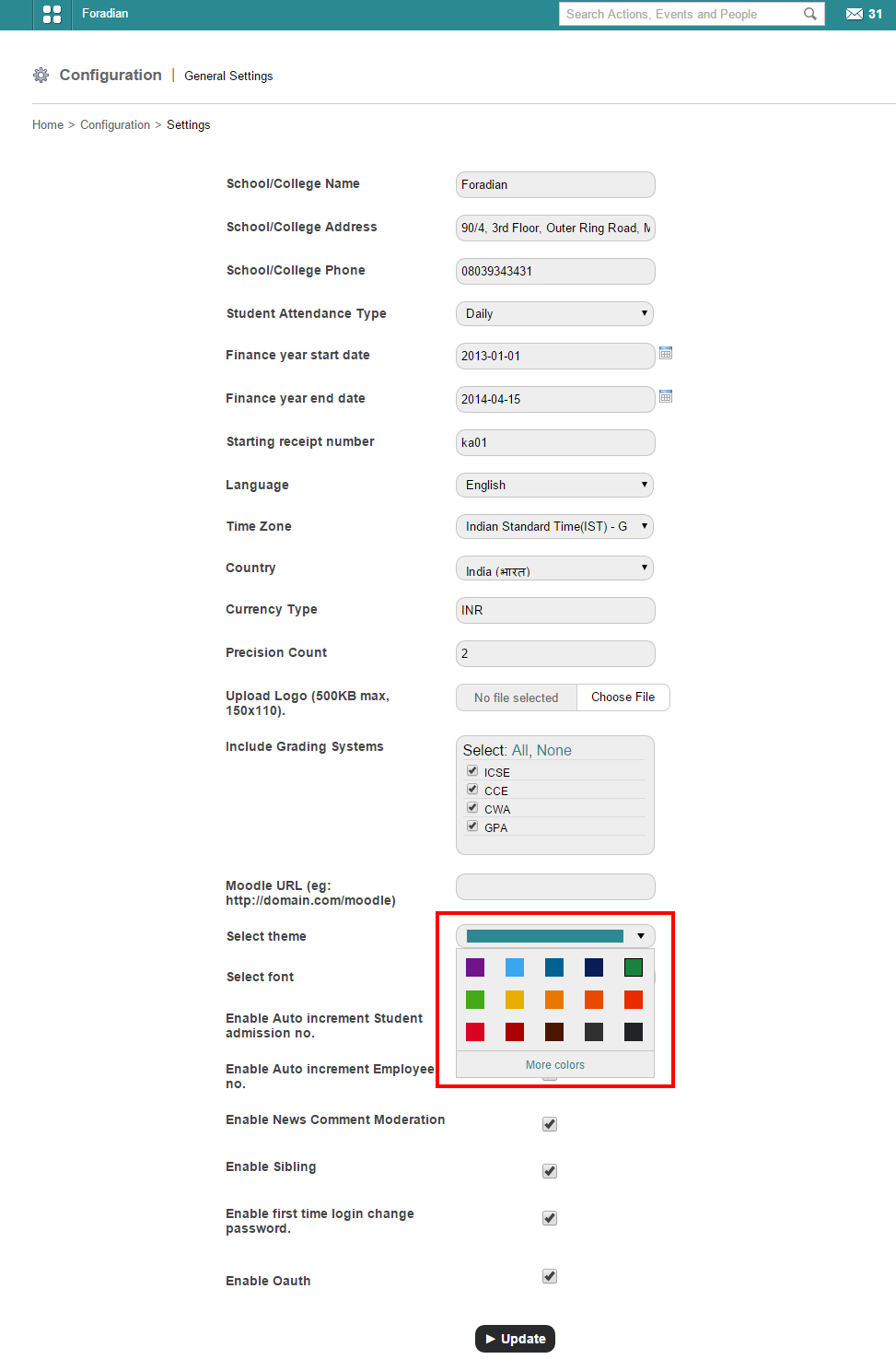
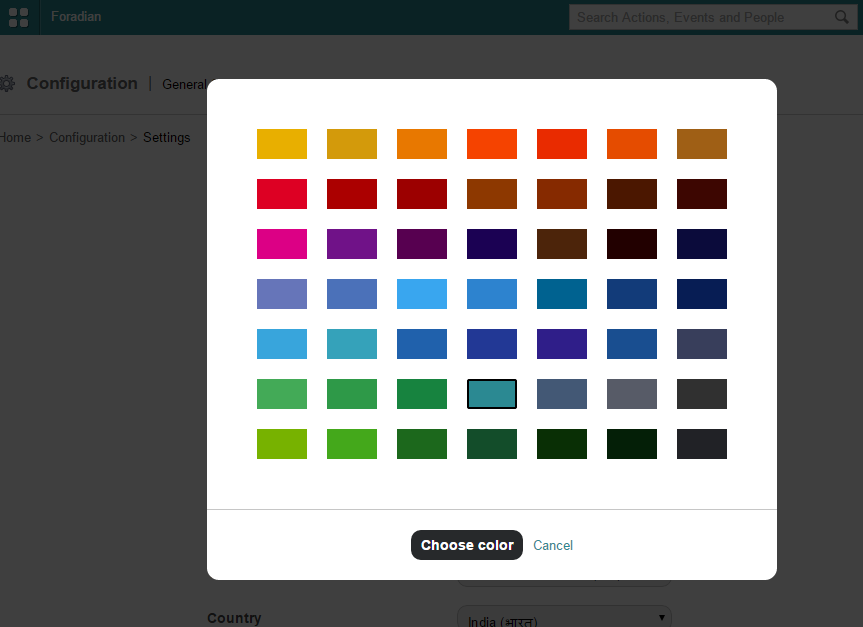
Here, as you can see in the screenshot above, you have the option to choose color from the available colors for theme. For more colors, select ‘More colors’.

2
Choose any color of your choice.

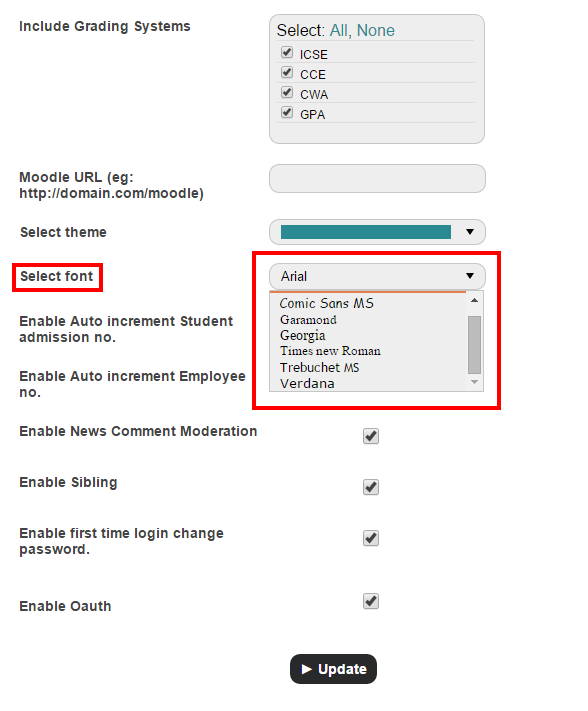
For font, you need to go to ‘Select font’ option in the ‘General Settings’ page only.

3Selecting font is a completely new feature in the color theme plugin. Choose from the 7 font styles available from the list.

Introducing Fedena 3.3

Fedena new release

As a part of our effort to provide our customers with the best of experiences of Fedena, we have come up with a new updated version of Fedena 3.3. This new version promises you a quality management software for schools and colleges with richer user features. Follow the release note below to know more about the latest version.

Write to us for your valuable feedback and any further information at info@fedena.com.

Core Features

Force deletion of student in case of data dependencies
Fee Headwise Report
Remarks Module
ICSE Grading System
Multiple Fee Payment and Particular-wise Fee Payment

Addons

Sales in Inventory
Interswitch Payment Gateway Enhancements
Color Themes

Language Updates

Added support for Gujarati and Turkish

Issues Fixed

E-mail

  • Scheduled job fails for E-mail Alerts
  • Remove “Send Email” option for parent

Reminder

  • Page load time is very high during reminder creation

Users

  • Style issue in employee profile page

Students

  • If no student is present in a batch then show flash message inside the elective subject assignment page
  • Selected date changes upon encountering an error in Student Admission page
  • Student Additional Details record does not get deleted when a student is deleted
  • Batch name is not shown in archived student profile page

Dashboard

  • ‘Administration’ tab is not shown for user with ‘Manage course/batch’ privilege

Online Exam

  • Online exam for which end date has elapsed could be published
  • Online Exam option should not be shown in parent login

Applicant Registration

  • Unclear flash message if the batch does not contain all the subjects as chosen in Applicant Registration page
  • Same student could be allotted a batch more than once with same admission number in Applicant Registration page
  • Change  the name ‘Download’ to ‘View attachment’ and open the attachment in a separate tab in View Applicants page

Attendance

  • Marking attendance prior to admission date is allowed
  • No SMS is sent and reason is blank in the email in case of rapid attendance
  • Duplicate batch name is shown in Attendance Register page

Custom Import

  • Unable to import exam score in Custom Import
  • Guardian custom import has no validation

Reports

  • In Examwise report, ‘PDF report’ button to be renamed as ‘Consolidated PDF report’
  • Teacher has no permission to view CSV report for Grouped Exam report

Events

  • During event creation for employees, “Select a Course” label is shown for department selection

Finance

  • Salary account details is not shown in Finance Compare Transaction page
  • Remove the title ‘Delete’ from the Master Fee Category listing table
  • In Finance Category page, sort order changes to ‘oldest-first’ after a category is created
  • ‘Payslip Date’ to be changed to ‘Payslip Period’ in Employee Payslip page, including PDF
  • Inactive payroll category is shown in View Payslip page
  • ‘Amount to pay’ is shown wrong for student fees
  • Discount is shown incorrectly while viewing fee collection
  • Discounts of former students is shown in the Discount list page
  • Total fees in the fee structure PDF is shown wrong
  • In ‘Finance reports’, transaction accounts from unassigned plugins are shown for new schools
  • Negative value is shown for ‘Amount to pay’ in the fee defaulters page after fees is paid
  • Reason is not shown in the PDF report of rejected payslip
  • Student category cannot be changed if unpaid fees exists for that student

Hostel

  • Error 500 is thrown after allocating student to hostel
  • Even though room rent is more than 9999.9999, unpaid hostel fees in student profile is shown as ‘9999.9999’ only

Transport

  • Even though bus fare is more than 9999.9999, unpaid transport fees in student profile is shown as ‘9999.9999’ only

Inventory

  • GRN PDF does not show ‘Grand Total’ value
  • Alignment issue in indent creation page
  • Items from deleted store are shown in search results

Mobile

  • Mobile View Fee Status does not show any information

Library

  • Alignment issue in book edit page

Online Payment

  • Unable to repay after a reversal

General

  • Parent can access all the pages that student can access
  • Should not allow to select elective subject from parent login

Apps

  • Unable to access apps in case of Hindi & RTL languages

Examination

  • Multiple exam score entries are shown for the same student and same exam

Previous Release notes:
Fedena 3.2
Fedena 3.1.1

Fedena 3.1
Fedena 3.0

The New Analysis and Reports Feature in the Form Builder Plugin

Reporting

We had discussed about how you can create and publish feedback forms using the Form Builder plugin in our last article. Today, we will see how the new Analysis and Reports feature works in the Form Builder plugin.

The main objective of this new feature of analyzing and extracting reports is the fact that at times, you might need to analyze the feedback to come to conclusion on the performance of any teacher. This is when you need the Analysis and reports which will help you do the required analysis and extract necessary reports.

How can you extract reports and do analysis of feedback forms?

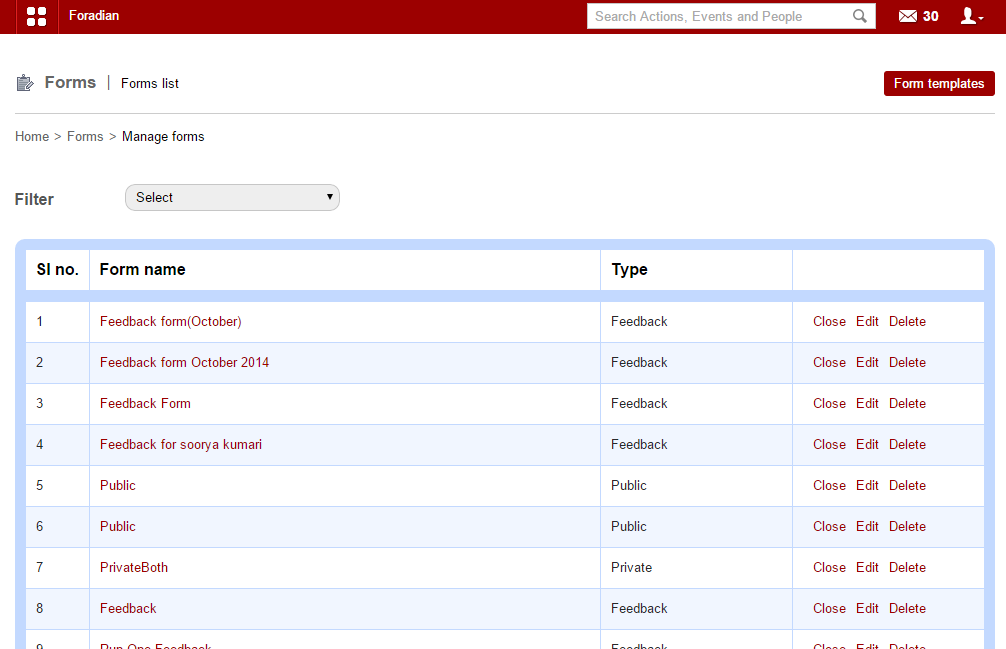
For this, you need to go to ‘Manage forms’ in the ‘Forms’ section.

analysis_1


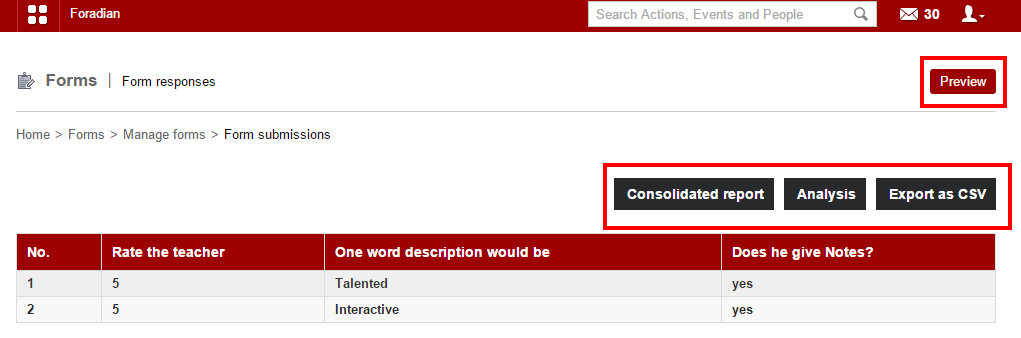
Choose the particular form you want. Once selected, it will take you to the particular form submission page.

analysis_2

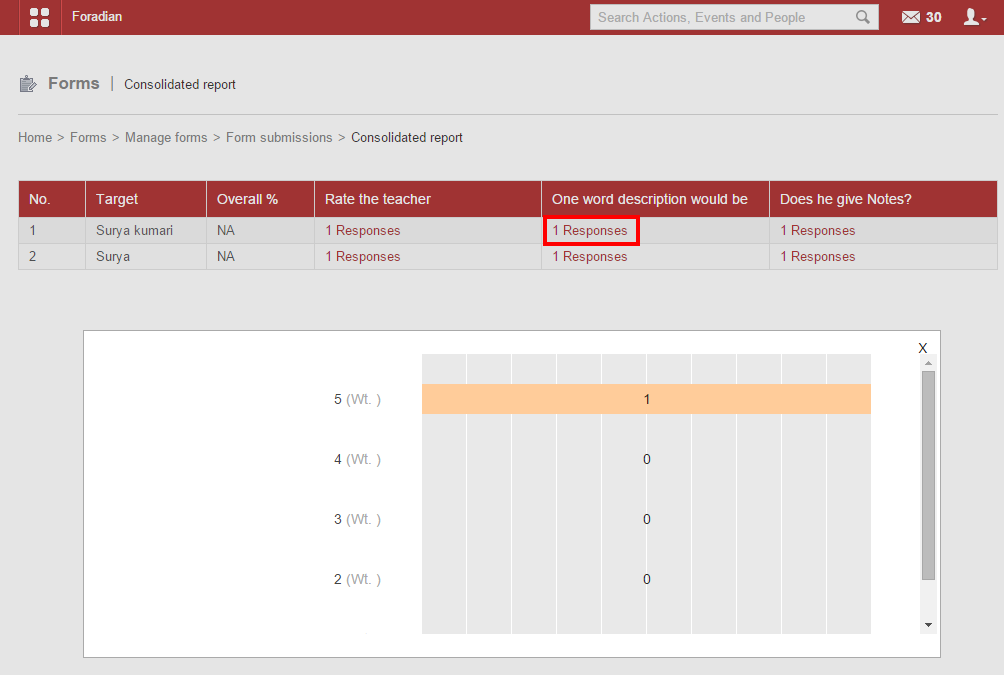
You can get a preview of the particular form you want using the ‘Preview’ option. When you select ‘Consolidated report’, you go to the ‘Consolidated report’ page.

analysis_3

You get a consolidated report on each of the target along with all the categories under which the target is rated in the feedback form. Moreover, a detailed report on the weightage can also be obtained as shown in the screenshot above.

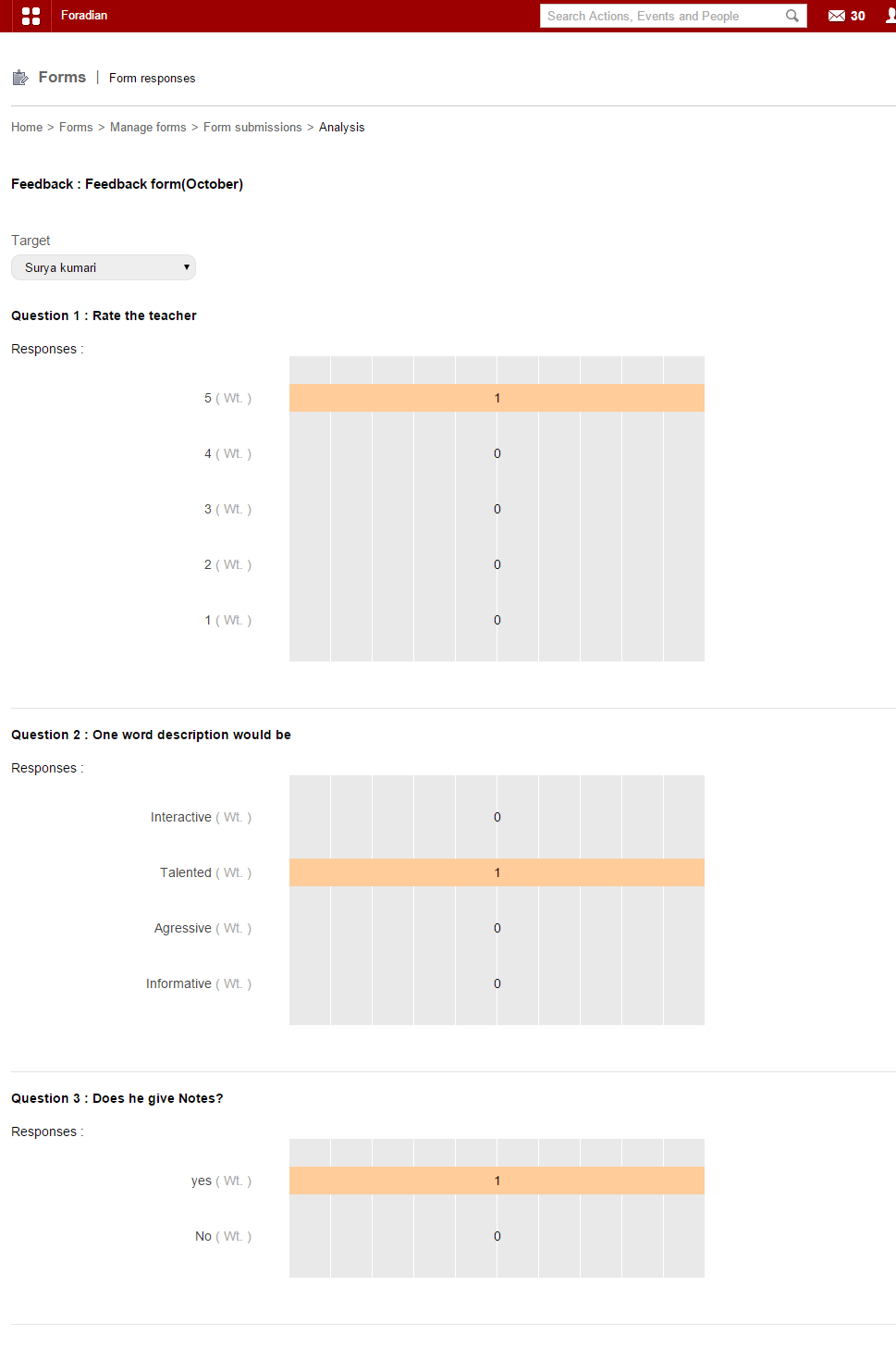
For analysis, select ‘Analysis’ and go to the page to get a detailed analysis for each of the target.

analysis_4

A detailed analysis as you can see from the screenshot above. Moreover, you can export the result of form submission in CSV format also!

Note:

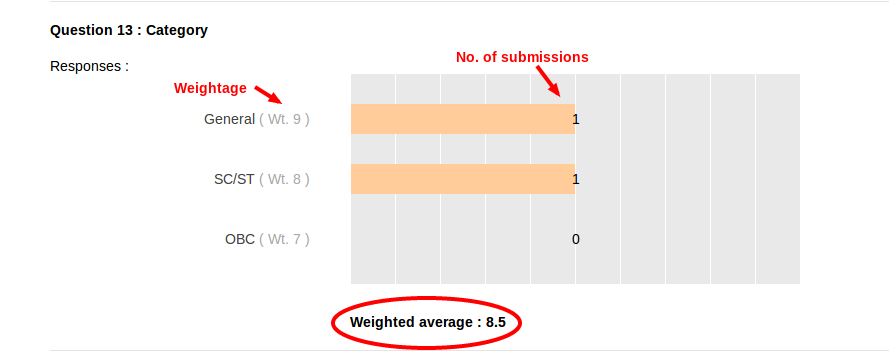
There is something called ‘weightage’ which allows you to enter weight for the options available under each question in the feedback form. It will show the ‘weight’ or the amount of importance each option carry. Here, in the above screen, as you can see ‘weightage’ is mentioned as ‘wt’. You have to mention the weightage during the time of form creation.


10 (1)


Weighted average = Σ(wt)i(n)i/Σ(n)i

Wt = Weightage

n = Number of submissions for the particular option

Σn = Total number of submissions for the questions


11


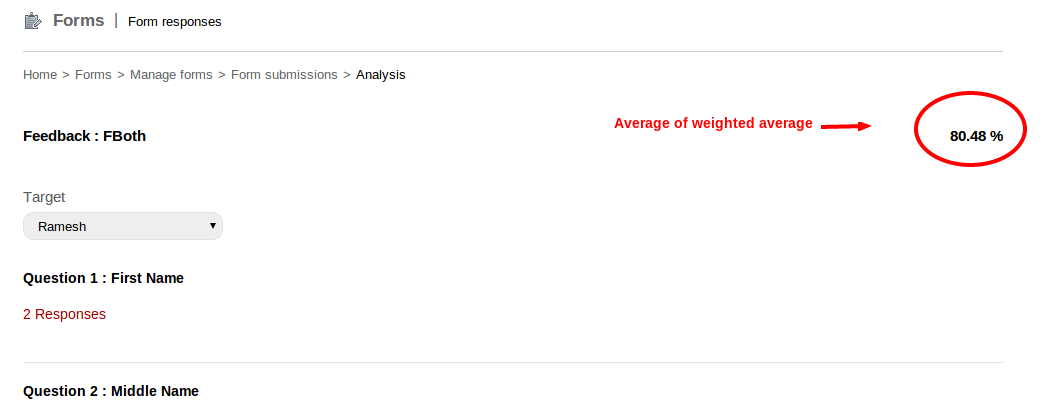
Average of weighted average = (Σ((wt)q*100)/(max*(wt)q))/nq

(wt)q = Weighted average of questions

nq = Number of questions

Why is Flipped Classroom the Right Solution to Competent Higher Education

Flipped


In the last few months, many educational institutions and universities have been experimenting with a new concept called inverted or flipped classroom. This instructional model is gaining tremendous popularity among both students and teachers. The concept has been popularized by Salman Khan in a Ted Talk. The video has already received around 3 millions views.

According to this approach, video lectures developed by teachers can be posted on the university or college’s Learning Management System, YouTube or private intranet. This provides students with convenient access any time. Most importantly, the educational institution’s investment in infrastructure, i.e, instructional design devices, course authoring, servers etc., is minimal.

Besides the use of relatively cost effective technology, a flipped or inverted classroom offers other important benefits. With this approach, the faculty has free time to help students in a better learning environment. The model also promotes consistency in various teaching methods. Students can interact with their instructors and fellow students rather than just sitting in a basic lecture hall.

Key Benefits of a Flipped Classroom

  • Video lectures can be easily polished, edited and re-recorded. Students can even replay, pause and watch various lectures repeatedly as per their convenience. With editing, the faculty can make lectures to the point and concise.
  • Faculty can use different tools and resources to analyze where certain students falter, and how the coursework can be modified for better results. Some of these tools include trends in FAQs, performance in previous examinations, student course evaluations and more.
  • Faculty can devote more time to help students explore application and develop synthesis during class time. This can be accomplished through team projects, experiential exercises, problem sets and other activities that were previously handled by students as homework. Students can benefit from direct faculty input on particular segments of the study material. This makes sure the material isn’t ambiguous or difficult to comprehend.

A lot of faculty members spend a huge amount of out-of-class, unpaid time to help students make some sense of difficult study material. In fact, even this can only be achieved when students proactively seek help from the faculty members.

With a flipped classroom, instructors can help students during compensated, assigned class time without increasing their burden. They can engage with students, and guide them in the right direction. Students can receive help regarding a wide range of activities. In addition to this, the faculty also finds it easier to identify and rectify problems to learning.

According to most industry experts, the application and synthesis of knowledge also finds great favor with educational institutions who already lack a competency-based approach in education. This has been the primary reason for the increasing popularity of this concept.

When it comes to small educational institutions, and the ones facing budget constraints, a flipped classroom can promote activities that occur online. These activities are independent of the regular classroom environment.

Thus, the burden on the institution’s infrastructure is reduced, and allows the faculty to manage more students with an integrated approach. There’s no doubt that a flipped or inverted classroom is the best solution to offer competent higher education to an ever increasing number of students.


Create and publish feedback forms using Form Builder plugin

Form-builder


With Fedena 3.2, you can now enjoy a very new and exciting plugin called the Form Builder. One of the biggest advantage of this new plugin is that it helps you create feedback sessions in your institution. Create and publish feedback forms in few simple steps which are mentioned as you go through the article. Read on to find how you can create and publish feedback forms easily.

Create feedback forms as an admin or a privileged employee

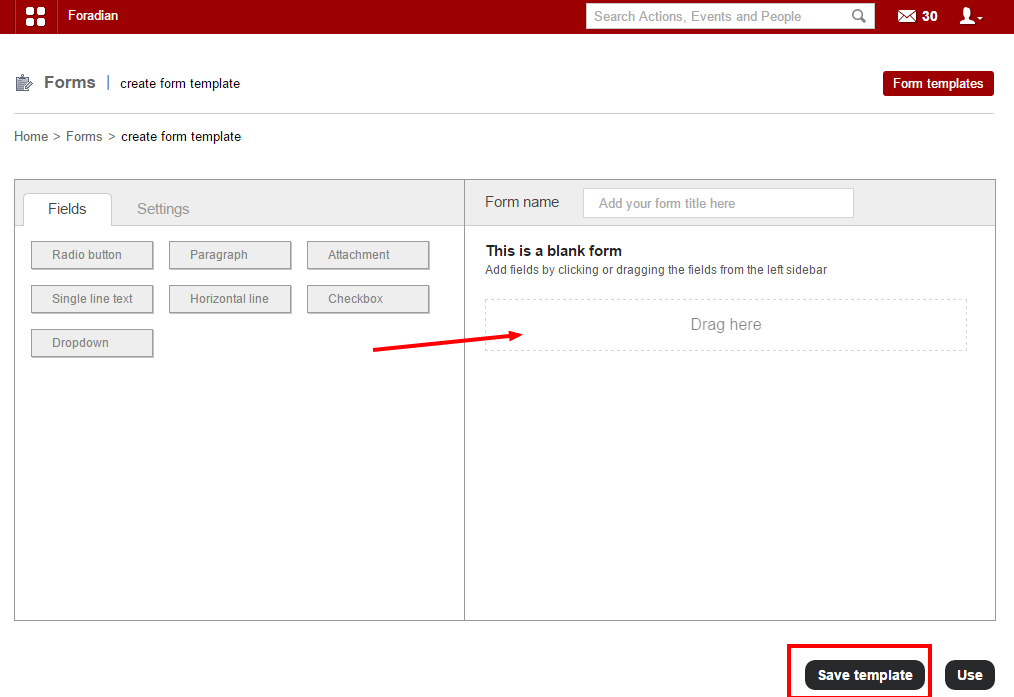
When you login to your Fedena account, go to ‘Forms’ in ‘Collaboration’. From there, you need to go to ‘Create form templates’ where you need to create the new form template. 

form builder_1

Drag whatever fields you want in your form template from the left column to the right one as shown in the above screenshot with the arrow. ‘Save template’ if you want to use the same template again in future. Else, ‘Use’ button will help you to use the template for the particular feedback session you want. Don’t forget to give a name to the form at ‘Form name’.

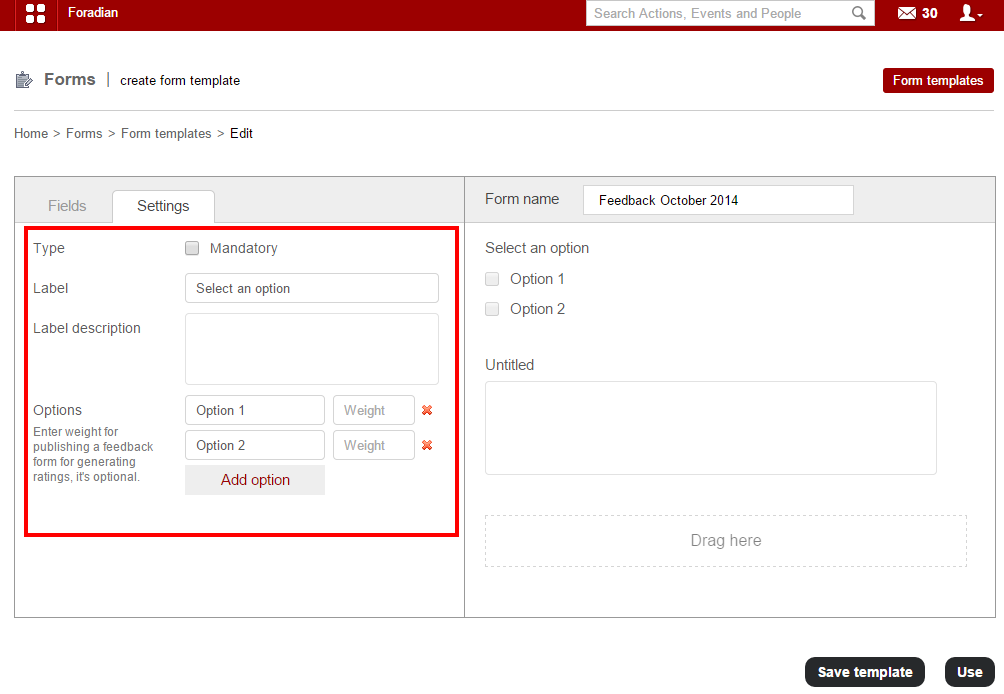
You have to create the form, put in all necessary information and for which, you have to go to ‘Form templates’ and select the respective template.


form builder_3


Fill in all necessary information to complete creating the feedback form. Once you are done with creating the form, you can go to the next step.

form builder_2


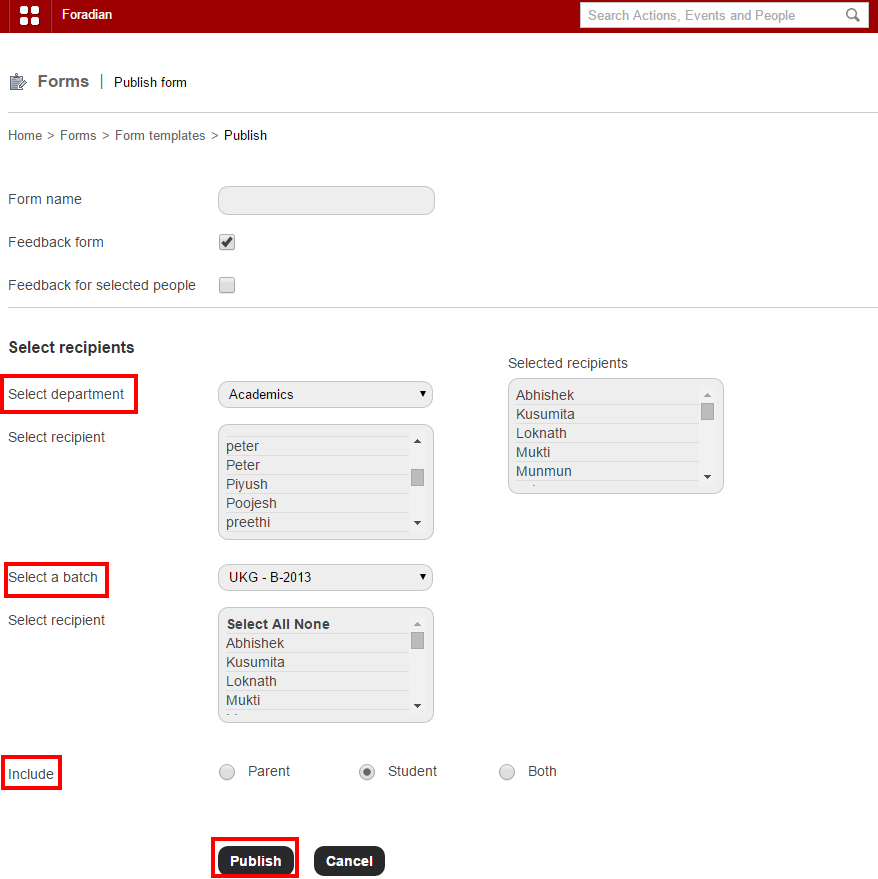
Before publishing the form, you have to select whether its a feedback form and also the recipients from the particular department and batch. Also, you can select if the feedback is meant only for students or parents or both.

When a student login to take part in the feedback

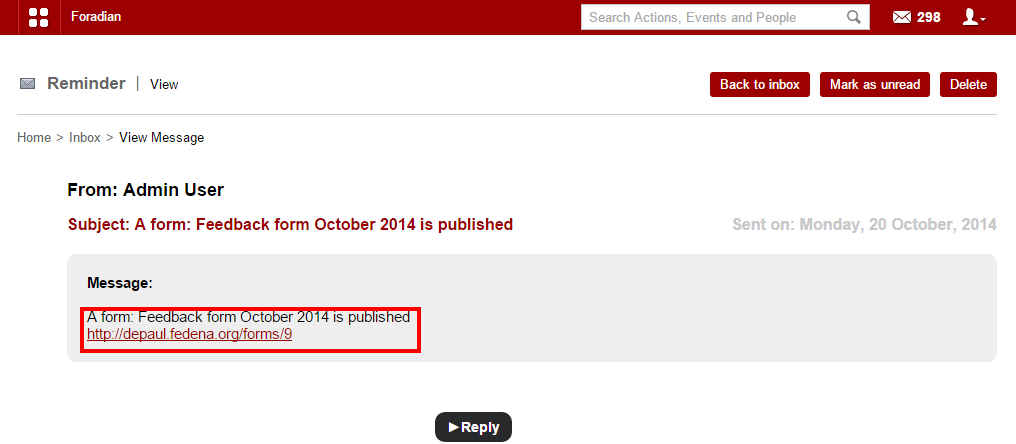
The students who are assigned to take part in the feedback session, will get message. Once selected, it will help in viewing the message.

form builder_4


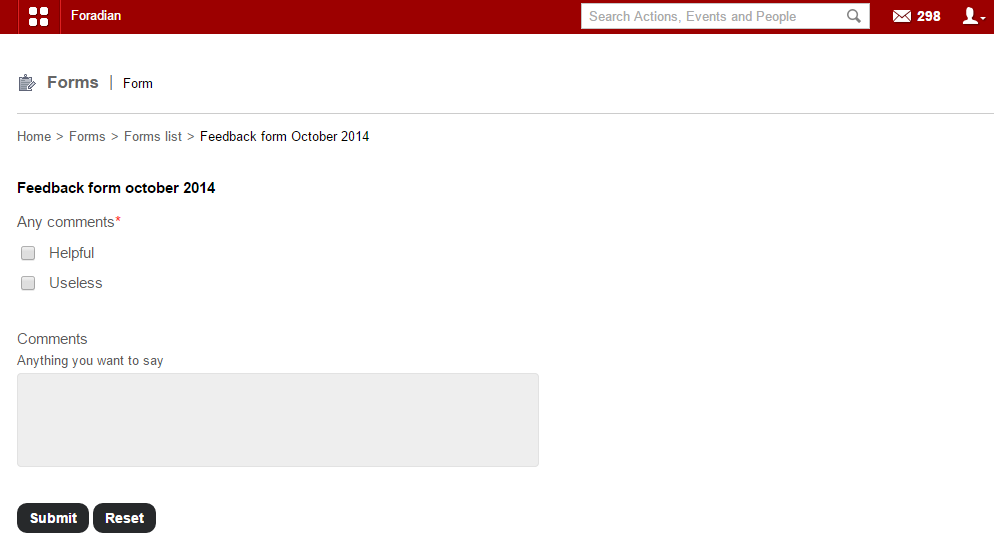
Click on the link to go to the form and fill it up.

form builder_5


Once the form is filled, click on the ‘Submit’ and it will go the admin.

Login as admin to see responses for the feedback session

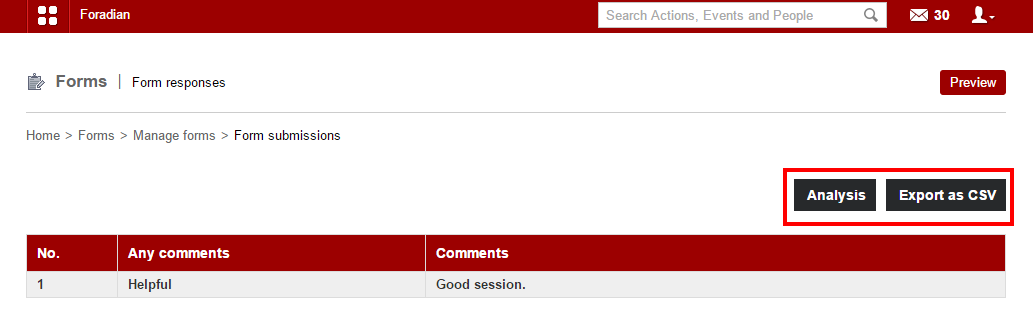
The admin can see the responses by navigating through ‘Manage Forms’. Click on the particular form to go to the form submission page.

form builder_6


You can extract the responses as CSV file or go for ‘Analysis’ also. Thus, an easy and smart way to conduct a feedback session at your institution.