The Need to Blend Character Education in Daily Classroom Learning

Character education

Martin Luther King Jr once said, “Intelligence plus character- that is the goal of true education” and true to every word in the quote, a child is expected to not just be well educated but mannered too; a dream of every parent to see their children grow up into educated and well-mannered individuals in the society. And that shows how necessary it is to introduce character education to children at school levels itself. Infact, education institutions have taken up the issue seriously and incorporating character education programs in regular teaching assignments.

So, does character education really play a good role in the academic life of a student? The answer is definitely, Yes! Character education focus on values like responsibility and the determination to perform a task. These values are surely the motivation required for students to do well in their studies. A better learning environment is created when students are helped with building up their character and they learn to communicate well with fellow students and teachers.

Character education, in addition, also develops the qualities of self management, particularly when it comes to managing their feelings. This quality, as believed by many experts, help children to deal with learning activities, mainly when these children come from troubled home environments. Management of their own feeling will help them cope up with learning at schools and colleges, despite their troubled personal life. Besides, adoption of character education at school level have proven to show greater results when it comes to suspensions, disciplinary actions against students and attendance issues. It brings about a positive environment, thus a sharp change  in increased attendance among students and an improved academic graph as well.

Young people, nowadays, are so exposed to things which are negative in nature all around them- disrespect, various character flaws, irresponsibility creeping through daily life. Top of that, parents too, have very less time to spend with their children due to different career engagements. Children have to know how to cope up with life, minus the influence of negativities and this is where character education fills the gap.

Character develops the destiny of a child; and not just the individual, but the whole society as a whole. As the famous Roman philosopher and orator, Cicero puts it, “Within the character of the citizen lies the welfare of the nation”. Hence, incorporating values in the youth will bring out responsible citizens of the society, of the country. To let children of today to become the standing members of the society tomorrow, they must know the values of life and what better way than character education in the class!

Re-arrange and randomize questions in Online Exams with Fedena 3.2

Rearrange-Questions
Conducting various type of exams often require you to frame questions and rearrange them for each question paper. And this task is without any doubt, much hectic, rearranging the questions for all the students. But with the question re-arrangement and randomize option, you don’t have to spend your time doing the same yourself. Read the article and know how you can use the options for examinations.

How to do it

Arranging questions takes place in two types- rearranging it yourself and using the randomize option.

In case the questions are arranged manually

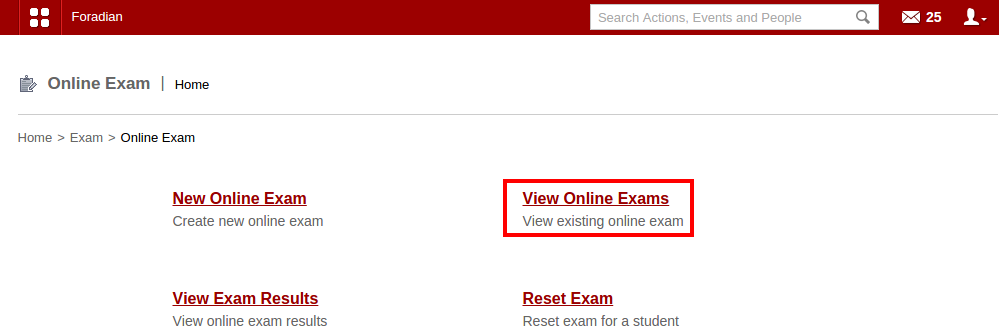
Login to your Fedena account and go to ‘Online Exam’.

1

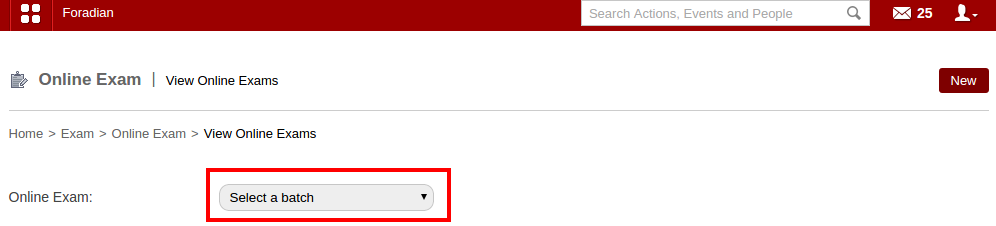
Select ‘View Online Exams’ and go to the respective page to select the particular online exam where you want to make the new updates with arrangement of questions.

2

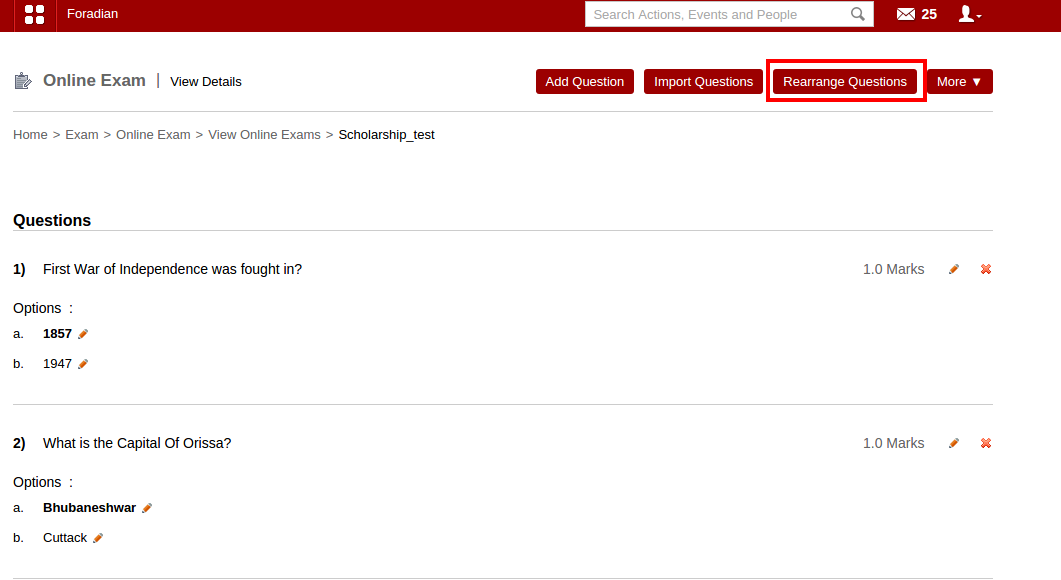
Select the particular online exam to do the modifications. Once you select the particular online exam, it will take you to the particular online exam detail page.

3

The ‘Rearrange Questions’ option lets you rearrange the questions according to you.

Using the ‘Randomize’ option

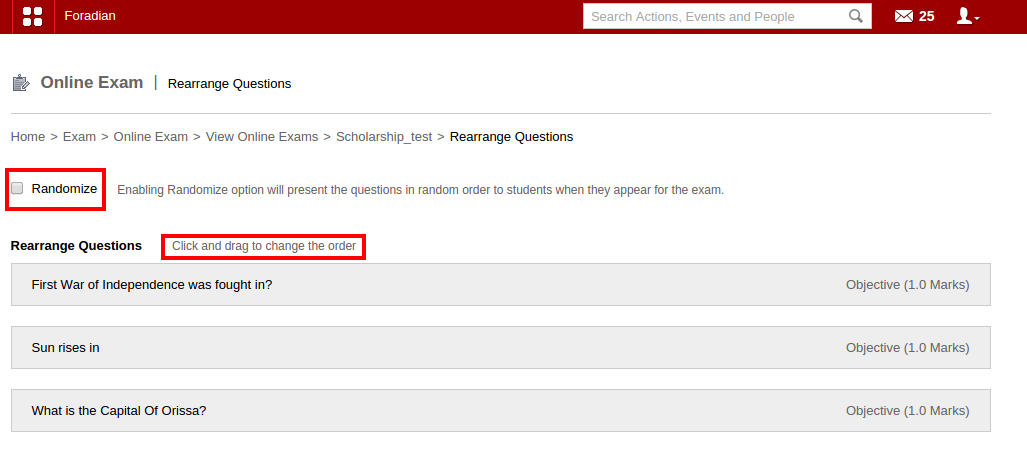
When you don’t rearrange questions manually, use the ‘Randomize’ option.

4
Just select the ‘Randomize’ option and the order of the questions will change every time a different student appears the exam. Thus, a perfect help for conducting different type of exams.

Classroom allocation made easy with Fedena 3.2

Untitled-2

Earlier version of Fedena didn’t allow its users to allocate special rooms for different classes. Hence, developing classroom allocation feature was something on high priority and finally, the feature has been released in the newer version of Fedena 3.2. Classroom allocation allows you to create separate classroom for conducting classes.

The earlier version of Fedena allowed you to view the timetable which showcased what subject is to be taught, who is the assigned teacher and the time schedule for which the class is allocated. But, in the earlier version, the concept of allocating classroom and building for the particular class to be taken was missing. With Fedena 3.2, you can now know where the class is supposed to be taken. Allocate building and classroom too, for the particular class to be conducted. Read the article and find how you can create and allocate classroom.

How Does the Feature Work

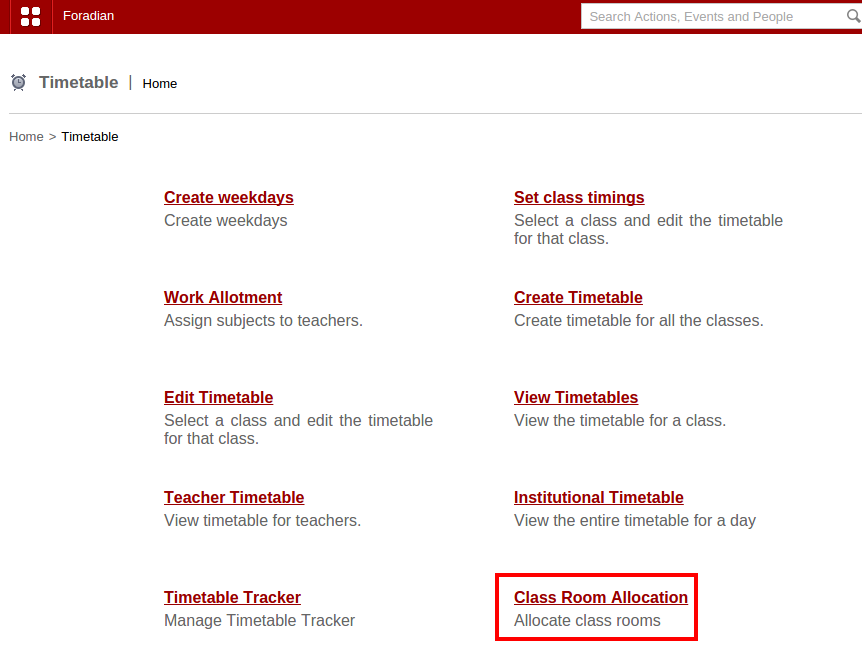
Login to your Fedena account and go to ‘Timetable’ in ‘Academics’.

1

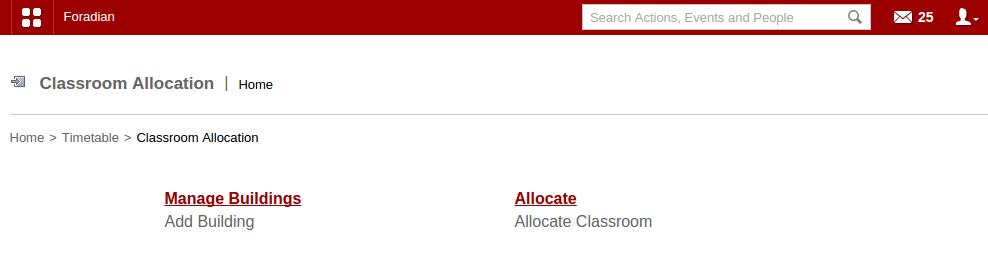
Select ‘Class Room Allocation’ and go to the ‘Class Room Allocation’ home page.

2
Select ‘Manage Buildings’ to add new building and new classrooms to allocate to respective classes.

3
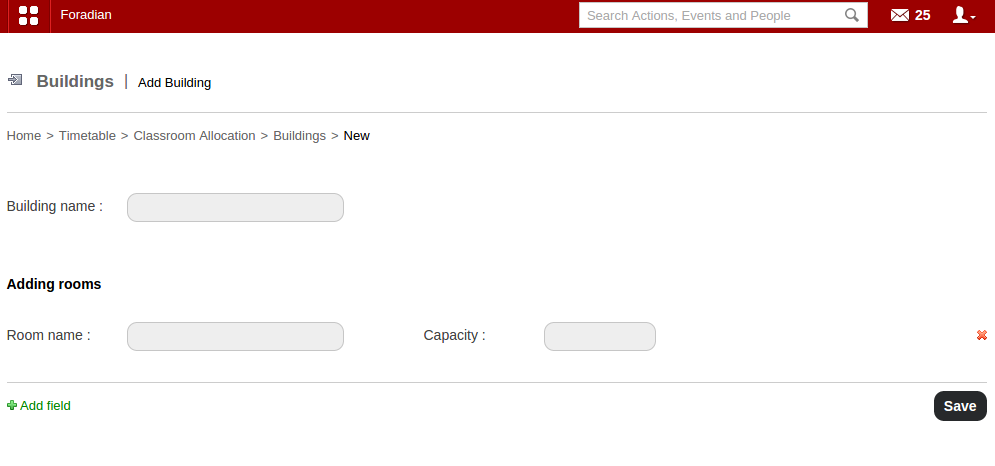
Create a new building and rooms by filling in the necessary information. You have to name the new room and also mention the capacity of each room in the building. Add any number of new room with the help of the option ‘Add field’. Once you are done with creating new building and rooms, you can go to ‘Allocate’ in the ‘Classroom Allocation’ home page.

4

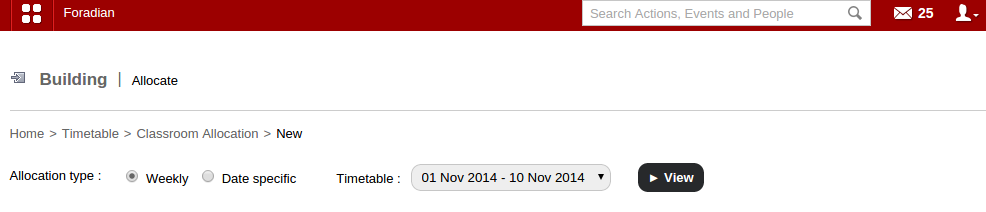
Select the allocation type- Weekly or Date specific. Also, select the particular timetable to which you want to allocate the classroom.

5

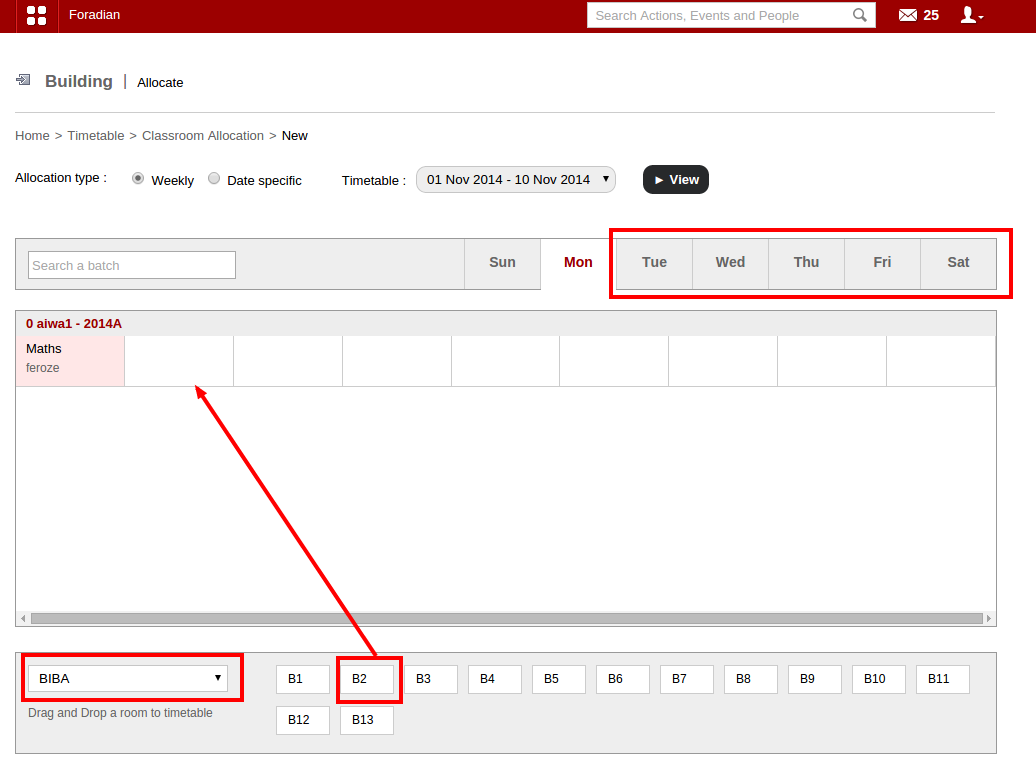
The above screenshot shows how to allocate classroom in case the allocation type is weekly. Select any of the day as well as the building and the particular room and drag it to the subject, as shown by the arrow.

6

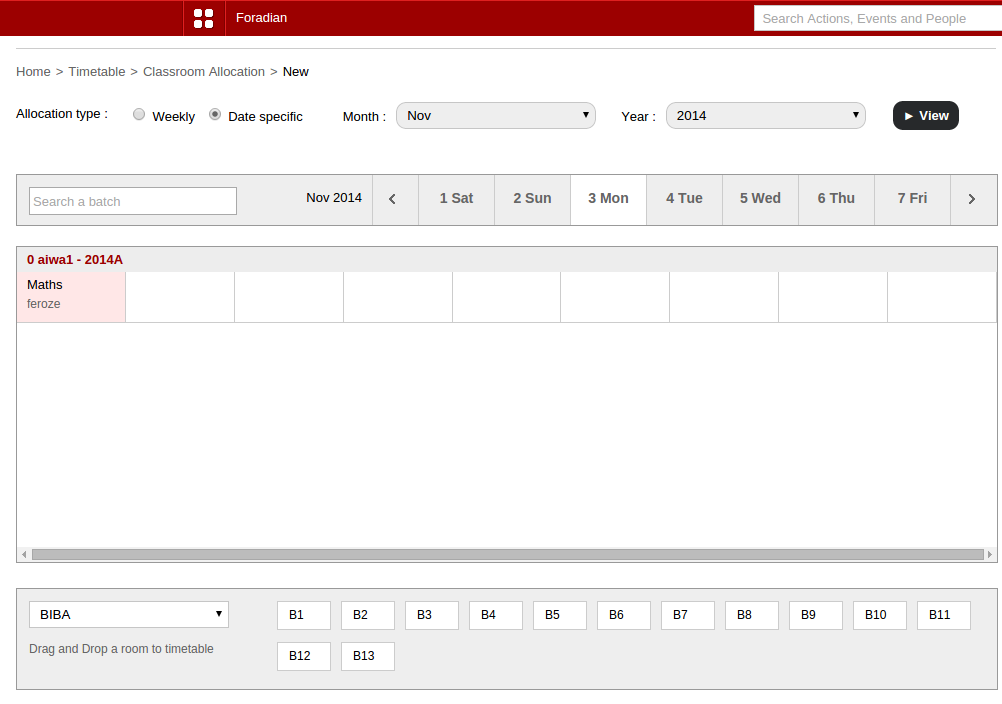
This above screenshot shows you how to allocate classroom when the allocation type is date specific. The rest you have to do the same with selecting the building as well as the room and drag it to the respective subject, just like you have done in the scenario shown above.

Note: The main difference between the two types of classroom allocation is that, when the weekly format is chosen for a given period of time (suppose from 1st November to 30th November), the timetable range along with the assigned building and classroom for each of the day in the week will be same throughout (in this case, from 1st November to 30th November), unless it is overridden by the date specific classroom allocation. Date specific classroom allocation can override the weekly classroom allocation for the particular date.

Case Study: Indira Group of Institutes

Case-Study-IGS

Indira Group of Institutes

Indira Group of Institutes (IGI) was born in the hands of Shree Chanakya Education Society (SCES), a organization dedicated to ignite the entrepreneurial abilities of the country. With 14 institutes, SCES currently houses 8000 students pursuing multi-disciplinary, graduate & postgraduate programs.

Challenges faced: Taking attendance of such a huge base of student required a faster attendance module. Creation of single timetable for combined batches as well as separate study groups and student groups for special classes.

Solution: Fedena Pro multischool

Indira Group of Institutes: “A journey of Aspiration to Inspiration”

Under the visionary leadership of Dr. Tarita Shankar, Shree Chanakya Education Society (SCES) was established in 1994 with the aim to provide top quality postgraduate education in the fields of Business management, International Business and Information Technology. Currently, Indira Group of Institutes has 14 full fledged institutes, housing 8000 students pursuing multi-disciplinary, graduate and postgraduate programs.

The main objective of Indira Group of Institutes is to provide ‘Management education in a corporate environment’ which is rendered by the dedicated efforts of the members of SCES, experienced in various fields like industry, academics, service and social-world.

Problems faced:

  1. Attendance marking for such a huge base of students required a smoother experience with a faster attendance module.
  2. With so many institutes and batches, the need for a single timetable for multiple batches was important.
  3. There may be times when a student is absent from the class, busy with school activities somewhere else. In that case, he/she has to be marked with special authorization.
  4. Separate study group and student group required for special courses. 

The solution by Fedena:

  1. Fedena allowed customization according to the needs and requirements of the institutes with varied courses and programs. The single click attendance marking was introduced for a faster attendance session.
  2. Single timetable can be created for combining multiple batches, conducted by single faculty.
  3. Fedena was customized to allow to create student group and study group for all those special classes and sessions.
  4. An authorized leave system created to mark a student and the same will be reflected in the attendance report in the form of authorized attendance percentage and normal attendance percentage. 

The New Change in Class Timing Interval with Fedena 3.2

timing
Earlier version of Fedena allowed the users to set class timings, only at 5 minutes interval. Hence, class durations were set at the multiple of 5, i.e, 5 minutes, 10 minutes, 20 minutes, etc. But with Fedena 3.2, the class timings can be set for any time limit and it may not  necessarily be a multiple of 5. Thus, being an user, you can now set the class timings for any time period- a class can be of 41 minutes, 52 minutes, 23 minutes, etc. Read on the article and find out how you can set class timings with the new changes.

How to do

Go to your Fedena account and go to ‘Timetable’ in ‘Academics’.

SS1
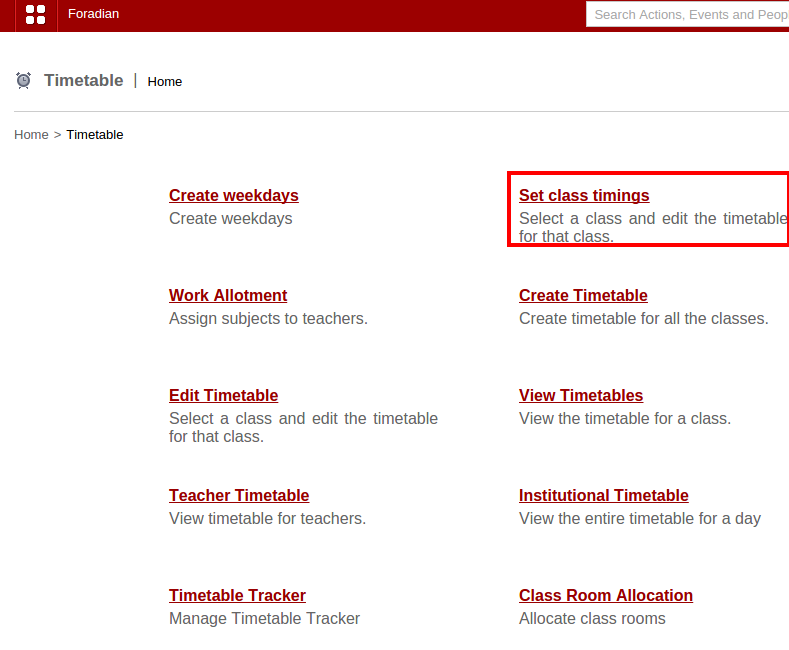
Select ‘Set class timings’ to go to ‘Manage class timing sets’ page.

SS2

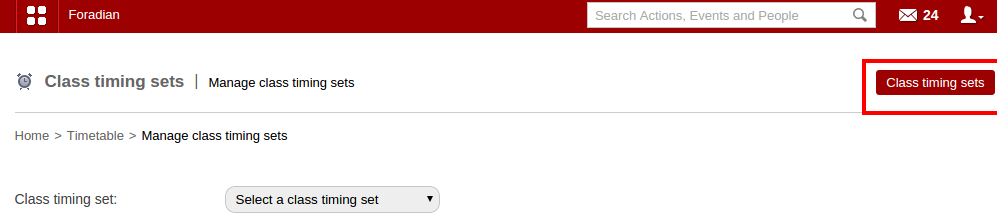
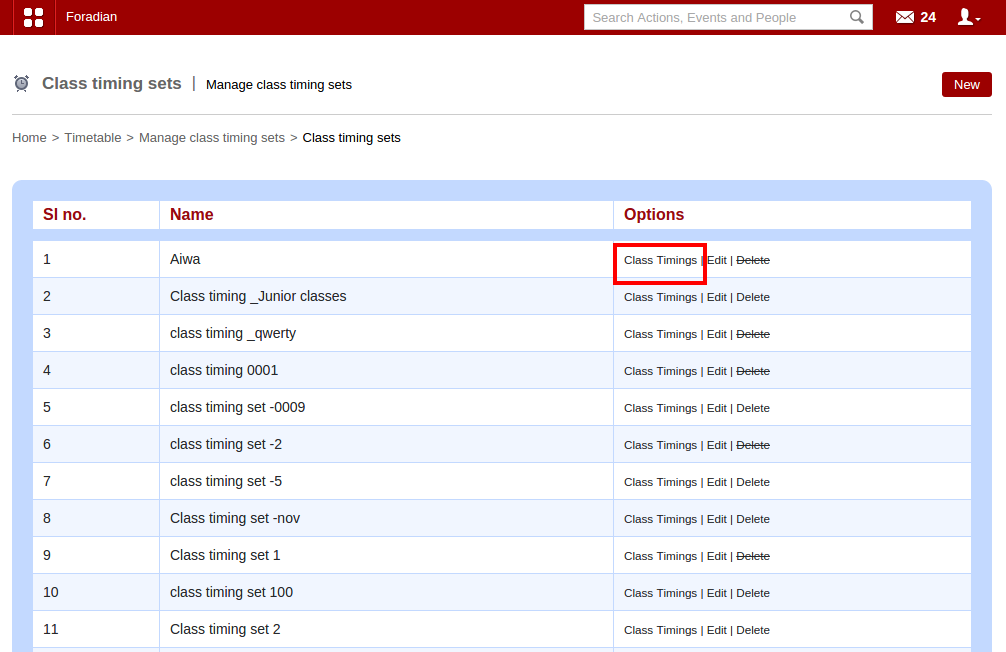
Go to ‘Class timing sets’ and select the particular class timing from the list.

SS3
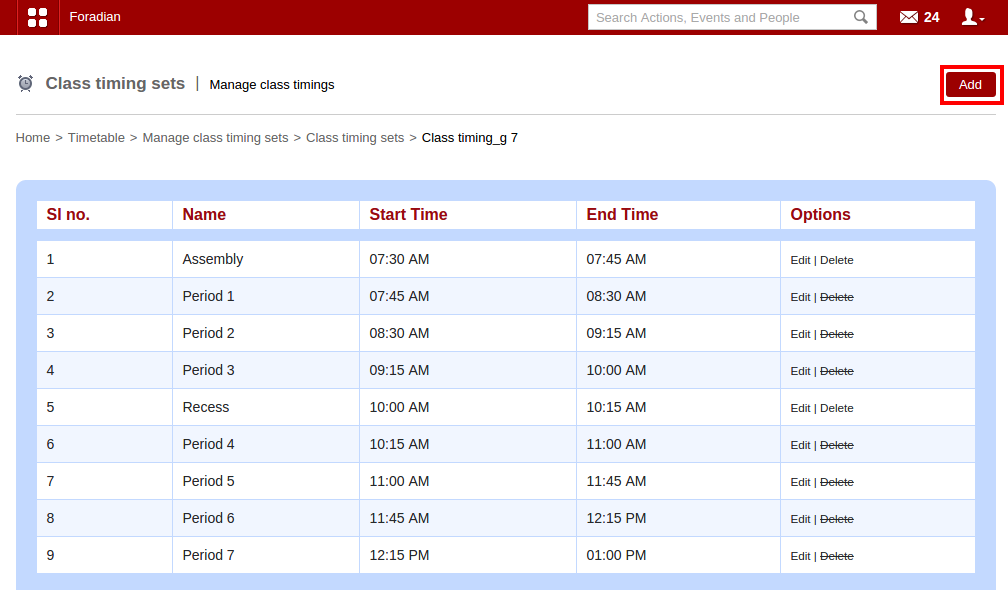
Class Timings’ will take you to the ‘Manage class timings’ page.

SS4
Click on ‘Add’ button as shown in the screenshot above.

SS5

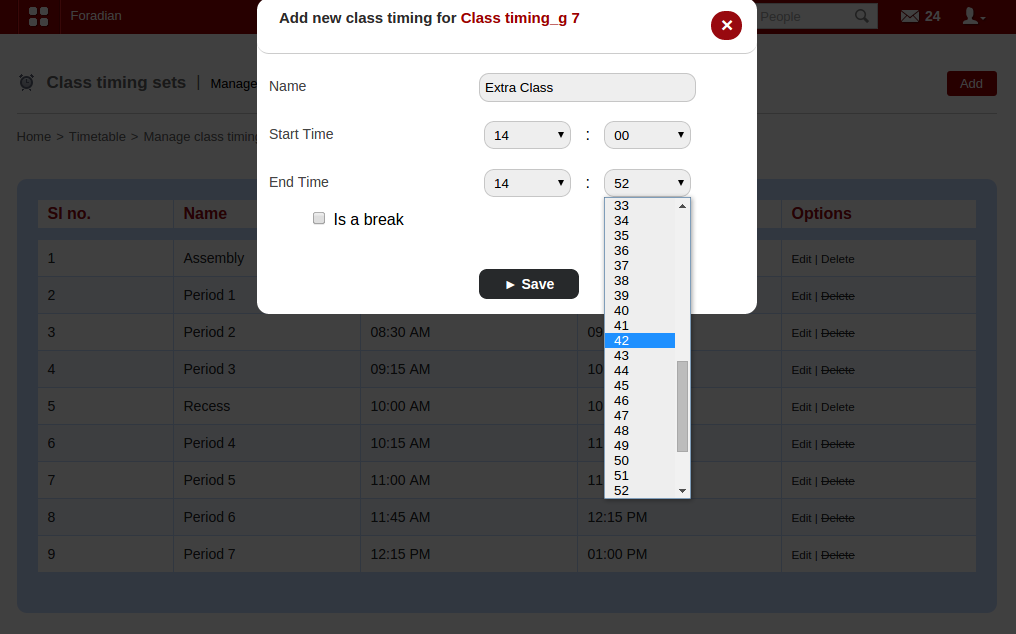
You can set the class duration of any time limit. It need not have to be in the multiple of 5. The class duration can be of any time duration, be it 15 minutes, 18 minutes, 42 minutes, etc.

Anytime Anywhere Data: Key to Effective Institution Management

Vishwajit

When we talk about effective institution management, we cannot deny the fact that the effectiveness that we talk about, focus on institutions of the 21st century. When education has moved beyond the peripheral of an actual classroom, how can management be limited to it. When teachers are not mere carriers of knowledge, but the right guidance to students in their quest for knowledge. When education has come out from the limitations of chalks and boards, books and pens and has moved into a virtual sphere connecting students and educators all over the world, management too, has to be at a level to match with the changing face of education and learning. And this kind of management should have systems in institutions that would facilitate better teacher student coordination, more consistency in approach and action throughout the institution.

Effective management of institution is crucial. Why? Well, think about a well connected and adequately communicated team of teaching and nonteaching personnel with defined roles and tasks. And administrators with access to data will have a proper control of the institution, with more transparency and accountability. Moreover, easy access to data can assist educators and administrators of institutions to study data from the past, analyze it and come up with solutions that would bring out wonderful results for institutes. Take for example, study of data gathered from the past can help educators to analyze the use of various educational reforms in their institutions. Collecting and studying of student data can help teachers and professors keep a track of student performances, their weak areas of learning and finding out ways to rectify them.

With education going global, more and more online courses coming to use, connecting students and educators across the world, management of these virtual institutions require availability of data anytime that can be accessed from anywhere. This kind of accessibility were things of impossibility till some years back. But no more. Data in any form can be accessed with just a minimal use of modern technology. A computer and internet connection, and you have access to any data of your institution.

The concept of anytime anywhere data is easily possible with the implementation of erp or education management in managing institutions effectively, with just a click of a mouse. Erp implementation or using education management software in institutions, customized according to individual needs, has benefits for all stakeholders students, parents, administrators and the management body also! The anytime anywhere data concept is easily viable to institutions powered by erp software solutions. Imagine, how beneficial it would be for administrators and members of managing body to get access to the institute irrespective of any kind of time and location constraints, thus a wonderful aid in times of emergency or urgent decision making. A one click access to information related to employees, students, academic is what is required in this technologically modified world. Access to administrative operations and functions are reduced to single click login, thus an effective management of institution is possible from anywhere, anytime.

But, when we talk about the accessibility of data in ERP, we should also keep in mind about the availability of data in ERP software; how can we make sure that data is available in the ERP software. Once data is available in the ERP, everything falls in place and the accessibility and analyzing of data is done with minimal effort. Here comes the focus of concern how is the data made available in the ERP; can there be a way to do it automatically? Like devices interconnected with each other would do auto data entry. Let’s put in the concept of Internet of Things in this place. How can this concept be of any use in this scenario? Well, Internet of Things, as we all know is a concept that talks about a future where every physical object is expected to connect to the internet and will be identifying themselves with other devices. That means, any object will be able to identify itself digitally, connected to the surrounding objects as well as database data. Think of a situation where computers will be collecting data without any human help and have all necessary information required and it will be all about the accountability, your ability to keep track of everything.

If Internet of Things can be put to use in education, it can create wonder for institutions. Interconnected devices in an institution can do the data entry without any help from administrators or teachers. Educators or teachers can save loads of time from inputting data to ERP software manually, thus investing the time in what they can do or expected to do best teaching. A very good example of how this kind of interconnected devices are a great boon to institution management is the Alndra Attendance management, an Artificial Intelligence enabled image processing technology to record attendance of classroom without any kind of manual interference. This kind of smart attendance requires just a mobile phone, with the app installed and take photos for attendance. Thus, a mobile phone connected with an education management software can create a lot of difference in your efforts towards effective institution management.

Fedena, the opensource software has been playing an active role in fulfilling the anytime anywhere data facilitator for thousands of institutions worldwide. A perfect school management software or an enterprise resource planning or a student information system, whatever you give it a role, it fits well. Anything related to education and management of educational institutions is carried out efficiently, by incorporating the power of internet, computer and modern technologies.

Smarter solutions to age-old problems in institutions by Fedena

Smarter-Fedena

Technology is changing not just the way we live; but how education is imparted as well. Education and learning have come up a long way and educational institutions too, are paving way for technology to take over and enhance learning at the institutional level. And adopting education management software is one big step these institutions are doing towards revolutionizing education. Today, we bring to you some areas of operation in an institution that can be enhanced and modified by adopting education management software, like Fedena. Fedena, the awards winning education management software has been playing an important role in revolutionizing education, learning and institutional management. Read on to find out what are the areas of improvement for educational institutions with Fedena.

Problem: Teacher’s spend most of the class time taking attendance. Hence, a chunk of productive time in class is lost in attendance marking manually.

Solution: Smart attendance with the help of Alndra Smart Attendance plugin, integrated with Fedena will let you take the attendance in as less as 10 seconds! The plugin enables image processing technology to record attendance of classroom minus the manual work.

Advantage: Teachers can now invest more time in teaching and learning activities.
Problem: Creating intelligent reports, customized according to various requirements demand immense manual work which at times becomes impossible and time consuming.

Solution: Creating not-so-typical reports made easy with the custom report plugin by Fedena.

Advantage: Customized reports give an insight to student performance and capabilities. Hence, teachers can act accordingly. 


Problem:
Tracking and managing expenses in an education institution at times becomes confusing, particularly when the expenses are variable and keeps on changing monthly.

Solution: Fedena allows easy management of these kind of expenses using a unique way of storing up information on these expenses.

Advantage: Managing these expenses under different categories is more systematic and easy to regulate expenses. 

Problem: Student tracking is often considered to be a genuine problem in government run institutions where there is lack of proper monitoring of students.

Solution: Get a biometric attendance system or RFID student tracking system and integrate with Fedena and see the wonders.

Advantage: Easy to install, use and highly scalable biometric technology can bring in good results for the rising number of missing students and teachers in government and community schools. 

Problem: Maintaining large number of students and employees with varied transportation details is a tough task for the assigned employee.

Solution: Transport plugin by Fedena to manage everything important related to transportation.

Advantage: Properly managed vehicles, transportation routes and fees for various students and employees stored in one system. 

Problem: A smarter way to library management, easy to manage books being issued, returned or any added new.

Solution: Fedena’s barcode integration for updating book records in library.

Advantage: Whenever a new book is added or an one issued or returned, everything is managed by scanning the barcodes of the books. 

Problem: With technological advancement, schools are going the virtual way and online exam is the need of the hour.

Solution: Online exam plugin by Fedena for all kind of online exams- objective, descriptive as well as subject-based.

Advantage: Specific online exams for students who are not present physically in the class. Perfect for online courses or virtual schooling. 

Fedena 3.2 Brings you the Import Question Feature in Online Exam

Blog-graphics1

In the last article, we have talked about the new updates and features in the Online Exam plugin with the newer version of Fedena 3.2. Today we take up a new feature in the Online Exam plugin which is called the Import Question. Read on the article to find out more about the Import Question feature.

Import Question Feature

The basic point of the Import Question feature is that it allows you to import questions from any last exam of a particular batch. And it can be done both in terms of exams which are ‘General’ in nature as well as of those based on any particular subject. To check out how the feature works for exams and questions which are ‘General’, login to your account and go to ‘Online Exam’ in ‘Examination’. Go to ‘View Online Exams’.

import_1.png

Go to ‘View Online Exams’ and select the batch for which you want to make the changes in the question paper and import questions.

import_2.png

Select the particular exam you want to modify.

import_3.png

The ‘Import Questions’ when selected will help you with importing questions from previous exam.

import_4.png

Select the question you want to import from the panel on the left and as it shows up in the right, click on ‘Import’. But you have to fill in the marks for the question as well before you ‘Import’ the question. And you are done with importing questions for exams which are ‘General’ in nature.

In case of exams which are subject based, questions will be subject specific only. To import questions for this kind of exams, you have to first select the particular exam for which you want to do the import question option.

import_5.png

As the screenshot shows, you have to select the ‘Course’, ‘subject code’ and then select the question you want to import. As mentioned earlier, you have to fill in ‘Marks’ allotted to the question before importing the question.

Any good or important question from previous exam you want to be part of a current exam, you can now do it easily with Import question feature.

New Updates in Online Exam Plugin with Fedena 3.2

Blog-graphics-Exam-Plugin
The new version of Fedena 3.2 has a lot to offer to its customers for a better user experience. And some major changes and updates have been done to facilitate such experience, Today, in this article, we will focus the changes and updates that have taken place in the Online exam plugin. Read on to find out the new updates.

Update 1: In the earlier version of Fedena, the online exam plugin allowed only exams which were general in nature and were mostly batch specific exam. That means, exams were only related to a particular batch and were not subject specific.

With the newer version of Fedena 3.2, exams can be created based on subjects as well. Hence, it becomes easy to create separate exams based on subjects.

online_1.png

When you select ‘Subject Specific’ exam, you need to select the particular batch to which you will be asked to select the subject as well as the students who are supposed to appear for the exam.

online_2.png

Note: When you select an elective subject, the students who have the particular elective subject will be able to appear for the exam.

Update 2: There has been a new update in the ‘Exam Format’. Earlier version of Fedena didn’t allow you to go for descriptive type questions. Only objective questions for exam was allowed. But Fedena 3.2 allows you to conduct exam with descriptive type question/answer pattern.

online_3.png

When you select the ‘Exam Format’ as ‘Hybrid’, it allows you to frame subjective type questions. And it also requires you to assign evaluators who will be checking the answers for the questions.

online_4.png


As shown in the picture above, you can assign as many evaluators you want. Only employees can be assigned as evaluators. Employees who are assigned as evaluators can see the link to the page for evaluation under ‘Academics’ when they login to their account.

online_6.png

This is how an evaluator marks an answer sheet of a student.

Update 3: When you select ‘Objective’ as ‘Exam Format’, the earlier version of Fedena offered constant number of options for answers. Fedena 3.2 now allows you variable number of options as answers. That means, you can have different number of options as answers for different questions.

online_5.png

Add as many options you want as answers. Plus, you can remove any option if you want to.

Update 4: Students, in the earlier version of Fedena, were not allowed to see their marks of exams they have attended. Only admin could see the marks. But with Fedena 3.2, students can not only see their marks, but check their answer sheet as well.


online_7.png

A lot more features on online exam will be published in the coming weeks. Stay tuned.

Smarter Ways to use Google Forms in Classroom

Google-FormsGoogle has successfully made its way to classroom. It has come up with a lot of tools to accelerate growth in learning and offer better teaching experiences. In fact, Google has a whole lot of products to offer including the new Google Classroom which is a great option to a perfectly organized classroom. Google Docs and Google drive are other effective tools for creating and sharing, hence something to look out for in classroom teaching. Today, we are going to talk about the Google forms and how Google forms can be used in classroom in the most effective ways.

Google forms is a very prominent feature of Google Drive and there are plenty of smarter ways teachers or educators can utilize them to make the most in classroom teaching.

  • Google forms are ideal for conducting a survey in the class. Communicating with students on regular basis is difficult without the use of proper medium to do it. But the importance of these kind of surveys cannot be ignored too. It not only creates a good teacher-student communication but also motivates students to offer their meaningful feedback and hence, let the educators evaluate the ways to effective learning.


  • What better ways can be to use google forms than a contact information collection form. Get your students fill their details in the form that might be crucial piece of information. A good way to know more about students and parents for future communication. These information are important particularly when you can save yourself from the tedious task of entering data. Everything can be done electronically, why the point of wasting time in doing the same manually again and again.


  • Student assignments are easy to collect with the help of Google forms, particularly when students have to attempt exploratory questions. Everything can be kept in one place as you can easily store all information about classroom projects like web links of blog post, video posts and others at one place. Managing projects is an easier task now.

A great help for assignments, keeping a track of grades and a feedback form, Google forms are perfect assistance to classroom teaching. There are a whole lot of other new ways that you can explore by yourself and employ in classroom teaching.

Check out the video showing some good ways to use Google form in classroom.

Fedena 3.2 Brings you the Rapid Attendance Mode for Faster Attendance

Rapid-attendance

A newer version of Fedena 3.2 has recently been launched and it comes with various new and improved features for a better user experience.

The older version of Fedena didn’t allow you to mark the attendance of any student as absent without giving the reason for absence. But many a times, the reason of absence are not known to teachers and in that case, it was not possible to mark any student as absent. But with the newer version of Fedena 3.2, there is a solution to it- the rapid attendance mode. The rapid attendance mode allows you to mark the attendance of students instantly without the option of reason of absence coming up every time you mark anyone absent. In the earlier version, the entire process of marking the attendance was taking place in four steps, but it has just been reduced to one simple step. Read the article and find out how it works.

The Rapid Attendance Mode

Login to your Fedena account and go to ‘Attendance’ in ‘Academics’ and it will take you to the ‘Attendance Home’ page.

rapid_1.png
Select ‘Attendance Register’ after which you need to select the respective batch for which you  want to mark the attendance register.

rapid_2.png

Select the batch for which you want to mark the attendance.

rapid_3.png

Select ‘Rapid Attendance’ which will allow you to mark the attendance without providing the reason for it. All you need to do is to click on the respective cell in relation to the particular student and the corresponding day he/she is to be marked absent.

Note: Under the new changes, you can also mark a student as absent without selecting the ‘Rapid Attendance’ option. In this case, when you click on the respective cell, the option of reason comes up, but you can save it without providing the reason.

rapid_4.png

Click the option ‘Add’ to store the attendance of the particular student without providing the reason.

A Quick Guide on Brain-Based Learning

BrainA comprehensive new form of teaching, brain-based education focuses on how the brain learn things naturally. It involves all those teaching methods, programs and designs especially designed on scientific researches on how the brain functions while learning. The researches deal with the learning process of students as they grow up and the various emotional, social and cognitive changes that takes place. In short, the age-old belief of intelligence being a constant thing is proven wrong as new researches have proved the fact that continuous learning and practicing of skills can lead to the brain physically changing. Thus, the overall functioning of the brain can now be modified with proper academic programs in schools and educational institutions has all the reasons to introduce special programs that enhances the functioning of the brain of students.

What exactly is this brain-based education all about? Defining brain-based learning would refer to all those techniques and programs that are specially designed on scientific findings on how the brain works. Scientific researches on neuroplasticity has been carried out thus proving the fact that neural connections alters themselves accordingly when people learn new things or have new experiences or practice skills for sometime. Moreover, these findings have also focused on the importance of diet and other conditions like stress on learning functions; emotional state of a being can affect the learning process; that the brain uses various areas in it to store information, among a lot of other conclusions. And so, it is advisable to educational institutions to develop programs and lessons to create such environments that would facilitate the learning process, something that would stimulate the brain like, music for de-stressing, healthy food and exercise for the brain, etc. Brain boosting programs are already taking up a concrete shape with institutions coming up with various courses. The Graduate School of Education, Harvard University offers a master degree program on Mind, Brain and Education.

Benefits of Brain-Based Learning

Investing enough time to research of developments according to the way the brain learn things, would bring out learning materials, programs and strategies accordingly. Here, given below are some benefits that brain-based learning offers to students:

  • Lesson plans can be customized according to the level of intelligence of students with the right quantity of information being supplied to them.
  • Brain based learning strategies can help educators know the different levels of understanding of students, their abilities to perform, how fast they develop skills and their varying learning styles.
  • Stressing on brain-based education programs will also motivate educators to stress on foods and exercise regimes for brain boosting. The right food and physical exercises can trigger the right mood for learning.
  • When educators have the right understanding of how the brain functions while learning new things, different learning strategies can be formulated accordingly. Different students have characteristics of their own and hence, teaching methods can be designed to meet these characteristics.


Brain-based education, in a brief, is all about the researches to frame out strategies and programs on the basis of how effectively the brain can be used to enhance knowledge intake. Educators should engage in framing out these strategies to utilize the brain for optimal learning.