IIT Banaras Hindu University

Case-fedenaThe Indian Institute of Technology or IIT (BHU) came into being with the Institutes of Technology (Amendment) Act, 2012 with 3 inter-disciplinary schools and 13 departments. This public engineering institution is situated in Varanasi, Uttar Pradesh, India.
Challenges Faced:Complete online management of nearly 7000 engineering students and 2000 staff and faculty members required a software that is easy to use and highly efficient at the same time. Easy to customize and implement erp software solution in the diversified learning culture of an engineering institution.

Solution by Foradian:

Fedena enterprise solution

The result:

Fedena enterprise solution assisted them in easy management of their vast population of students and staffs.Moreover, the fedena support helped them with customized plugins, according to the diversified requirements of an engineering institution.

“Everything gets automated, very simple and easy in use, both by the users as well as by the Admins. Very easy to develop newer customized plugins for specialized functionalities.” – Dr. N. S. Rajput, Principal Investigator, Networked Communication & Computation Laboratory, IIT (BHU)

Indian Institute of Technology, BHU: “Education is Character”

IIT (BHU) or the Indian Institute of Technology (Banaras Hindu University), located in Varanasi in the Indian state of Uttar Pradesh is the home to some 7000 engineering students, managed by 2000 faculty members and staffs. Originally functioned as the Institute of Technology, Banaras Hindu University (IT-BHU), the institution was converted into Indian Institute of Technology by the Institutes of Technology (Amendment) Act, 2012.

This residential and co-educational institution has 13 departments and 3 interdisciplinary schools.

The Challenges:

1. An engineering institution with a huge population of students and staffs required a software that could offer the best and effective online management and complete automation.

2. Customized plugins to suit the various situations and exceptions of an engineering institution.

3. An erp software that’s user and implementation friendly. No need to hire highly qualified professionals to operate the software.

The Solution: Fedena enterprise solution

1. Fedena enterprise solution, the simple and easy to use erp software helped IIT BHU with complete academic automation and online management of the big population of 7000 engineering students and 2000 faculty and staffs.

2. Being an engineering institute with distinct situations and exceptions to handle, IIT BHU required customized plugin developments which is possible with customization-friendly fedena. Fedena allows IIT BHU to let it’s students develop customized plugins as well.

3. One of the best things about Fedena is the fact that it doesn’t requires software professionals to operate and this is what helped the institution as they went for normal system administrator to run the whole system who required no special training.

Bulk Data Movement with Fedena

Fedena (1)

Data and data analysis plays a vital role in our day today life. Everything we look into is associated with some kind of data or other. Data plays a key role in arriving at any decisions . It support in decision making. In short, data can be defined as information that has been translated into any form that is more convenient to move or process.

Data can be different. It can be either meaningful or meaningless or can be abstract. When it comes to computing, data is the prime component. Every aspects related to computing is associated with some kind of data processing. Conversion of computing problems into executable programs involves analysis, understanding of problem data. Object Oriented Programming makes this conversion much easier by connecting all real world things to objects that have data fields (attributes that describe the object) and associated procedures known as methods.

In Fedena we manage gbs of institution data.  In between fedena’s evolution, we use to get plenty of requests related to data retrieval and data entry. So data management has always been a topic of study.So for the bulk movement of data into and from fedena.Considering the importance of data processing ,what we could do is create an exporting and importing interface. But fedena expands rapidly, its not wise to implement this for every new modules made. So what we needed is an engine to handle data bulk export and import, which can adapt to the changes in fedena easily. Hence we design Data Export and Custom Import plugins which handles bulk import and export of data in a simple manner.

And for the engine design, we exploited the MVC architecture. In MVC architecture the data and logic are separated into different layers. Model represents the physical data in your application. MVC architecture converts the database into model structure with the help of some object oriented principles. Model layer helps in creation and updation of data inside each tables. The data can be captured in the form of attributes and their values of objects. Each tables inside the database will be mapped to one model. We can add more power to the data analysis by creating relationships between data in different tables.

Two engines one handles import and other export. In both we define a particular schema for data for each models. When importing according to the schema the engine creates a csv file which defines headers for the particular model. User downloads it and merges with the data they want to import. The header as I said will be defined by the engine, and the header for a user selected model will be closely associated to the real world object itself. For example a header for Student model will contain first name, last name, admission number, address, batch name etc. While during data export a same schema is set for each models. The user selects the model, accordingly the engine creates export files. The engines makes it easier to extend the functionalities for new module within Fedena.

When it comes to ERP applications data movement has an important role. Almost all ERP applications use extensive set of data for its functioning. The way each of the application process and use data may differ. Fedena custom import and export plugin helps a great deal in data management. Fedena custom import module is primarily developed to move bulk data into fedena. This eases the time consuming data entry process. Fedena custom import plugin supports commonly seen file formats which user can choose as per the requirement. In overall complexity in the data upload is greatly reduced.

Fedena data export module supports the user to export Model data for various purposes. There will be a predefined set of exports (model) available. Model data can be downloaded in either of formats xml or csv. These exported data are of various use. The export operation serves many purposes like backup of certain model, data transfer to some other application, for acquiring meaningful insights from dataset, data driven decision making etc. And overall today’s business, organisational process plannings are based on data. Data is constantly analysed to for evaluation. Different kind of outputs are made out of same set of data. Data exported from Fedena can be used for many of all of those reasons.

This article is written by:

1393660_542978212446375_2117412812_n
Priyanka TP

Somebody who literally cooks code, Priyanka is kind of girl who works smart in kitchen and on computer with the same zeal. And her codes are equally noteworthy as her delicious recipes.

Barcode Integration: A unique new feature in Fedena 3.1.1

Barcode

Fedena 3.1.1 is now equipped with Barcode Integration which can help you deal with library management in your institution. Any new book addition or a book issued or returned by students can be entered. Be it a renewal or the search for a book to know its status can be easily done by the scanning the barcodes of the books. Managing your institution’s library is much easier now with the new feature of barcode integration. Read the article and know what all scenarios will let you use the feature.

Scenario 1: When a new book is added

When a new book is added, go to ‘Manage Books’ in the home page of library and then select ‘Add books’.

barcode_1.png

Select ‘Add Books’ to go to the page where you will add information about new books.

bar code_2.png

There are two ‘Book addition mode’- ‘General’ and ‘By barcode’. Thus, you can add a new book in your library using the barcode of the book.

Scenario 2: When a book is returned/renewed/issued

The barcode integration can also be used in case a book is issued from the library or is returned or renewed. You can keep a track of all the entries with help of the barcode in the book. In case of returning a book, go to ’Return Book’ in ‘Library Management’ page. Store the returned book using the barcode.

barcode_3.png

For issuing a book, go to ‘Issue books’ in ‘Library Management’ and use the barcode to do the need.

barcode_4.png
For renewal, go to ‘Book renewal’ in ‘Library Management’ page and use the barcode of the book for book renewal.

barcode_5.png

Scenario 3: When a book is searched for

The barcode integration can also be used to search for books in your library. Use the barcode of books to look for the current status of a particular book, whether its available or reserved by someone for later issue. For this, go to ‘Search book’ in ‘Library management’ and use the barcode of the book to know the status.

barcode_6.png

Fedena UI Redesign: Case Study

Fedena-UI

Overview

Fedena is used by thousands of schools and millions of users worldwide, and it is considered really user friendly app. The simplicity in design and easy to use interface, makes Fedena stand out from similar tools.

But the increasing number of features in Fedena and the changes in worldwide design trends, made us think that the time had come for a facelift.

Problems with the Earlier Design

Fedena-Old.jpg

Too many features, uncategorized:

Like any other app, features in Fedena have been increasing since we started our journey. The market study, research and innovations from our team and also the interactions with clients,  give us a better understanding on what additional features are required to make Fedena more efficient.

Currently Fedena has more than 50 modules and external plugins. For a user, it is a tedious task to browse through all of them in the dashboard and find what he/she is looking for. We were also not happy about the very long ‘More’ menu where the rest of the features were shown due to space issues.

Sub menus are not easily accessible:

Most of the entries in the dashboard had submenus, and some of them were further divided. In order to access them, the user had to click the icon and go inside the module.

No options to monitor day to day activities and data:

This was more like a requirement than a problem. The easiest way to know what is happening in the institution today, is the one place where we show all the daily activities and statuses like examinations, fee due, online meetings, discussions etc, without browsing each module. Fedena had no such feature.

Outdated design:

Despite being simple and easy to use, the main design pattern we followed was a little old, and tried & tested in several apps. The days of big colorful skeuomorphic icons and background patterns are long gone. So a user who is aware of the internet standards and current UI design trends, might have felt Fedena design outdated.

Key Focus while Designing

Efficiency over features:  Priority should be on ‘how it works’, rather than ‘how it looks’.
Aesthetic and meaningful data presentation: Give the user relevant data from time to time.
Giving control to the user: User should be able to decide what he/she wants to see.
Minimal design: Design should be light, simple and to the point.

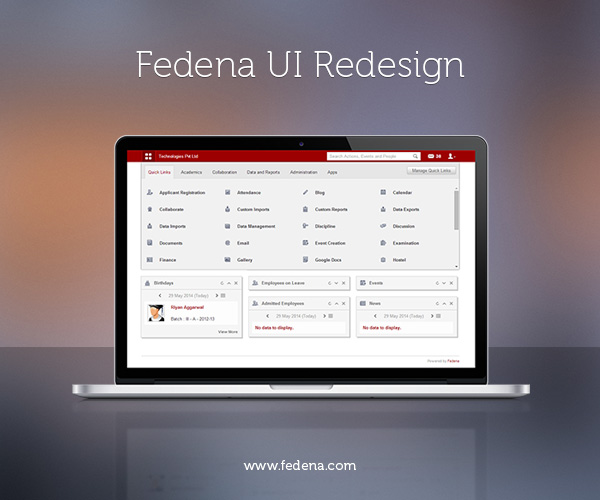
Keeping these things in mind we started planning. Studied several apps, from amazon api, salesforce and desk.com to even e-commercial websites, to get best possible options to solve these problems. So many designs were tried, tested and scrapped. And finally we came up with this design:Dashboard.png
and it turned out to be a never before seen menu and dashboard view.

Navigation Bar

Navigation.png

The revamped navigation bar now consists of a menu button, link with institution name which acts as a backlink to the dashboard, search area, messages and a user preferences icon. Everything is arranged in such a way to make the best use of the space.

Menu button: One click to get them all

Menu.png

All the module menus have been stacked neatly under one single button. Wherever you are in the app, you can access any other module by just a click in the menu button.

Categorising the Modules

We have grouped them according to their nature under different tabs. For example, if a user wants to access Examination module, he/she just needs to go to the Academics tab. No longer scrolling through the big list of modules.

Easily accessible sub menus

Submenu.png

Place the mouse over a module and the submenus will appear. This has reduced the number of clicks required to reach a feature the user wants.

User Controlled Quick Links

Manage-quick-links.jpg
The quick links tab gives the user the freedom of bringing favorite modules under one tab. By clicking ‘Manage quick links’ user can control what all features need to be there in the quick link tab. He/she even can control the sub menus that appear on quick links.

Wide Range of Clean Monochrome Icons

Icons.jpg

The big colorful icons were the face of Fedena. But as the part of bidding adieu to the old school design, we had to chuck the ‘iconic dashboard’.

The new set of icons are modern, pixel perfect, more precise, and go along with the updated user interface.

The Consolidated Dashboard

The idea is to give the user the most possible data relevant to him when he/she enters Fedena. This reduces the time taken for daily monitoring, and makes sure the user never misses any important data.

Dashlets.jpg

There are several ‘dashlets’ and from which the user gets an insight of what all activities are happening in the institution on that day and he/she can also switch the dashlet to any other date. Activities like birthdays, events, examinations, discussions happening all can be accessed at a glance. Also the day to day statuses of finance, students, and employees can be monitored. The data shown in the dashboard palettes differ from user to user, based on their privilege.

Manage-dashlets.jpg

The user can sort the dashlets by dragging them. And clicking the ‘Manage Dashlets’ button helps the user to control what should appear on the dashboard.

Implementing the Design

Finalized designs were given to development team and they did a fantastic job on giving life to the visuals. The results were exactly what we had planned, thanks to the pixel perfect front-end and smooth back end coding.

Future Plans

With the new dashboard and menu design, we have completed the first phase of Fedena redesign process. Since Fedena is a vast application a complete redesign is a time taking work. New features in Fedena are being made in compliance with the redesigned dashboard. Soon the entire app will have a new look.

Another major upcoming plan is to implement an ‘Analytical dashboard’, where the user will get visual data on institutional activities through graphs, charts and infographics. Comparing and consolidating data will be more easier and efficient in future.

Our aim is to make Fedena more vibrant and strong.

This article is written by:

Devi-display-picDevi Prasad

Or Devi like everyone calls him, is a multidisciplinary designer and artist with an eye for innovation and pixel perfection. Spends most of his free time sketching, surfing the cyberspace for inspiration and watching movies.

The New Revert Batch Transfer Feature by Fedena 3.1.1

Blog-graphics (4)

The new version of Fedena 3.1.1 now, allows you to revert a batch transfer that you have already done. What is the advantage of this feature? Well, there are times when some errors are noticed after a particular batch has been transferred to the next level. And this is when the revert batch transfer feature comes to your rescue. Revert the batch and fix any issues associated with the batch transferred. This is one feature was absent in earlier version of Fedena 3.1.

To revert batch transfer, you need to login to your account and go to ‘Administration’ in the menu. Click on ‘Administration’ and you will get ‘Settings’.


revert batch_1.png


Select ‘Manage Course/Batch’ to go to ‘Manage Batch’.


revert batch_2.png


‘Manage Batch’ will take you to the page where you can use the revert batch option.


revert batch_3.png


To revert any batch transfer, select ‘Revert Batch Transfer’ and go to the respective page.


revert batch_4.png

Select the particular batch for which you want to revert the transfer and you get details of the transfers that you want to revert. Once you select the transfers, select ‘Revert selected’ and you are done with your revert batch transfers. To check if everything has been done correctly, you can go back to the respective batch to check if the revert process has been done correctly.

P.S: In case of revert batch transfer, there should not be any dependencies in order to make the transfer smooth.

Custom Import Bulk Edit with Fedena 3.1

BG

With the earlier version of Fedena, the user was not allowed to do editing in bulk and in case, anything required changes, it had to be done one by one. Suppose, if you needed to change the blood group for all the new admissions for a particular batch which you have already saved, you had to go through each and every data to make the necessary editing. But with Fedena 3.1, you are allowed Custom Import bulk editing which allows you to edit custom imports in bulk. Read this article and know how you can edit in bulk for custom imports.

Login to your account and go to ‘Custom Imports’ in ‘Data and Reports’ section in the menu links.


custom_edit 1.png


Selecting ‘New’ will take you to the ‘CSV Data Import’ page.


custom_edit 3.png


Give a new name to the CSV file and select the particular model you want to make the edit. Once you are done with saving, go back to ‘All Exports’ and select ‘Export CSV’ corresponding to the particular report.


custom_edit 5.png


‘Export CSV’ will export the particular file for you to make the required editing. Once you are done with the editing, you can upload the file using the ‘Bulk edit’ option.


custom_edit 4.png


Select ‘Bulk edit’ and you can upload the edited CSV file.

Flexibility of Fedena Examination Module – Part 2

Fedena-Exam-Module-Part2In the last article we dealt with the major building blocks which attributes to the Flexibility of the Examination module. As we progress into the second version of the article we will have a brief idea about  the Implementation of  Examination module in real time. The additional available grading systems: CCE, CWA & GPA helps to take the actual reports. Lets go on a quick swivel of how these reports look like.

CCE

In strict adherence to the CCE grading system by CBSE, Fedena takes care of the creation of assessment via Subjective Assessment and Formative assessment for the overall evaluation of a student. One can create Term-wise Examinations and the respective Descriptive Indicators and Observation groups to get a full fledge report of a student under the two major heads – Scholastic and Co-scholastic. The exhaustiveness of a report purely depends upon the parameters created by the user. After the required set of configurations are done, the exhaustive report can be generated.

screenshot3.png

CWA

CWA(Course weighted average) is  one of the most widely used grading system. Here the users have to assign credit hours to subjects. Then the marks  scored by the student helps the system to calculate the final transcript by multiplying the score  with the credit hours. A final transcript of report would look like this.

screenshot2.png

GPA

The only major difference between a GPA and CWA grading system is that the GPA uses grades instead of marks to calculate the final transcript. These grades can be created from the grading levels of  Exam settings which will be used along with the credit hours to give us a decent report like this.

Saint1.png

Normal Grading System

As mentioned in the last article, the Normal grading system is the generic grading system to fit into  any model of grading system.We can even connect the exams by assigning a different weightage to each examination being held during the academic year.So may it be a Monthly test or a Half-yearly, we can assign each exam a different weightage to get a final transcript like this.

screenshot_111.png

What serves as additional perks to the reports are the amazing features in the Exam settings like the Grading levels, Class designations and Ranking levels.

While the grading levels helps you to make an ala carte grading set  for each batch, the class designation can  give the final one word result for the student’s score like  First Class, Second Class and Third Class or failed.Taking the evaluation to a whole new level the Ranking levels sets up criteria to classify students by taking the marks scored in each of the subjects.

screenshot7.png

Being Equipped with a stock of all the above features, Fedena can help you to generate exhaustive reports of your choice, if the relevant features are used wisely.

This article is written by:

1185742_10200807421647862_134988297_n


Sandeep Panda

An optimistic techie with special interests in implementing technology in real life situations with  a curiosity for the lesser known technical stuff. An individual who can adapt to cross-cultural environments with ease.

The New iOS 8 and its Big Surprises for Education

ios8

The very recent launch of the next generation mobile operating system, iOS 8 by Apple is not just a good news for the users, but has a lot in store for education too! iOS 8 will be released for iPhones and iPads. The Mac operating system will be getting the latest updated version of OS X Yosemite. In this article, we bring out to you the new updates and features of iOS 8 and what’s in store for education.

A new coding language called Swift

A new easy to use programming language that can motivate more and more kids into coding using Swift. App development is smarter with Swift since it is incorporated into Xcode minus the common programming error categories and can be used for creating OS X and iOS apps. So, students who are into developing apps can definitely benefit from Swift. An official iBook guide for Swift can be found here (https://itunes.apple.com/us/book/the-swift-programming-language/id881256329?mt=11)

iCloud Drive

A good competitor to cloud storage services like Google Drive or Dropbox, iCloud Drive could store all documents including ePub files and allows access to them using any Apple device and makes sharing files easier across apps. Equipped with 5GB free storage, Apple have reduced their extra storage pricing also. A good opportunity for students and educators for storing and sharing docs.

Newer keyboard

A new update for keyboards- Quick type which is a predictive text update that works in 14 various languages. Special education classes are expected to benefit a lot from this new update apart from its usual benefit to people who loves lot of texting on phone. Moreover, Apple has opened the doors to developers for keyboard customization. This definitely allows education to look forward to education-based customized keyboard.

A modified AirDrop

AirDrop has been there on Macs as well as iPad and iPhone for sometime. But it lacked any kind of communication between OS X and iOS which received a makeover with iOS 8 which now allows anyone to AirDrop files from Mac to any iOS device connected within the same wireless connectivity. Imagine how helpful it will be to students who can easily AirDrop assignments to teachers using Macbook, minus the need for email address.

iOS 8 for iPad

Schools using iPad always had tough time keeping pace with software updates made by Apple which at times required new hardware to run new software. But the new iOS 8 will run on iPad mini and iPad 2. Schools will have a good time ahead!

Some more features are expected to be there in iOS 8 that can be a positive introduction to education and they are as follows:

* Pre-installed iBooks

* 24 new dictation languages

* Braille keyboard that allows 6 dot braille input directly

* Speak screen

* Alex voice accessibility

* Touch ID to exit Guided Access

* Panoramic photos on iPad

The latest iOS 8 update surely has a lot to offer to education, especially mobile learning. Moreover, a lot of customization opportunities awaits young developers ahead with iOS 8. Till then, lets wait for its free download to be available from Fall of 2014.

New Update: Fedena 3.1.1 with Additional Features and Usability

Fedena

Fedena 3.1.1 with new features and improved functions. Read the release note below to find out more about the latest Fedena release. You can write to us at info@fedena.com with your feedback and suggestions.


Features

Core

User privilege changes in Reminder.

Edit/Delete for past timetable.

Revert Batch Transfer.

Changes in auto suggest menu.


Library

Tags to have view edit, delete options in library.

Integration of Barcode Reader in Library.

Displaying Book Count in library based on filters

Bugs

Core

No need to list the inactive batch inside the time periods.

Increase size of the word Signature in Fee receipts.

Prevent changing the swapped subject through drag and drop in the timetable entries.

Count showing wrong in the attendance report.

If there is no elective subject in elective group then show a message in subject transfer page.

Increase date of birth start year for guardian.

Attendance filter option is not working.

Defaults weekdays are being set for new batch.

Exam control privileged employee does not have the permission to edit the exam group.

“Add New Batch” privileged employee can’t assign/remove students to/from electives.

Deleted elective group name showing in assign subject page after adding a subject.

Subjects with No Exam are not listed in reports (Grouped/Transcripts etc) even if subject was present when exam was created.

Student admission privileged employee have no permission to add the siblings, delete the previous data subjects, add guardian.

Not possible to add a guardian for a student, showing ‘ward id can’t be blank error’ message.

Add a space between No guardian added and Add guardian link.

Add a space between employee category and position name in HR settings.

Employee last name in small caps in edit privilege page.

Student edit page date of birth year limit is not same as Admission Page.

Inactive batches not being filtered in the CCE batch listing pages.

Unable to mark daily attendance.

Can’t mark attendance for swapped subject, since it is not present in timetable.

Should not allow to mark the student attendance for the disable dates through custom import.

Separate country name into name + regional name format.

Invalid Request error in attendance API for subject wise configuration.

Discount created for the students are also importing into the new batch while importing the fees of the previous batch.

Applicant Registration

Show the loader in correct position in register page.

Custom Import

Country full name issue in custom import.

Data palette

SMS Sent Palette does not show time according to set timezone.

Discipline

Add one space before the admission number in complaints.

Wrong error message showing in complaints edit page at the time of deleting attachment.

Doc Manager

Style issue in doc manager – search label not aligned.

Hostel

Alignment issue in error message showing in hostel page.

Inventory

Add star for mandatory fields in store item page.

Library

Style issue in book renewal page.

Only first name of the book is showing in capital letter in student_library_details page.

Going to dashboard while clicking the reserved employee name in the library book show page, here the employee is archived employee.

Online Exam

Add uniqueness in online exam.

Tally Export

Strike the delete option if any dependent data exists.

Error message is not showing at the time of deleting company name.

Transport

Selected batch getting refreshed while editing the transport fee collection.

Previous Release notes:
Fedena 3.1
Fedena 3.0

The Need for Regression Testing

Regression-testing

Whenever a developer is fixing any issue, it may affect other parts of the software. Testing existing software applications to make sure that a change or addition hasn’t broken any existing functionality is called regression testing. For regression testing, we verify that newly added feature is not creating any problem in the entire software. Regression testing can be done after verifying the new bugs/features or at the same time while testing the bugs/features. Usually it is done after verification of new changes.

The purpose of regression testing is to catch new bugs that may have been accidentally created into release. For small projects, we can test the entire product with the help of test cases. For most cases, it’s difficult to check the entire product by manual testing. So automated testing is used. In Fedena, we test software manually. Regression testing helps us improve the quality of the product. The main reason for regression testing is to determine whether the change in one part of the software affects the entire software’s functionality. Sometimes, it may affect other parts of the software as well. It will reduce the quality of the product.


Testing Process

In Fedena, we use regression testing after developing new features or after fixing the bugs. It helps us to find new bugs that may arise due to fixing other bugs or adding new features. Most of the Fedena modules are related to each other. So, if we fix one issue in Fedena, it may create another issue in some other part of it. Sometimes we miss some bugs at the time of testing features. Most of these issues will come to notice during regression testing. In Fedena, we have found several issues during regression testing.

An example of regression testing

In Fedena we have two types of attendance

  • Daily wise

  • Subject wise

In subject wise attendance, attendances are related to the timetable. In case of daily wise, attendance its only related to weekdays(working days).

Suppose there is a batch “A”(start date:01/06/2014 and end date 30/6/2014)  which has 5 working days (Monday to Friday). If the batch has daily wise attendance type, then we can mark attendances for this batch based on these week days, i.e we can mark attendance from Monday to Friday. Suppose, on 21/06/2014 , we change the weekdays entry to have  6 working days (Monday to Saturday) now. After this change, attendance count now shows 18 (six working days x 3 weeks) but it should have been 15 (5 working days x 3 week), according to the old scenario.

To fix this issue, changes were introduced to the concept of attendances by the developers. Now, a daily wise attendance relates to the timetable for that particular timetable period. Hence, each of these sets are independent, i.e changes made in one set will not affect the past entries. As a result, the attendance count issue is fixed. Drawback of the new scenario being that timetable has to be created for marking attendance for that period.

Also, due to fixing the earlier issue, another issue pops up in attendance.In the old scenario, since the timetable was not required for marking attendances, we could mark attendances for even those days for which the timetable didn’t exist. But now, since the changes were made, its not possible to mark attendances for those days for which no timetables exists.

Issues of this sort is very difficult to track down if we follow normal testing methodologies. This is where Regression Testing helps us in a great deal. Regression testing is capable of tracking such issues so that necessary steps can be taken to avoid them.

Use of test cases in regression testing

Test case is a set of conditions with which a tester will determine whether a software satisfies all requirements. Test cases have great importance in regression testing. If we create good test cases that include the input and output of the software, then we can test each and every part of the software accurately and catch bugs easily.  If we are testing the software without any test cases we may miss out on some parts. So, we have to create test cases properly. Currently, we are verifying whether any software meets the end user requirements or not. With the help of test case, regression testing helps us to improve the quality of a product.

This Article is written by:

IMG_20140404_124153894

Anoop K

A cartoonist with vivid imagination,apart from being a strike bowler for the Foradian cricket team, Anoop loves playing caroms and watching movies.

College Girl Develops Attendance Tracker App

Bunk (1)

Nokia’s ‘Your wish is my app’ contest saw the birth of an app that can keep a systematic track of assignments and attendance of students, thus letting the student keep a knowledge of their performance in class. This app has been developed by Devyani Ruhela, a second year civil engineering student at B.M.S College of Engineering, Bangalore and is expected to solve the much prevailing problem of attendance management among students in India. ‘Bunking Buddy’ as the app is called, seems to be an ideal solution to the problem of missing out on classes and keeping a track of it.

How it works? Well, the app ‘Bunking Buddy’ will ask the students to feed in timetable and subjects along with the minimum attendance that is required to be updated and also keep a record of the classes attended or bunked. So,students can easily keep a proper track of their attendance in class. Besides, the app will also act as a reminder for assignment deadlines, tests and other class events. In short, the perfect organizer that can smoothen student life.

It was an initiative by Nokia who hosted a reality television show on application that prompted Ruhela to get the idea that was selected from more than 61,000 app ideas as one of the thirty entrees. Later, Ruhela got assisted by designers from Nokia to create the appearance of her app.

Ruhela doesn’t support bunking classes. And what made the idea pop up? As she says, “Being a college student, I know how difficult it is to remember and keep a track of the various deadlines for assignment and tests. Skipping classes is common, and it helps to have a track on it to prevent shortage and this idea can help students prevent shortage at the end of the year.” The idea is still in the development stage and is expected to affect students of all levels to plan and organize their attendance problems.

The All New Additional Leaves Feature by Fedena 3.1

Blog-graphics (3)

The all new Additional Leaves feature offered by Fedena 3.1 allows to grant additional leaves to employees and keep a track of it as well. Generally, the leaves allotted to employees of any institution are divided under various categories like casual leave, sick leave, earned leave, etc. An employee who wants extra leaves under any section can be categorised as additional leave. With this feature, you can manage all additional leaves permitted to employees in your institution. This article will assist you to know how the feature works.

How it Works

Login to your account and go to ‘Human Resource’ in ‘Administration’. In ‘Human Resource’, select ‘Employee Leave Management’.


additional_2.png

‘Employee Leave Management’ will take you to the ‘Manage Attendance’ page where you need to select the ‘Attendance Register’.


additional_3.png


’Attendance Register’, on selection will ask you to select the department for which you need to check the register to mark any of the employees for additional leaves.


additional_4.png


Once the additional leaves are allocated, you can check the number of additional leaves taken by an employee for which you need to go to ‘Attendance Report’ in ‘Employee Leave Management’ of the ‘Human Resource’ module. Selecting ‘Attendance Report’ will take you to ‘Employee Attendance’ page where you need to select the ‘Additional Leaves’ option.


additional_5.png

Select ‘Additional Leaves’ and it will take you to the ‘Additional Leave History’ page.


additional_6.png


Select the month, year and also the department for which you want to know about the employee who had taken additional leaves.


additional_7.png

In the above screenshot, as you can see, the employee had taken additional leave under the Earned Leave or EL category.


Note: Only the admin or a privileged user can allot and check additional leaves of any employee.