Fedena School ERP dedication to Anne Sullivan

Nix : Fedena 3.5.2

Fedena 3.5.2, codenamed Nix has released to our users across the world. From the Automatic Timetable generator to Transfer Certificate generator there are many exciting features to forward to this time. We are also continuing our practise of naming a release after a famous teacher. We often hear about people who went on to do great things and changed the lives of many around them. What we don’t hear often is the story of the people behind them who realized their potential and moulded them from a young age. In this release, we introduce you to such one teacher — Anne Sullivan.


By the age of ten, Helen Keller had become proficient in reading braille and in manual sign language. Now she wished to learn to speak, Anne Sullivan took her to the Horace Mann School for the deaf in Boston. After attending speech classes Helen was still never satisfied with her speech. To help with this Anne adopted the Tad-Oma method where the learner touches the cheek of the teacher to understand the vocal vibrations. Under her guidance, Keller reached new heights and became the first to get a Bachelor of Arts degree in 1904.


Watch the video of the famous event from Helen Keller’s life on how Anne Sullivan taught the blind and deaf girl about the existence of language to name items without Helen Keller hearing or seeing it. (Movie – The Miracle Worker (1962))


Anne Sullivan’s life is comparable to many of the teachers who have taught us. While many of their students go on to become famous and achieve great things in life, they continue their work of imparting education without expecting fame or recognition in return. We dedicate this version of Fedena 3.5.2 to Anne and the countless teachers like her who work behind the scenes.
 
Fedena 3.5.2 School ERP update
 
What’s New in Nix?


  1. Automatic Timetable Generator
  2. Transfer Certificate Generator
  3. Advanced Payslips Reports
  4. Payroll Calculation mode
  5. Continuous and Comprehensive Evaluation ( CCE )
  6. Saving Student Documents
  7. Greek language option


What’s updated in Nix?


  1. Ability to cancel classes in the timetable
  2. Continuous and Comprehensive Evaluation ( CCE )
  3. Batchwise payments of Fees
  4. Partial payments for Hostels & Transports
  5. Option to pay all fees through online portal
  6. CSV export options for Fee Receipts
  7. Print option for student remarks
  8. Footnote in Payslip reports


And a lot of other fixes; Here is the full list of them in our release notes.


Payroll Calculation mode


A new custom mode is added in payroll settings of the HR module. Using this the payroll of an employee can be calculated without knowing the gross salary. The existing method of salary calculation is now known as gross based payroll. The new mode is useful for institutions where the payroll of an employee is directly or indirectly dependent on a couple of payroll categories.


Continuous and Comprehensive Evaluation


A new mode to select how co-scholastic remarks appear in the report card. Your institution can select Choose from remarks set which allows the creation of custom remarks for each observation or auto populate remarks which generate the remarks from a list of descriptive indicators of the observation.


New Detailed FA report which shows the marks for each descriptive indicator of the selected FA.


New student wise FA report which gives report cards for each selected FA. The reports can be published and accessed from student and parent profiles.


Transfer Certificate Generator


This new feature allows the institution to create a customized template and generates transfer certificates using this template. The fields for the certificate can be selected from system fields or

custom fields as per the institution’s requirement. Read more about it here


Automatic Timetable Generator


The automatic timetable generator is a new plugin that creates timetables based on the constraints and conditions defined for a batch or subject. Read more about it on our blog.


Here’s a look at it in action:

View post on imgur.com


Saving student documents


The student attachments feature provides a repository to save documents related to a student. These documents can be added to categories. There are two predefined categories – default which is present in all schools and registration documents which are documents saved from applicant registration module.
 

Fedena is now available in Greek, bringing the total count of languages Fedena is available in, to 23. 


Sneak preview of what’s coming up!


Our team is already working on a host of new features that will enhance your experience with Fedena. A mobile application for admins, students and parents is getting rigged in our workshop. The features you have requested will soon be live in Fedena, the number one school management system.


 

The Rise Of School Management Software In The Indian K-12 Segment

Rise of school management software in Indian k 12 segment blog image

School management software helps in implementing strategies for success in the education industry

 
Just like any other business, the education industry has commenced using technology to its advantage in order to establish their system in place. Education institutes all over are looking at maximizing productivity within the available resource and seeking to fill gaps in the system that can impact the Indian K-12 segment in a big manner. New models have cropped up, allowing us to review, comprehend and prepare the premises for a better school management. With the effective usage of a software for school management in the K-12 segment, implementation while maintaining and managing a school has become equally easy as pie.
 
The cloud-based software solution has made education a game changer during the time where the cultural fabric of the country in evolving. Efficient administration, structural assistance, rapid enrollment procedures, managing credentials and other lengthy transactions have witnessed a substantial improvement in their functioning. Consistency, productivity, efficiency has structured various challenging procedures, making everything competent.
 
Below are the key points that show as to how the school management software is playing an important role throughout the education industry:
 
Effective Communication:
Speedy and efficient communication is a major catalyst connecting parents, teachers, staff, and society to the school on the right note. During time constraints, it is humanly impossible to pass on significant information manually, in such cases the software for school management provides valuable help. Emails and SMS Alert services designed especially for schools helps reach out countless people at all levels. For daily information on academic schedules, syllabus, assignments, and announcements, the school can effectively communicate through online resources like video recordings of classroom sessions, internet sites, and emails.
 
Error-proof account management:
Managing school finances and resources is in itself a tumultuous task with no room for error. Keeping a track of funds, allowances, donations, and fees on a daily basis calls for heavy paper work and dedicated labor. The automated management system helps regulate the school’s finances smoothly. They keep financial information secure and successful and the school admin does not have to suffer the cost of fraudulent acts or misleading transactions anymore.
 
Organized Schedule Management:
Software for school management acts as a powerful instrument to help schools meet the needs of its ever-more-diverse student teaching requirement. Planning ahead is essential, and a methodically managed calendar in terms of scheduling of exams and timetables improves competency amongst students, productivity amongst teachers and limited stress amongst parents. An organized schedule allows everyone access to the varied information around. Grading, calculating and preparing student appraisal reports and various other documents become relatively easier.
 
India is now the largest country after beating US & UK, to have the highest number of schools and students enrolled in the K-12 system. In this ever so tangled environment, schools look out for consistent and efficacious, simple processes to canvas their widespread activities. With the aid of this digital tool, schools have become technologically skilled and better prepared for the contemporary world, enhancing the overall networking between parents, teachers, and students. Apart from improving the administration & management of schools and classrooms, each one of them, now is able to do more complex and creative work with ease; making it integral for every school to have a proper system that lays the foundations of it being the very best.
 

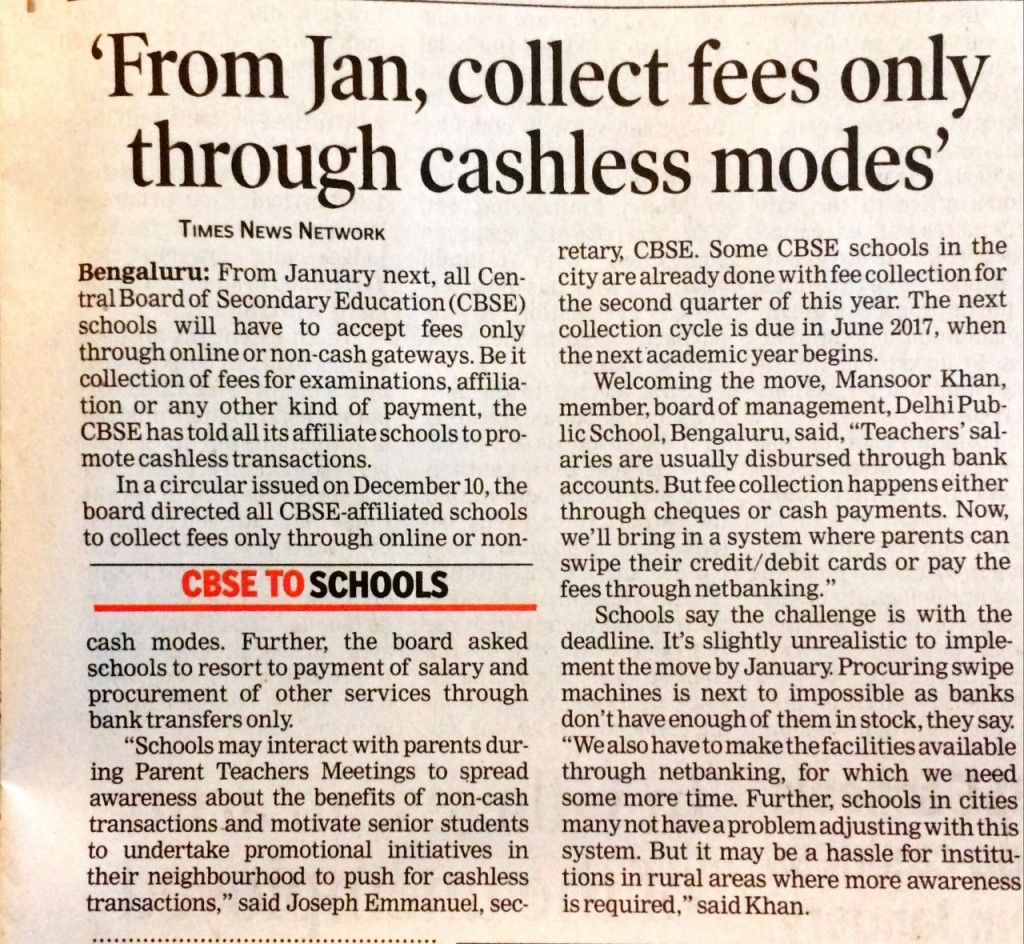
Digital India Impact : 18,000+ CBSE Schools in India to go Cashless from January 2017

As reported on NDTV, and newspapers all over the country,
 
Times of India Article cut
 
Following the Indian Prime Minister’s plan for digitizing the economy, the CBSE board has advised all affiliated schools to go cashless by the next quarter, commencing from January 2017.
 

What does going cashless mean?
 
In the letter from the CBSE secretary Joseph Emmanuel, schools have been instructed to carry out online transactions rather than cash exchange, from purchase orders to student fee collections, hostel payments to employee salaries and the CBSE board has brought e-payment facilities for collection of examination fee, affiliation and various activities. Schools have to completely shift their finances to the digital medium following this mandate. What seems to be a positive move forward from the board, some of the concerns this decision brings are problems edtech companies have been helping solve for the CBSE schools.
 
 
Pros of going Cashless
 
Primarily employee payments in CBSE schools in cities and suburban areas are done through bank transfers. Fee collections are done via cheques and cash. Now with the new CBSE cashless mandate, schools will have to setup online payment portals, net-banking, and accept credit/debit cards. This completely removes parents from ever coming to stand in a queue to pay their wards’ fees when the payment can be done via an online portal either provided by the school or their bank. Setting up these procedures are also not that difficult as net-banking is a feature already available with almost all the banks in the country. Setting up online payment portals might be a little tricky but for schools who already have a school management system running, like Fedena, integrating online payment portals is as simple as sending an email.
 

Online transactions also make it tremendously easy to track and maintain records digitally for schools, school management softwares like Fedena, can easily keep a record of all transactions of a school, including inventory purchases, fee collections, hostel payments, transport fees, employee payslips etc. Schools will have no need to maintain any physical records aligning schools to our Prime Minister’s vision of a Digital India as well as the mandate passed earlier from the CBSE to maintain all records in the digital format.
 
 
Cons of going Cashless
 
One of the major concerns after this mandate is for CBSE schools in rural and remote areas. Most of the students attending these schools are from families who might not have bank accounts, especially for rural areas, the awareness plays a pivotal role. Families living in remote areas will also face this problem as their form of income might not involve digital transactions. Even though this seems like a major block towards digitizing transactions for schools, we should look back to another of the mandates provided by PM Modi, instructing banks to service every rural area to open bank accounts and spread awareness. This mandate has been in action since the time Modi took office, which only means that this hurdle for CBSE schools in rural areas is already getting solved. The secretary himself has asked every affiliated school to start spreading awareness to students, parents and teachers alike.
 
 
What this means for Edtech Companies?
 
It’s December, and Christmas is just around the corner. There couldn’t have been a better time for companies trying to help schools, colleges and other educational institutions in going digital. The only way forward for schools is to digitize or die. In exploring these opportunities, schools will be keenly looking towards all edtech companies to solve their problems. The time is now for school management softwares, learning management systems, online payment portals.
 
 
How does Fedena help CBSE schools in going Cashless?
 
Fedena has always come prepared for schools being cashless, in fact we have always encouraged schools to go cashless and paperless. Integrations of payment gateways were part of the earliest versions of Fedena and now in the latest version you can pay school fees through your mobile. Also if you are wondering about adopting an online payment gateway, let us tell you why it’s such a good idea. For any further inquiries, just click on the banner below.

Fedena 3.5.2 update TC generator

Generate Customized Transfer Certificates for your School now!

Long has there been a debate on the Transfer certificate systems followed by our schools and often it has been a thorn in the complete academic process for parents and students as transferring from one school to another is no easy process. Even schools and admins classify generating and managing transfer certificates as an additive task.
 
Students change schools for a variety of reasons and during this process of shifting schools, the transfer certificate is one of the most important documents a student needs. When applying for one, the present school just generates the certificate and the onus of collecting and storing it shifts to the parents and the students. All the school needs to maintain is the leaving date and dues of the student. While joining a new school, it’s the student’s or parent’s prerogative to provide the transfer certificate issued by the previous school. At most times, this process generally gets delayed because of misplacement, incorrect formats, TCs which look like they aren’t professional etc.
 
Generating Transfer Certificates in your school management system
 
Once the school is digitized and starts maintaining digital records of students in a school management system like Fedena, it becomes a relatively easier process for the schools to generate and store transfer certificates. It also becomes easier for students and parents to apply for one. In Fedena 3.5.2, Nix, the latest update to be released this Christmas, we have added a new feature to the Transfer certificate section. Schools and admins can now customize TCs to help them make this process easier and faster for the students and parents.
 
The idea behind this was quite simple, schools and admins want to reduce the time taken to generate TCs for students passing out or leaving the school. The students and parents appreciate spending lesser time on following up with the school on getting these certificates. Our vision with Fedena is to be the one and only school management software being used by schools and we recognized that there are multiple formats, templates, and designs in the diverse set of schools we are currently servicing as well as plan to. To help reduce their time and bring about an ease of use for any school, the TC generator feature was added to the Academics module.
 
How to use the new Transfer Certificate Generator in Fedena 
 
Here’s how you can use the new feature in Fedena 3.5.2 once it’s out this Christmas!
 

    • Click on Menu > Academics > Transfer Certificate to open the module
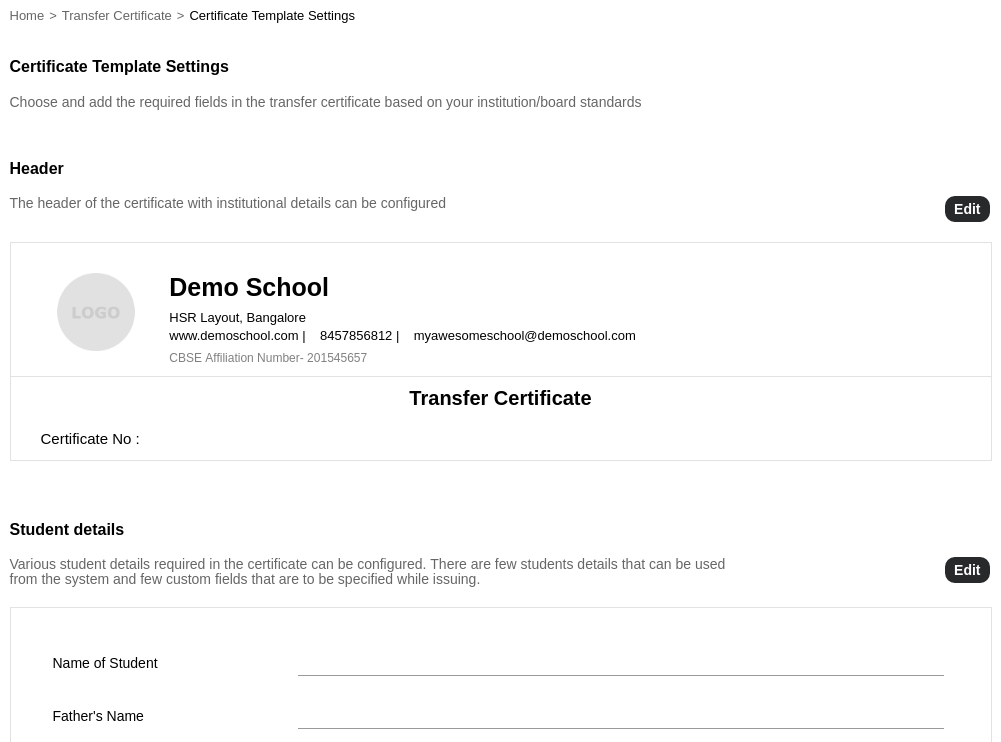
    • Click on Transfer Certificate Settings to configure the TC template. The header section has the details of the school, Certificate Number, and Logo. Student Details section has the various fields to be shown in the TC and the Signature and Clauses section allows you to configure signatures and additional text.

 
Fedena 3.5.2 TC Generator screenshot
 
Student details can be mapped to a field in Fedena or can be a custom field.
 

  • Click on Edit against each section to edit or add new fields. You can preview the certificate format by clicking on the Preview Certificate button.
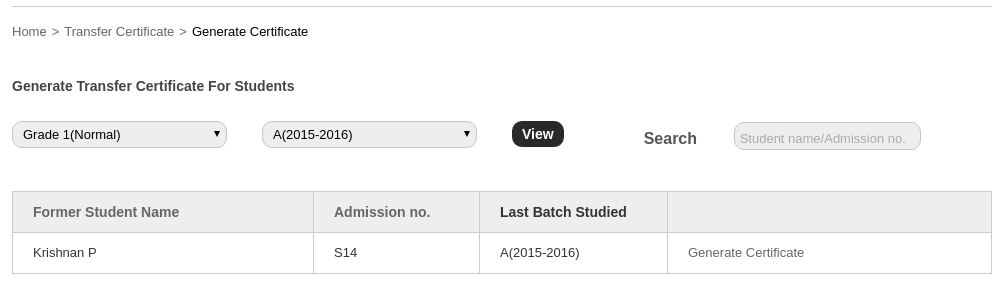
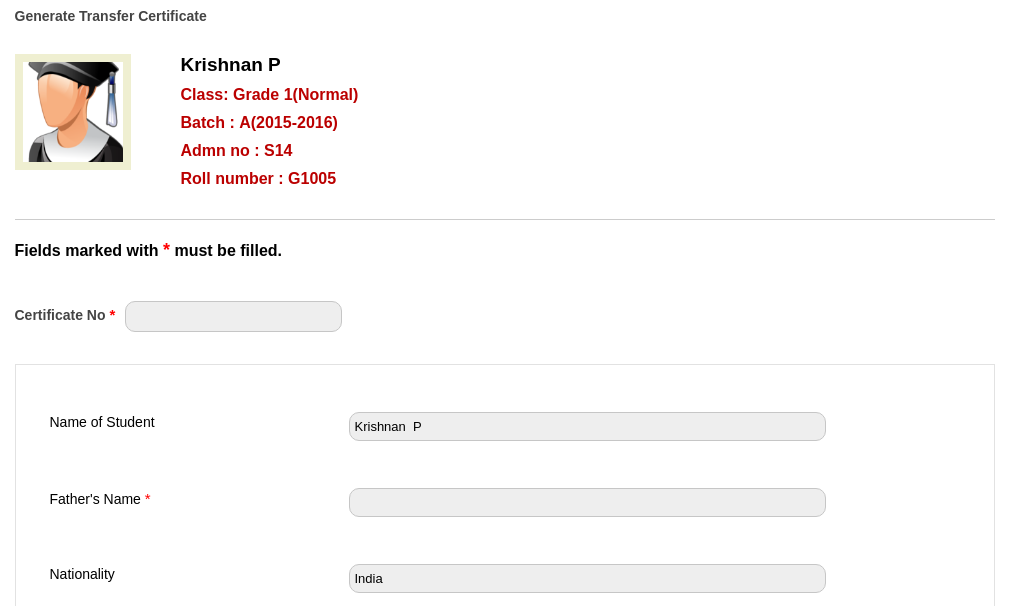
  • Click on Generate Certificate to generate a new TC certificate for the student. Select the course and batch to view the former students of the batch. Select a student to enter the data into the TC. Click on Proceed to Certificate to generate a preview and then click on Generate to complete the generation of the certificate.

 
Nix TC Generator screenshot 2
 
Enter the data of the student and click on Generate.
 
Fedena 3.5.2 TC Gen screenshot 3
 
Now schools and admins can store the TC template in Fedena and generate the TC for the required student within a couple of minutes, massively reducing the admins task as well as the parent’s and student’s time.Another huge benefit for schools and admins comes in the form of storage, these generated TCs can be saved and stored in digital format so that the next time a leaving student comes for a duplicate copy because they have lost the TC, the school admin can retrieve it in a jiffy by just searching for the student’s profile in the system.
 
Fedena 3.5.2 or Nix is due for release this Christmas and we are hoping we will be shipping the updates earlier than that. The TC generator is a feature being added to the already existing Academics module.

School ERP with automatic timetable generator

Finally a School Management System with Automatic Timetabling

Being a school management system catering to 20,000+ schools around the world, we’ve had the time to open conversations with teachers and school administrators to better understand their pain points. After a lot of digging, we found a similar type of dialogue/remark coming our way, “I just wish we could automatically generate timetables! A school management system with automatic timetabling would be the best!”.
 
We feel you! So this Christmas we are spreading a little holiday cheer for school administrators and teachers around the globe with our spanking new exclusive Plugin the automatic timetable Generator. You can now save time by generating timetables of hundreds of batches under a minute with just a few clicks. A school management system with automatic timetabling!
 
Get in touch with us today to book this brand new plugin in Fedena!
 
Traditionally, schools are used to creating timetable structures over large sheets of paper for multiple batches over the course of many days and finally coming up with a timetable for the academic year. Subjects with preconditions—like physical education classes early in the morning or having 2 lab classes consecutively—are usually inserted first and then followed up with other subjects. After an initial framework is ready, the difficult process of adjusting for subject overlaps and teacher subject limits came next and this continues to be the most tedious task. Even after the advent of computers, while this work shifted from paper to excel sheets and software screens, it still is a very laborious and time-consuming process in many schools.
 
Those of you who have used or followed Fedena over the years might have noticed how the timetable module has evolved. It has only increased in popularity and usage with each subsequent upgrade. During all this time, however, one of the most received feature requests was the ability to auto-generate timetable entries. However, timetable scheduling is not an easy task. In computational complexity theory, it belongs to the NP-complete class of problems—which are one of the hardest to solve. Part of the reason lies in the fact a random set of subjects put in a grid does not become a timetable.
 
There are many factors that go into deciding where the subjects should get placed, some of them which cannot be just ‘computed’. For example, there are subjects that cannot be taught in certain timings and there are teachers who cannot be given classes at other timings. One teacher put it as the ‘emotional aspect’ of timetable generation. Many of the solutions that have tried to solve this problem did so by bringing in complicated solutions. In this first version of the automatic timetable generator, we have tried to incorporate the scenarios that schools commonly face while sticking to the Fedena philosophy, ease of use. So without further adieu let’s introduce one such setting in our new Plugin—Preferred Start Time.
 
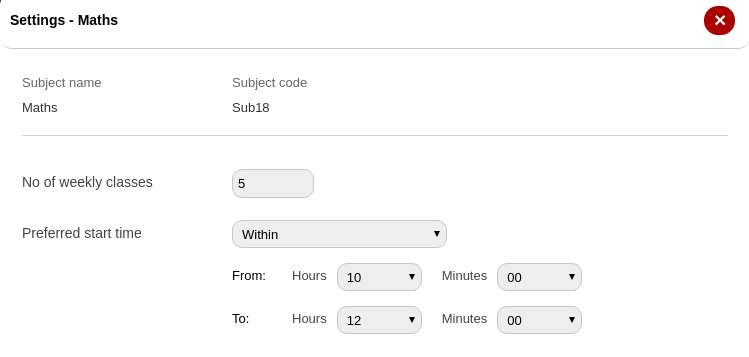
Some subjects, for various reasons, are preferred to be taught within certain hours. For example, it is said that Math—particularly for the lower and middle-level class students—is best when learned in the early hours of the day. This is where Fedena allows setting the preferred start time for a subject. Using this, you can specify the timing before, after or within which a subject needs to be taught. So, by giving the preferred time as shown in the screenshot below, the algorithm will give more weightage to Math appearing between 10 and 12.
 
School ERP with automatic timetabling Screenshot
 
This beta version is just the first step to building a solution that schools can ‘just use’. Stay tuned to the Fedena blog for more details on the timetable generator and other plugins coming in version 3.5.2. And finally, here is a quick sneak peek of a timetable getting created with this new feature.
 

View post on imgur.com


Are you as excited as we are about it? Spread the word by sharing this and tell us what you think about this new Plugin.

Fedena discipline management system blog image

Managing Discipline in Schools

Discipline is a crucial factor in the overall development lifecycle of a student(be it at school or college level). Till the age of 16-17, children spend a majority of their time at schools rather than at home, hence the process of disciplining school children becomes very important in providing them a safe and comfortable learning environment as well as building their character.
 
Managing discipline and disciplinary actions have always been identified as a serious problem in any educational system. Establishing an effective discipline and behavior management system within an institution isn’t always easy as it has to consider opinions of students, teachers, administration and other related departments while making the final decision.
 
Teachers are mostly held responsible for not handling students’ behavior and discipline but we often fail to realize that they are most affected by the institution’s process of managing school discipline as it inhibits the teaching process.
 
The discipline module in Fedena (Academics<<Discipline) was built with the intention of making life easier for the teachers as well as the staff responsible for managing the school’s disciplinary actions. The basic functions of the module keep a track of complaints received and decisions taken.
 
Assigning school heads to take necessary actions on any disciplinary issues of students, providing a channel to communicate these issues with parents become easier once a school management system incorporates such a module. Helping parents always keep an eye on their ward’s discipline and behavior at school.
 
All complaints are updated on respective student profiles for a quick look. The status can be updated as solved, once the final decision or action has been taken on the student’s complaint or the complaint against the student. You can view the list of all registered complaints or discipline issues whenever required by just heading over to the discipline module. A complete description of the incident, who were part of the discipline, who complained, to whom it was complained against, all these details can be updated and stored. A search based on the status of the complaint (Solved or Pending) is also available in the module.
 
Let’s have a look at how you can set up a process for disciplinary actions in your school using Fedena:
 
Creating a disciplinary issue

  1. Head over to the discipline module under ‘Academics’.
  2. To enter a new complaint, start with a title for the complaint.
  3. In the description, the details of the incident reported can be filled in.
  4. Decide on a suitable date for the trial and choose it in the date box.
  5. Search for the student/employee who has registered or wants to register the complaint.
  6. Assign it to the guilty student.
  7. A choice for Jury is also available as different incidents have different processes, some might be big enough for a full discussion.
  8. In this step, you can assign the staff who will be responsible for solving the issue.
  9. Any files that need to be attached, like photos, documents etc can be attached.
  10. Finally, once you are done submitting it, the issue will show up on the dashboards of all the people involved, automatically notifies them of the incident and time for trial.

 
It’s also important to note that an automatic complaint number is created for every new complaint and the status of the complaint will be pending unless otherwise solved and marked as solved by the staff involved.
 
Posting comments/suggestions
Jury/Officials/Staff added to the complaint can log into Fedena and view the complaint from Academics< Now they can add and post comments about the complaint
Jury and responsible officials can refer these suggestions to members and give a final verdict.
 
Closing the complaint/discipline
To close the complaint, the jury needs to enter the verdict and comments and choose the convicted person from the list provided. The status of the complaint will then be updated to ‘Solved’.
 
Fedena Discipline Management module is a powerful tool that simplifies the time-consuming task of tracking student discipline and behavior with records maintained and ensuring the students are held accountable for their actions. This, in turn, helps your institution to organize rules and regulations, punishments and attitude of the students and concentrate on creating and growing the best learning environment, your school.

Fedena school management system blog feature image

Managing Student Records in a School Management System

People often ask what is the need for a school management software, when schools can be managed with existing systems and what is the value addition to the learning process. It was Winston Churchill who said “To improve is to change; to be perfect is to change often.” and there is no change without a struggle, it is easier to continue with the pre-existing system just because there is no challenge in running them.
 
Fedena Student Records blog image 

However, the substantial challenge with student records is keeping them relevant as time progresses. Another unaddressed issue with pre-existing systems is the time and resources consumed in recording and maintaining student records.


A student’s educational journey has always been mapped with his/her academic achievements, extra-curricular achievements, and well-being. Most of these records are useful for a relatively longer period of time and need to be relevant even after students have completed their educational journey. This is precisely why the student records module in Fedena or any school management system is immensely significant in recording and maintaining a student’s educational journey in an organized manner.
 
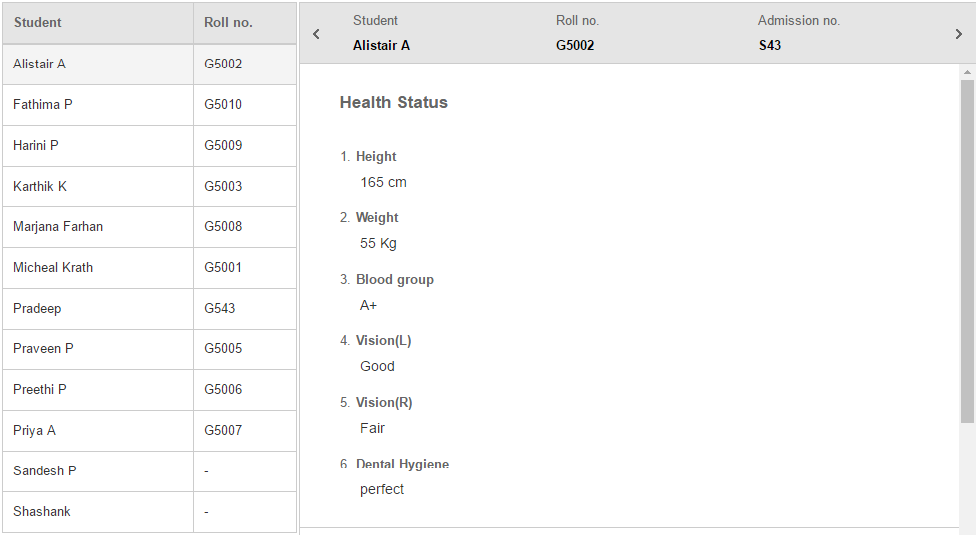
The Student Records module in Fedena can be used to record and store all details about a student. Details like health records, extracurricular activities, or any other information that is a milestone in the student’s growth. For example, institutions can continuously record and track the immunizations students have received throughout every academic career. These records are attached to a student’s profile so the information is easily accessible when required.
 
Fedena School ERP Student Records
 
Consider this scenario, there is a general health check-up drive in the school and the last recorded health status of students is required. Normally this would involve the admin staff (non-teaching staff) to sift through all the physical records being stored to get out all the records of every batch and class in the school or finding the right excel sheet stored in the school’s admin computer. If the school were to have a school management system, like Fedena, the staff just needs to head over to the student records in the system and generate reports of the existing student health details.
 
Fedena School ERP Student Records 2
 
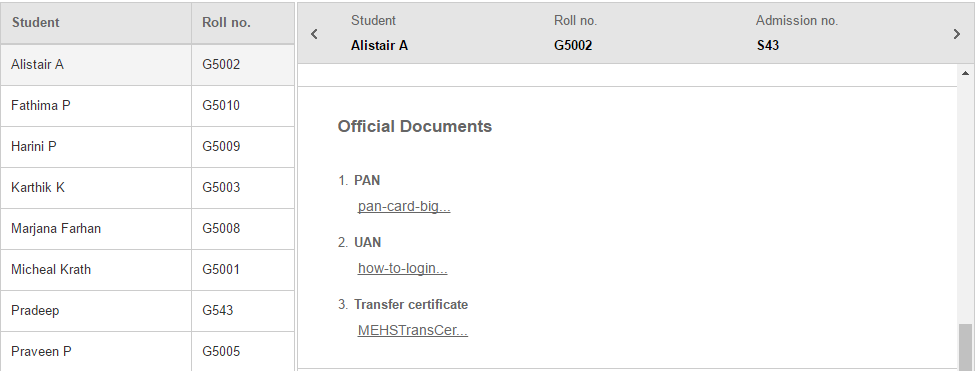
Employing a school management system with a student records module also helps in keeping all formal documents of students that substantiate past education records, identification papers of students, and extracurricular achievements.
 
Fedena School ERP Student records 3
 
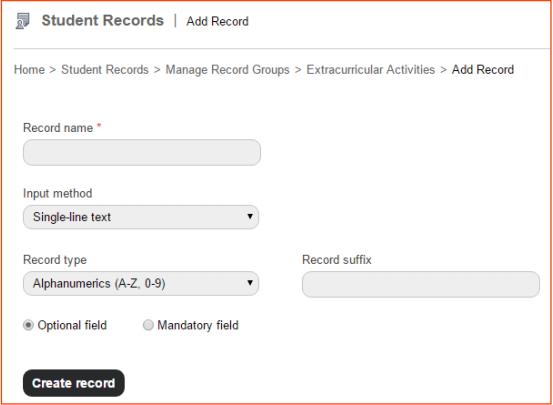
Sometimes the reports required or data to be stored could be different from what any system has to offer. The input for such records can be chosen based on the type of information that is being recorded. Like:
 
• Single line text
• Multi-line text
• Multiple options.
• Date
• File attachment
 
The student records module is vital when it comes to detailed CCE examination reports that include health status, self-awareness records, academic performance and extracurricular achievements. What is notable in such a system is that it reduces the time taken to retrieve data on either a few students or a full class or students. All though we discourage printing unnecessary reports, these details can also be directly printed using the same system, without having to check for formatting or using another application.
 
The benefits of employing a school ERP for a school are endless, especially when student records can be simplified to such an extent that they are available at a click of a button. Fedena is a constantly evolving school management system which is built with keeping schools’ processes and admin roles in mind.

Customized Reports in a School management system.
A common argument in discussions on the future of school management systems for schools and institutions is “Customization”. Most of the supporters of this concept are companies which have vested interests in becoming a service offering company rather than a product development company. Most of them are unaware that once a customization is provided, it opens the floodgates to countless other feature requests and customization.
 
A customized school management system is a solution for some institutions and schools, not all.
 
Which is why in Fedena user-specific reports were designed to facilitate any and all data required from the school management system, under the label Custom Reports. The reports are two types, student-specific and employee-specific for many efficient reasons. We noticed that in most cases the existing user-specific reports aren’t sufficient for admins, teachers and students in an institution, as the data required for an admin would be different from that required by a teacher or a student or a parent. This is exactly where Fedena custom reports comes into it’s full potential.
 
Consider a scenario where one admin staff may need a report on the names of students who were admitted on a particular date, another may need a report on the student guardian details just for a batch of students and another admin may need the contact details of all your employees in a single report. Each of these users can get their desired reports just by using the filters in the custom reports section, removing any clutter and unwanted data.

A student’s profile in a school management system records almost any and all data possible on the student and is constantly updated with any changes in these student details. In Fedena, custom reports can be constantly modified with various details needed to generate reports on the latest data of the student or employee.
 
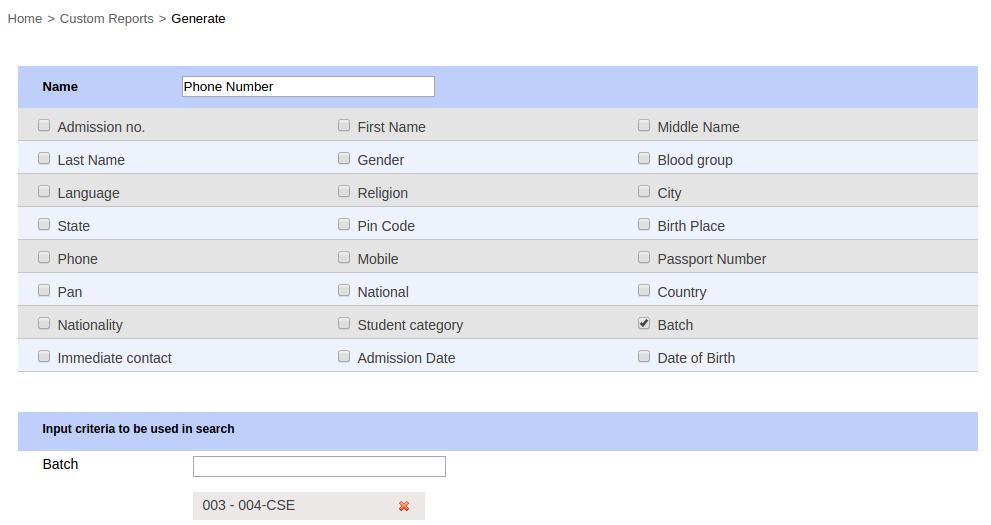
Fedena Custom Reports screenshot 1
 
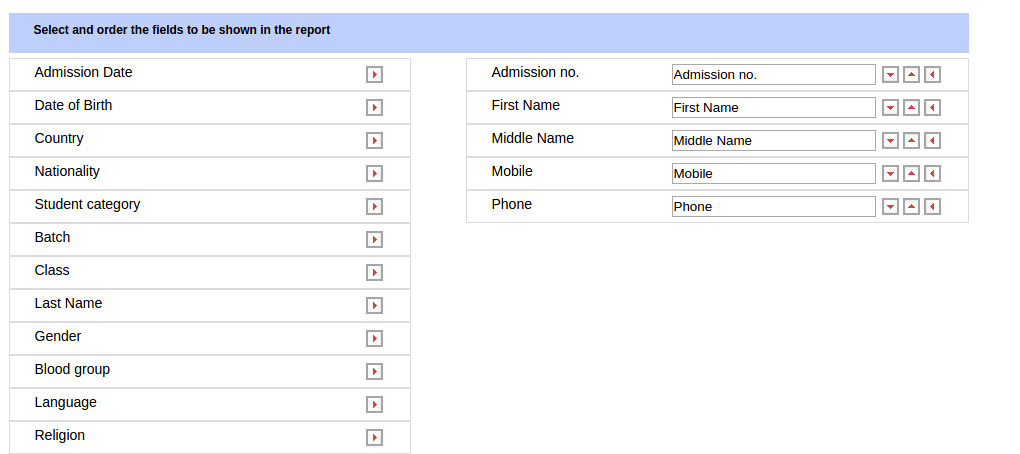
Consider a scenario where the admin staff needs the mobile numbers of all the students in class X. Fetching this data from each profile will be a time consuming task. Custom reports will allow the admin staff to choose just the mobile phone numbers to be displayed in the report they generate for class X students.
 
Custom Report Fedena screenshot 2
 
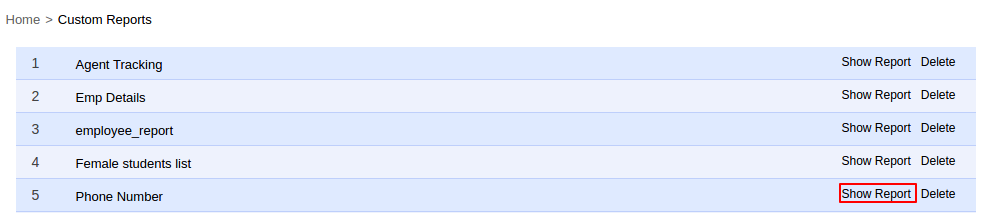
A similar process can also be applied for reports on employees of the institution.
 
Custom report fedena screenshot 3
 
Custom reports in Fedena were designed keeping the arguments of customization on school management systems in mind. What this means for the future of Fedena is, we are going to continue listening to your requests and gather as much data as possible from various institutions. Allowing us to work on providing a software which provides a unified online experience and at the same time provide solutions for each and every specific custom need of all institutions using Fedena. Records and certificates are always going to be how institutions access data on their employees, students and parents and vice versa. Fedena will always focus on efficiently providing these custom reports to render these records and certificates to institution and user specific needs.

Setting up reminders in Fedena

Setting up Reminders in Fedena

“It’s ironic, how we forget the things worth remembering, but remember the things worth forgetting”
— Unknown
 
Happy Diwali! It’s 2016 and within a couple of months, we are going into 2017. It’s been a busy and fast year, and as we progress, we also get busier. We must keep up with technology (social media, WhatsApp, etc.), work emails to keep track of, manage our expenses (which is ever increasing), and at the same time remember to buy Diwali gifts for family, neighbors, friends, pay our debts, and the list just goes on. Our life is one torrential pool of busy schedules, meetings, and transits that hardly give us time to follow up or remember the important stuff, daughter’s quiz competition, son’s arts & crafts assignment etc.
 
The reminder plugin was added in Fedena School ERP keeping in mind just how busy our lives are. The school staff/admins/teachers/parents can be reminded of important occasions and events such as the fee due dates, parents about the exam dates, any custom reminders to any specific users in Fedena etc.
 
The reminder module in Fedena alerts students, parents, and employees about
upcoming institutional events or any occasions either via an SMS or an email. The admin staff with the privilege of editing the settings can choose the best method to send the reminders.
 
Setting up reminders in Fedena
Reminders can be created for:
 
• Events – Diwali celebrations, quiz competitions, PTAs, Sports Day, etc.
• Exams
• Online exams
• Fee collections schedules
 
Custom reminders can also be created to notify parents and students in your school ERP, about any type of upcoming activities in your school/institution.
 
For example, Diwali celebrations are due in two days and your admin staff is busy with other tasks, and in the case of not having a reminder module in your school ERP, the staff would generally write it down on a piece of paper or leave a mark on the calendar. This is easily lost in the many papers you have in your admin office, but with a reminder module you can set a reminder well in advance so that all the necessary arrangements are done, parents are reminded on-time because the reminders are sent as messages to mobiles and email accounts.
 
The most powerful use of the reminder module comes into play while scheduling fee collection in your school. The usual practice followed by class tutors is to write it down in students’ diary or send printed circulars, which can easily be missed by parents due to their busy schedules.
 
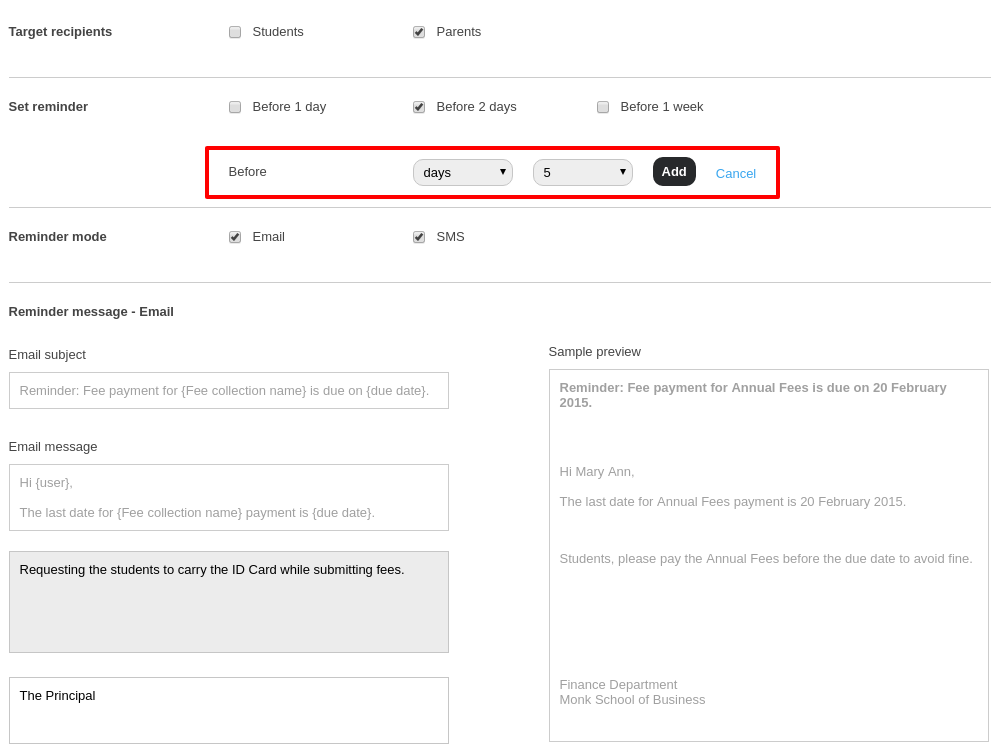
In Fedena, a school ERP that comes with a reminder module. Reminders can be set as many times as needed with multiple options available in the reminder settings.
 
Fedena School ERP Reminder Module
 
The reminder module also comes with an option to create custom reminders apart from the default options available.
 
This brings us to an end of this week’s tutorial and benefits of a school ERP for your institution/school. Fedena is constantly evolving and we are constantly trying to accommodate real time scenarios from schools and institutions alike that can make the life of parents, students and teachers a lot easier. Have a safe and happy Diwali!

Fedena Bulk edit school ERP

Updating information in your school ERP – Fedena

“Things get done only if the data we gather can inform and inspire those in a position to make a difference.”
― Mike Schmoker
 
In an era of employing best practices in Data Analytics, it is important for people to update the information at hand and efficiently use it. The core functionality of any institution is to organize and manage information available. In such scenarios there is no hindrance when the data to be managed is small. However, when handling large information, institutions often lose valuable resources and time just to manage the system.
 
Fedena Bulk edit school ERP
 
Over the years, institutions across the globe have been trying hard to look for an ideal solution to implement a process to manage massive data and mechanism to update them. In most of the institutions that we observe, we find that during the initial phase of any data entry process, information is not completely entered due to unavailability of information and time restraints compelling admins to upload only the minimum information required.
 
Subsequently, when a requirement to upload the remaining additional information is at hand, the process becomes tedious as the admins have to remember each category or folder that they have created and update the remaining information. Fedena, a school ERP, has always understood such requirements and comes with a feature with the option of importing data.
 
Fedena school ERP screenshot
 
With the Custom import feature to import data, Fedena also allows admins and teachers to edit large information using the bulk edit option to handle updated information efficiently. This bulk edit feature proves useful when changes need to be made to multiple records that were uploaded through Custom Import, allowing the user to either make the changes in Fedena or perform a bulk edit.
 
The ease in updating data in Fedena is because of this technique adopted. The user is only required to enter the information required in the file and use the bulk edit option. The information here can range from few lines to hundreds of rows. The basic functionality of the feature involves mapping existing records with the fields and information in the CSV file.
 
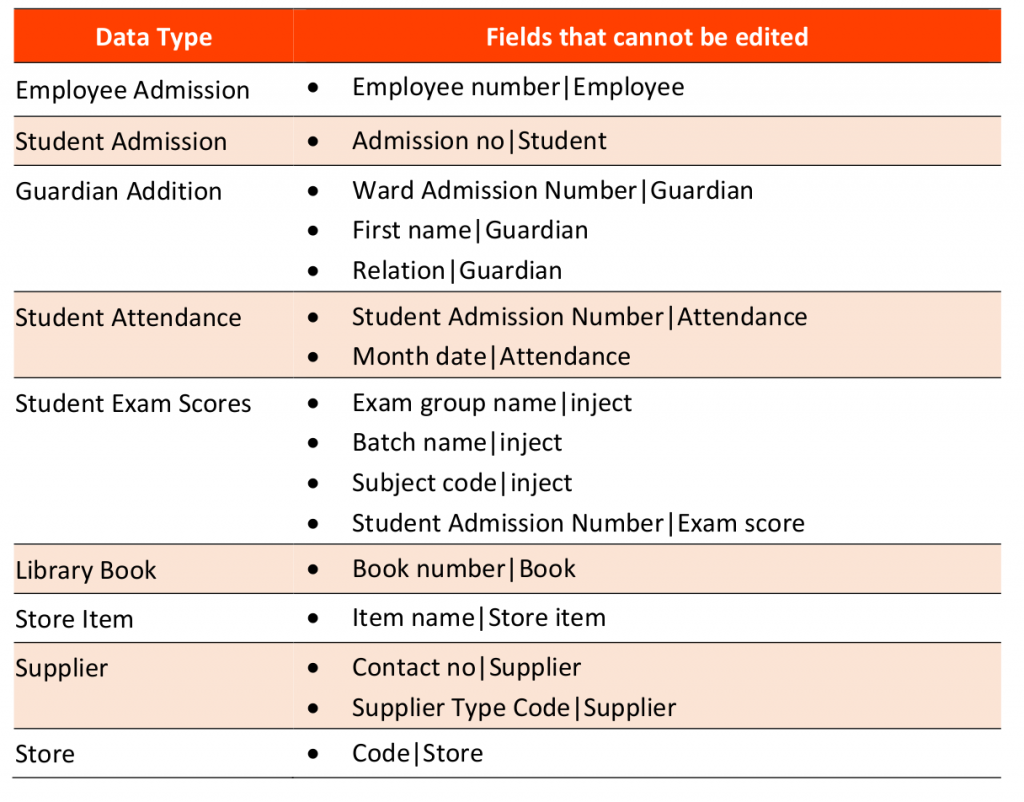
The mapping of information in many school ERPs is not crystal clear and often leads to admins getting confused, but in Fedena, this is handled automatically by the plugin. A snapshot of the fields that are used to map the details in Fedena are as follows:
 
Fedena school ERP bulk edit screenshot
 
Many institutions have often come forward after using this feature to tell us how data management has improved in their system, in return allowing them to focus on other key aspects.

Fedena School ERP - photo upload

Student Photo Upload via Fedena API

The recent advancements in technology and connectivity have made schools jump on the bandwagon of digitizing their students’ records. This helps the schools in recording and fetching students’ data as and when needed, thereby assisting the school management in taking key decisions in line with kaizen.


The knowledge of data can unleash innumerable capabilities of the institution. It is quite important to note that every ERP implementation banks on “the correctness of the data”, which comes with a list of tedious tasks, especially for first timers. From our observations, while implementing Fedena, an ERP for schools, that the responsible school admin might have to go on rounds collecting every possible piece of information, identifying common patterns in the daily functioning, questioning every detail in the processes and then map the same into the ERP for their schools. And to add to this, all of this is to be done while continuing to run the daily processes and functions of the schools.


A deeper understanding of the actual problem is equivalent to solving a jigsaw puzzle, where assembling the oddly shaped interlocking and tiling pieces gives you the bigger picture.


Today, we are addressing one such scenario pertaining to data upload in ERP for schools, where you have a lot of student photos, that need to be uploaded in the relevant student records. Had it been a mere email field, the user could have added the missing emails via a spreadsheet or a CSV file and upload it. When the number of records is in the units of thousands, it becomes a herculean task for the team to upload the images one by one and the time consumed in doing so is enough to add to the list of pre-populated worries. This got us thinking, we wanted Fedena to be more than just a school management software, we wanted Fedena to help and ease the school admin’s work rather than add to their worries. This lead us to engineer student photo upload API to add to our list of existing open APIs in the Fedena API Playground.


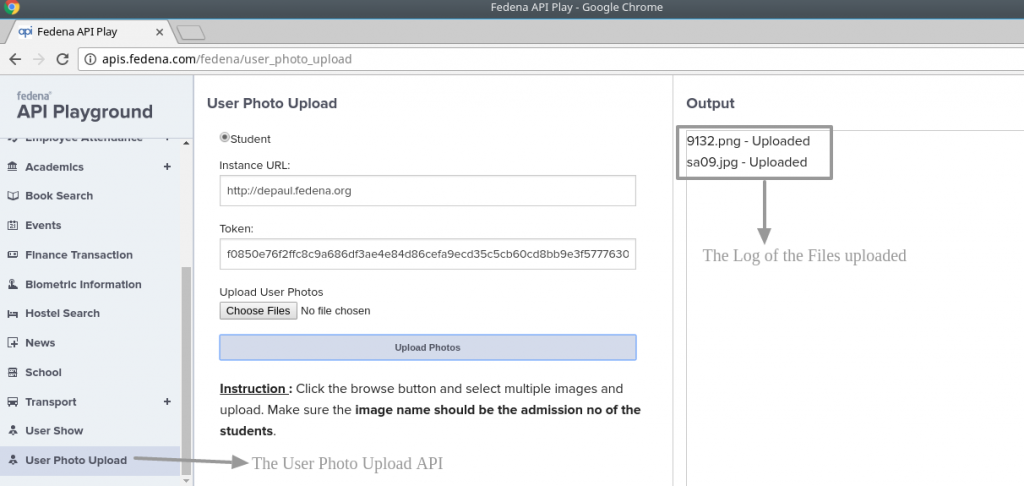
We tried to make it as simple as possible by asking the user to replace the filenames of the images with the relevant Username(or Admission number) of the students. Once done, it’s a cake walk.


  1. Go to our API Playground
  2. Enter the Instance URL and the Authentication token generated  and start uploading your Photos all at-one-go.


Fedena school ERP photo upload API


We have a video to help you start with student photo upload here along with the Other APIs available. The admins save a lot of time and effort in uploading student photos, event photos etc in just  a matter of clicks, making Fedena the number one ERP for schools. So keep visiting our blog for more everyday hacks for your school management using Fedena.


Fedena school erp information sharing

How Fedena Helps in Information Sharing

Fedena school erp information sharing
 

An ERP aims to associate the structure across an organization in a way of systemizing the workflow, sharing information among departments and providing an insight into various business operations. The traditional methods of handling data and tracking information seems more comfortable and familiar that we tend to forget there are better alternatives. Every institute and organisation have valuable data that needs to be handled efficiently.  There are better ways to bring in efficacy and it starts with innovation in technology.
 
School ERP softwares like Fedena provide the end user to retrieve, manage, analyse and share data in a user-friendly way. Any college or school ERP will streamline all the common activities of the organization to increase productivity, but Fedena takes a step ahead to help you share information among various members of the organization with ease. The benefit of getting an erp implemented in your organization is the ability to allow your users to utilize the data they need at the right time. The need to reply to others in the organization causes a great delay, which further causes a dip in productivity.
 
Multiple users input data and access it via various modules in Fedena, which allows them to share information with ease. The Fedena dashboard is one such valuable asset of Fedena allowing users to perform multiple tasks and at the same time acts as a central point to begin various tasks. It has a collection of dashlets that provides a quick overview of the information that matters most to the user. Fedena also provides the user with a lot more features.


  • Optimize Your Human resource department

Multiple departments can be setup and communications are a breeze. The HR admin generates payslips and every employee has access to it through their profiles. Employees can also apply for leaves using Fedena while the managers approve/deny them at their leisure.


  • Improve Inventory Management  

Fedena allows you to build a greater control and automation in your inventory to save time, money and provide your students and teachers with stationaries, study materials etc on time. Multiple users can use the module to run the inventory efficiently.


  • Maintain Financial transparency

Fedena also enables you to control your accounts, cash management, donations, payroll, assets, liabilities and tax management. Allowing you to maintain transparency and privacy with the admins, teachers, students and parents.


  • Library Management

Most library managers are very concerned with the need for management of information about the books in the library. All students and staff get instant access to check the availability of books and reserve them. The Library manager can get meaningful information about movement of the books and easily manage the library efficiently.


  • Effective User-to-user Communication

You can choose to send internal messages, SMS or Emails to all the users in your organization. You can keep your employees, students and parents updated with the latest events and information. This task of mass communication is easily accomplished with Fedena and allows the school admin to message teachers, students and parents individually or setup automatic messages for various events like holiday reminders, event reminders, fee payment reminders, attendance reminders etc.


Having a high stack of spreadsheets and reports on your desk and trying to make sense of all the data you need to review? It’s time to tidy up and organize all your data using Fedena.
 
This article is written by : Aarthi Paramasivam
 
Aarthi Paramasivam Fedena Trainer photo

 
Somebody who is a naturally articulate speaker and taskmaster, Aarthi is an industry expert in Fedena. Her idea of fun is engaging customers and helping them succeed at understanding Fedena and improving institution processes.