Fedena discipline management system blog image

Managing Discipline in Schools

Discipline is a crucial factor in the overall development lifecycle of a student(be it at school or college level). Till the age of 16-17, children spend a majority of their time at schools rather than at home, hence the process of disciplining school children becomes very important in providing them a safe and comfortable learning environment as well as building their character.
 
Managing discipline and disciplinary actions have always been identified as a serious problem in any educational system. Establishing an effective discipline and behavior management system within an institution isn’t always easy as it has to consider opinions of students, teachers, administration and other related departments while making the final decision.
 
Teachers are mostly held responsible for not handling students’ behavior and discipline but we often fail to realize that they are most affected by the institution’s process of managing school discipline as it inhibits the teaching process.
 
The discipline module in Fedena (Academics<<Discipline) was built with the intention of making life easier for the teachers as well as the staff responsible for managing the school’s disciplinary actions. The basic functions of the module keep a track of complaints received and decisions taken.
 
Assigning school heads to take necessary actions on any disciplinary issues of students, providing a channel to communicate these issues with parents become easier once a school management system incorporates such a module. Helping parents always keep an eye on their ward’s discipline and behavior at school.
 
All complaints are updated on respective student profiles for a quick look. The status can be updated as solved, once the final decision or action has been taken on the student’s complaint or the complaint against the student. You can view the list of all registered complaints or discipline issues whenever required by just heading over to the discipline module. A complete description of the incident, who were part of the discipline, who complained, to whom it was complained against, all these details can be updated and stored. A search based on the status of the complaint (Solved or Pending) is also available in the module.
 
Let’s have a look at how you can set up a process for disciplinary actions in your school using Fedena:
 
Creating a disciplinary issue

  1. Head over to the discipline module under ‘Academics’.
  2. To enter a new complaint, start with a title for the complaint.
  3. In the description, the details of the incident reported can be filled in.
  4. Decide on a suitable date for the trial and choose it in the date box.
  5. Search for the student/employee who has registered or wants to register the complaint.
  6. Assign it to the guilty student.
  7. A choice for Jury is also available as different incidents have different processes, some might be big enough for a full discussion.
  8. In this step, you can assign the staff who will be responsible for solving the issue.
  9. Any files that need to be attached, like photos, documents etc can be attached.
  10. Finally, once you are done submitting it, the issue will show up on the dashboards of all the people involved, automatically notifies them of the incident and time for trial.

 
It’s also important to note that an automatic complaint number is created for every new complaint and the status of the complaint will be pending unless otherwise solved and marked as solved by the staff involved.
 
Posting comments/suggestions
Jury/Officials/Staff added to the complaint can log into Fedena and view the complaint from Academics< Now they can add and post comments about the complaint
Jury and responsible officials can refer these suggestions to members and give a final verdict.
 
Closing the complaint/discipline
To close the complaint, the jury needs to enter the verdict and comments and choose the convicted person from the list provided. The status of the complaint will then be updated to ‘Solved’.
 
Fedena Discipline Management module is a powerful tool that simplifies the time-consuming task of tracking student discipline and behavior with records maintained and ensuring the students are held accountable for their actions. This, in turn, helps your institution to organize rules and regulations, punishments and attitude of the students and concentrate on creating and growing the best learning environment, your school.

FinTech Terminology Blog feature image

A Beginner’s Guide to Financial Technology Terminology

On November 8th, 2016, Prime Minister Modi announced the demonetization of the 500₹ and 1000₹ notes effective immediately and new 500₹ and 2000₹ notes to be circulated in the market over the next few months. While the verdict on the decision is still up for debate, this decision has given opportunity for many companies in the finance technology sector or like they would call it the FinTech industry to finally be able to spread their wings and grow; as people are starting to shift to using mobile payments, online transactions, and eMoney.
 
All of this might seem really alien to you if you were still dealing with cash on a daily basis, stuck to your debit/credit card for other expenditures and managing your investments manually. FinTech is easy to get wrapped up in. It has been an exciting field that’s taking power away from traditional, bloated banks and giving the industry a much-needed facelift. It’s helping the “underbanked” (as any FinTech evangelist will tell you over and over again), and many popular FinTech technologies are becoming integrated into everyday life, PayTM for example, has been one of the forerunners for awhile now. But what’s with all the lingo and jargons? Despite the excitement, understanding exactly what’s happening in the field can be really difficult for the uninitiated. The list of terms includes banking terms, tech lingo, and pure FinTech jargon. Here’s a lexicon to get you ready for the age of cashless transactions that’s descending upon us.
 
FinTech: Financial Technology, an industry known for creating and mastering software and technology in the financial sector. They’re also popular for challenging traditional banking and other incumbent institutions.
 
KYC: Know Your Customer also revolves around authenticating users. Requirements of thorough identification checks and due diligence information seem to have grown more powerful in recent years to fight fraud by requiring users to prove their integrity. You might have noticed this recently while upgrading your PayTM account or while exchanging your old notes for new at the bank.
 
Payment Gateway: A service provider that authorizes credit/debit card payments. They act as an intermediary between a payment portal, like a website, and your bank. (Fedena can be integrated with almost all the payment gateways in the market!)
 
Digital Native: A person raised in the age of digital technology. This demographic is vital to the growth of FinTech as they are more likely to expect their banking services to be technologically advanced and always online.
 
Collaborative Consumption: An economic model based on the sharing, swapping, and renting of services and goods. The “Sharing Economy” or “Collaborative Economy” can be seen in many platforms, for example, Airbnb or Kickstarter and is growing in FinTech solutions via solutions like peer-to-peer lending.
EMV: This represents the global standard for credit and debit cards. The title is taken from its original developers, Europay, MasterCard, and Visa. Many cards already feature the EMV chip designed to fight card fraud, theft, and secure every mode of payment.
 
Encryption: The process of encoding messages. Encryption is probably the most essential to FinTech, the blockchain, cryptocurrency and anything else that needs to be secure. Data, like names, numbers, and account numbers is turned into a code using algorithms (mathematical formulas). A key is required to turn that code back into useful data, which is generally kept only with the banks or the FinTech company.
 
SSO: Single Sign-On authentication saves users from the barrage of IDs and passwords by allowing one set of login credentials to sign in for multiple applications. For example, in Fedena you can set up login through Gmail ids using the Google APIs helping students, teachers, and parents to login with just one click.
 
API: Application Programming Interface (API) represents the functionalities of a certain application. These are important because they enable other programmers to use components of existing software, allowing for faster and more reliable software development—a major component of the FinTech and any technology. Fedena too comes with APIs to help integrate Fedena with other applications.
 
Underbanked: People who don’t have access to proper banking or services offered by retail banks. They might have a banking account but rely largely on spending physical currency. The ability to serve the underbanked is considered one of the most important facets of FinTech.
 
Cryptocurrency: A digital currency using cryptography for regulation and security. It’s a decentralized system, meaning no central entity exists to oversee the processes. Instead, it uses a blockchain. There are several different kinds of cryptocurrency, including Bitcoin,Ripple, and Ethereum.
 
Online Wallet: An online wallet is what is replacing bank accounts at a rapid pace. Companies like Google, Paypal, and others are already in this sector, helping you pay most of your bills through online wallets and storing your money for you at minimal to no cost.
 
There are far more terms and jargons in the FinTech industry which we haven’t delved into but this should help you get started and familiar with the landscape. For all of our customers as well as schools and institutions trying to figure out a way to incorporate online payments, Fedena can easily be integrated with all the online payment portals in the market, making us one of the top educational ERPs in the market.

Fedena school management system blog feature image

Managing Student Records in a School Management System

People often ask what is the need for a school management software, when schools can be managed with existing systems and what is the value addition to the learning process. It was Winston Churchill who said “To improve is to change; to be perfect is to change often.” and there is no change without a struggle, it is easier to continue with the pre-existing system just because there is no challenge in running them.
 
Fedena Student Records blog image 

However, the substantial challenge with student records is keeping them relevant as time progresses. Another unaddressed issue with pre-existing systems is the time and resources consumed in recording and maintaining student records.


A student’s educational journey has always been mapped with his/her academic achievements, extra-curricular achievements, and well-being. Most of these records are useful for a relatively longer period of time and need to be relevant even after students have completed their educational journey. This is precisely why the student records module in Fedena or any school management system is immensely significant in recording and maintaining a student’s educational journey in an organized manner.
 
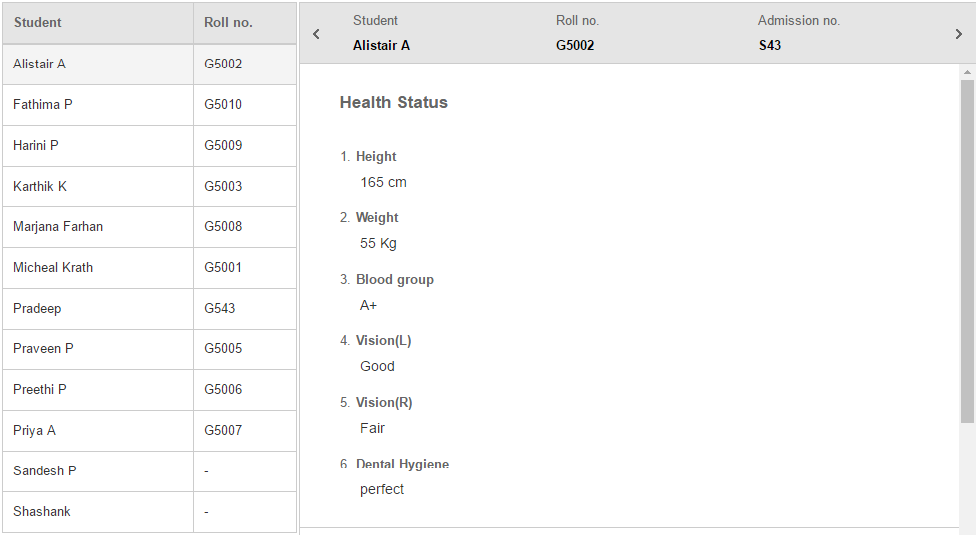
The Student Records module in Fedena can be used to record and store all details about a student. Details like health records, extracurricular activities, or any other information that is a milestone in the student’s growth. For example, institutions can continuously record and track the immunizations students have received throughout every academic career. These records are attached to a student’s profile so the information is easily accessible when required.
 
Fedena School ERP Student Records
 
Consider this scenario, there is a general health check-up drive in the school and the last recorded health status of students is required. Normally this would involve the admin staff (non-teaching staff) to sift through all the physical records being stored to get out all the records of every batch and class in the school or finding the right excel sheet stored in the school’s admin computer. If the school were to have a school management system, like Fedena, the staff just needs to head over to the student records in the system and generate reports of the existing student health details.
 
Fedena School ERP Student Records 2
 
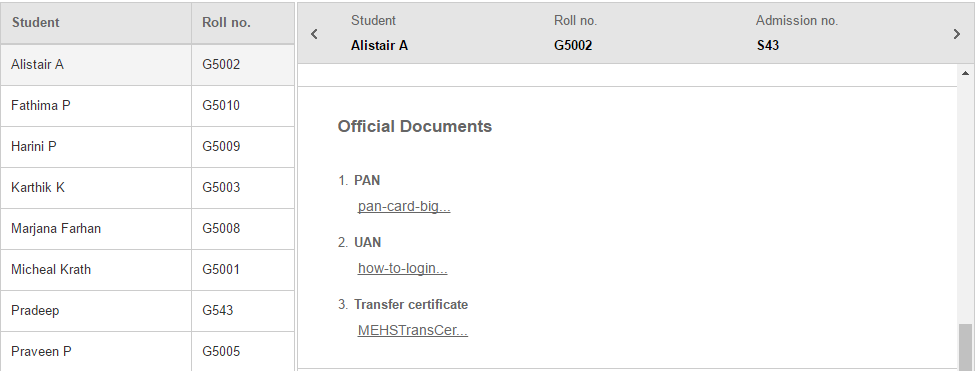
Employing a school management system with a student records module also helps in keeping all formal documents of students that substantiate past education records, identification papers of students, and extracurricular achievements.
 
Fedena School ERP Student records 3
 
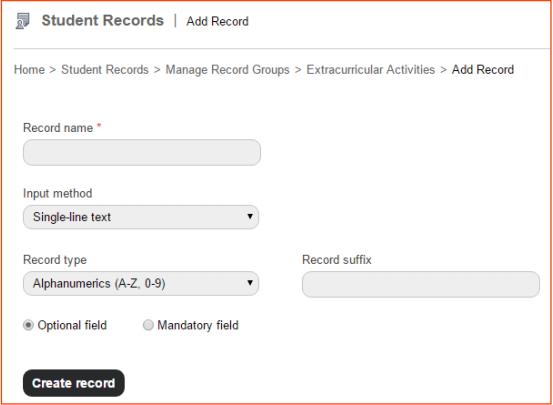
Sometimes the reports required or data to be stored could be different from what any system has to offer. The input for such records can be chosen based on the type of information that is being recorded. Like:
 
• Single line text
• Multi-line text
• Multiple options.
• Date
• File attachment
 
The student records module is vital when it comes to detailed CCE examination reports that include health status, self-awareness records, academic performance and extracurricular achievements. What is notable in such a system is that it reduces the time taken to retrieve data on either a few students or a full class or students. All though we discourage printing unnecessary reports, these details can also be directly printed using the same system, without having to check for formatting or using another application.
 
The benefits of employing a school ERP for a school are endless, especially when student records can be simplified to such an extent that they are available at a click of a button. Fedena is a constantly evolving school management system which is built with keeping schools’ processes and admin roles in mind.

Customized Reports in a School management system.

A common argument in discussions on the future of school management systems for schools and institutions is “Customization”. Most of the supporters of this concept are companies which have vested interests in becoming a service offering company rather than a product development company. Most of them are unaware that once a customization is provided, it opens the floodgates to countless other feature requests and customization.
 
A customized school management system is a solution for some institutions and schools, not all.
 
Which is why in Fedena user-specific reports were designed to facilitate any and all data required from the school management system, under the label Custom Reports. The reports are two types, student-specific and employee-specific for many efficient reasons. We noticed that in most cases the existing user-specific reports aren’t sufficient for admins, teachers and students in an institution, as the data required for an admin would be different from that required by a teacher or a student or a parent. This is exactly where Fedena custom reports comes into it’s full potential.
 
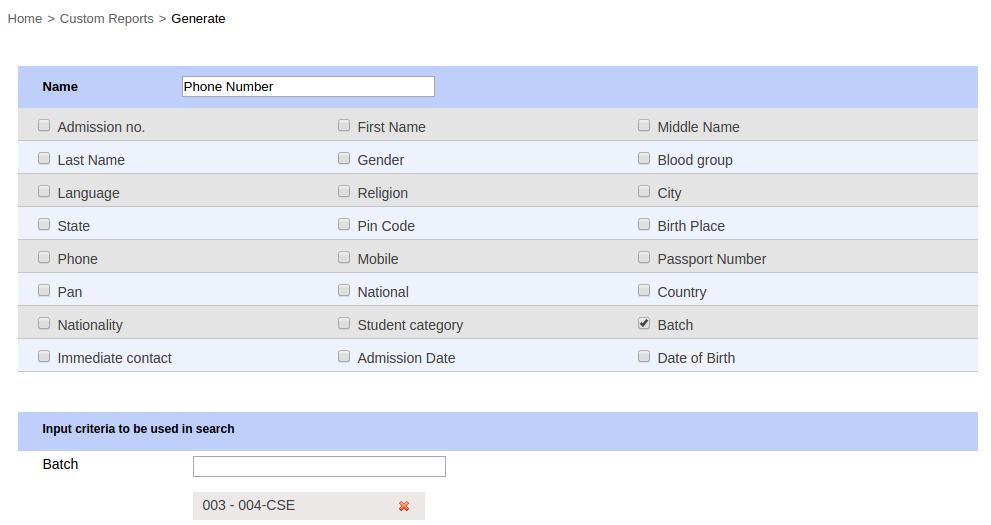
Consider a scenario where one admin staff may need a report on the names of students who were admitted on a particular date, another may need a report on the student guardian details just for a batch of students and another admin may need the contact details of all your employees in a single report. Each of these users can get their desired reports just by using the filters in the custom reports section, removing any clutter and unwanted data.

A student’s profile in a school management system records almost any and all data possible on the student and is constantly updated with any changes in these student details. In Fedena, custom reports can be constantly modified with various details needed to generate reports on the latest data of the student or employee.
 
Fedena Custom Reports screenshot 1
 
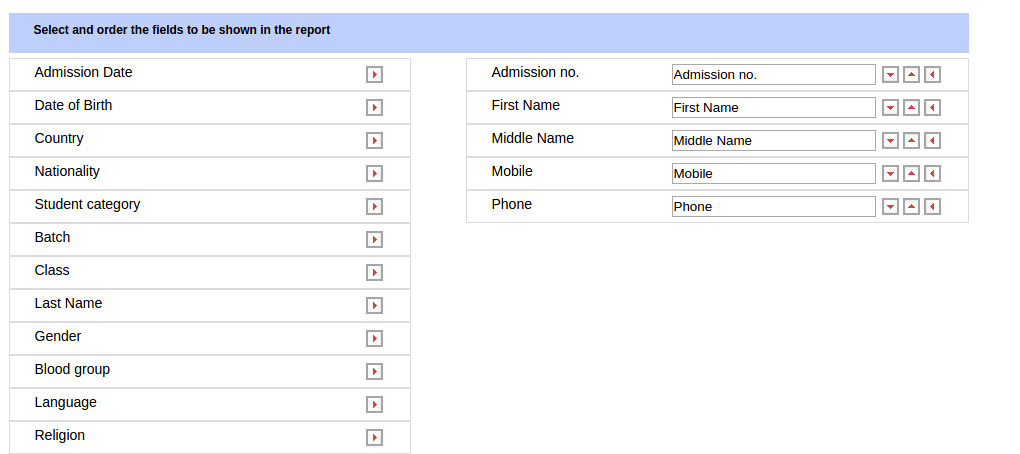
Consider a scenario where the admin staff needs the mobile numbers of all the students in class X. Fetching this data from each profile will be a time consuming task. Custom reports will allow the admin staff to choose just the mobile phone numbers to be displayed in the report they generate for class X students.
 
Custom Report Fedena screenshot 2
 
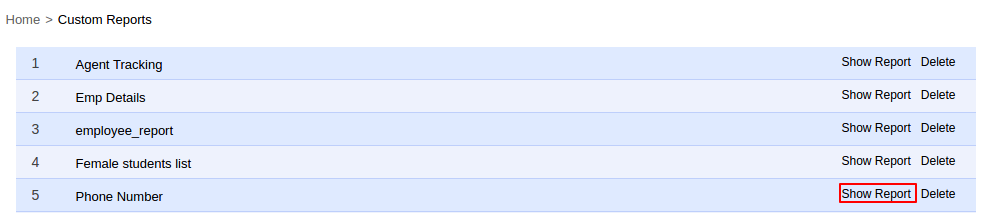
A similar process can also be applied for reports on employees of the institution.
 
Custom report fedena screenshot 3
 
Custom reports in Fedena were designed keeping the arguments of customization on school management systems in mind. What this means for the future of Fedena is, we are going to continue listening to your requests and gather as much data as possible from various institutions. Allowing us to work on providing a software which provides a unified online experience and at the same time provide solutions for each and every specific custom need of all institutions using Fedena. Records and certificates are always going to be how institutions access data on their employees, students and parents and vice versa. Fedena will always focus on efficiently providing these custom reports to render these records and certificates to institution and user specific needs.

Setting up reminders in Fedena

Setting up Reminders in Fedena

“It’s ironic, how we forget the things worth remembering, but remember the things worth forgetting”
— Unknown
 
Happy Diwali! It’s 2016 and within a couple of months, we are going into 2017. It’s been a busy and fast year, and as we progress, we also get busier. We must keep up with technology (social media, WhatsApp, etc.), work emails to keep track of, manage our expenses (which is ever increasing), and at the same time remember to buy Diwali gifts for family, neighbors, friends, pay our debts, and the list just goes on. Our life is one torrential pool of busy schedules, meetings, and transits that hardly give us time to follow up or remember the important stuff, daughter’s quiz competition, son’s arts & crafts assignment etc.
 
The reminder plugin was added in Fedena School ERP keeping in mind just how busy our lives are. The school staff/admins/teachers/parents can be reminded of important occasions and events such as the fee due dates, parents about the exam dates, any custom reminders to any specific users in Fedena etc.
 
The reminder module in Fedena alerts students, parents, and employees about
upcoming institutional events or any occasions either via an SMS or an email. The admin staff with the privilege of editing the settings can choose the best method to send the reminders.
 
Setting up reminders in Fedena
Reminders can be created for:
 
• Events – Diwali celebrations, quiz competitions, PTAs, Sports Day, etc.
• Exams
• Online exams
• Fee collections schedules
 
Custom reminders can also be created to notify parents and students in your school ERP, about any type of upcoming activities in your school/institution.
 
For example, Diwali celebrations are due in two days and your admin staff is busy with other tasks, and in the case of not having a reminder module in your school ERP, the staff would generally write it down on a piece of paper or leave a mark on the calendar. This is easily lost in the many papers you have in your admin office, but with a reminder module you can set a reminder well in advance so that all the necessary arrangements are done, parents are reminded on-time because the reminders are sent as messages to mobiles and email accounts.
 
The most powerful use of the reminder module comes into play while scheduling fee collection in your school. The usual practice followed by class tutors is to write it down in students’ diary or send printed circulars, which can easily be missed by parents due to their busy schedules.
 
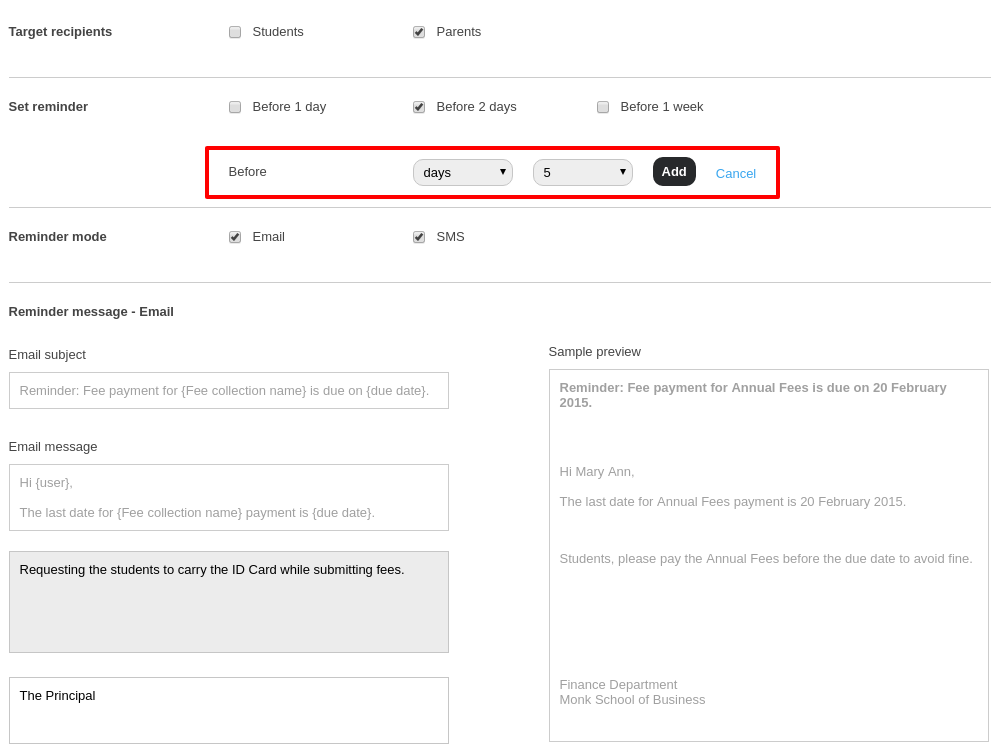
In Fedena, a school ERP that comes with a reminder module. Reminders can be set as many times as needed with multiple options available in the reminder settings.
 
Fedena School ERP Reminder Module
 
The reminder module also comes with an option to create custom reminders apart from the default options available.
 
This brings us to an end of this week’s tutorial and benefits of a school ERP for your institution/school. Fedena is constantly evolving and we are constantly trying to accommodate real time scenarios from schools and institutions alike that can make the life of parents, students and teachers a lot easier. Have a safe and happy Diwali!

Fedena Bulk edit school ERP

Updating information in your school ERP – Fedena

“Things get done only if the data we gather can inform and inspire those in a position to make a difference.”
― Mike Schmoker
 
In an era of employing best practices in Data Analytics, it is important for people to update the information at hand and efficiently use it. The core functionality of any institution is to organize and manage information available. In such scenarios there is no hindrance when the data to be managed is small. However, when handling large information, institutions often lose valuable resources and time just to manage the system.
 
Fedena Bulk edit school ERP
 
Over the years, institutions across the globe have been trying hard to look for an ideal solution to implement a process to manage massive data and mechanism to update them. In most of the institutions that we observe, we find that during the initial phase of any data entry process, information is not completely entered due to unavailability of information and time restraints compelling admins to upload only the minimum information required.
 
Subsequently, when a requirement to upload the remaining additional information is at hand, the process becomes tedious as the admins have to remember each category or folder that they have created and update the remaining information. Fedena, a school ERP, has always understood such requirements and comes with a feature with the option of importing data.
 
Fedena school ERP screenshot
 
With the Custom import feature to import data, Fedena also allows admins and teachers to edit large information using the bulk edit option to handle updated information efficiently. This bulk edit feature proves useful when changes need to be made to multiple records that were uploaded through Custom Import, allowing the user to either make the changes in Fedena or perform a bulk edit.
 
The ease in updating data in Fedena is because of this technique adopted. The user is only required to enter the information required in the file and use the bulk edit option. The information here can range from few lines to hundreds of rows. The basic functionality of the feature involves mapping existing records with the fields and information in the CSV file.
 
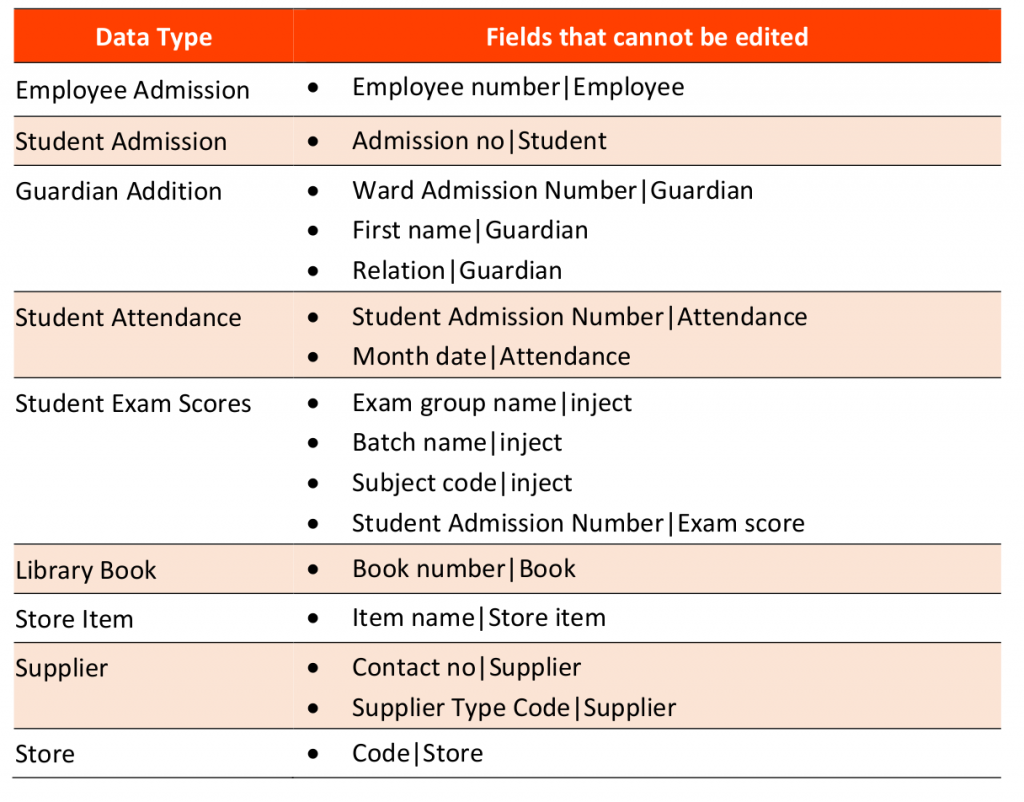
The mapping of information in many school ERPs is not crystal clear and often leads to admins getting confused, but in Fedena, this is handled automatically by the plugin. A snapshot of the fields that are used to map the details in Fedena are as follows:
 
Fedena school ERP bulk edit screenshot
 
Many institutions have often come forward after using this feature to tell us how data management has improved in their system, in return allowing them to focus on other key aspects.

Fedena School ERP - photo upload

Student Photo Upload via Fedena API

The recent advancements in technology and connectivity have made schools jump on the bandwagon of digitizing their students’ records. This helps the schools in recording and fetching students’ data as and when needed, thereby assisting the school management in taking key decisions in line with kaizen.


The knowledge of data can unleash innumerable capabilities of the institution. It is quite important to note that every ERP implementation banks on “the correctness of the data”, which comes with a list of tedious tasks, especially for first timers. From our observations, while implementing Fedena, an ERP for schools, that the responsible school admin might have to go on rounds collecting every possible piece of information, identifying common patterns in the daily functioning, questioning every detail in the processes and then map the same into the ERP for their schools. And to add to this, all of this is to be done while continuing to run the daily processes and functions of the schools.


A deeper understanding of the actual problem is equivalent to solving a jigsaw puzzle, where assembling the oddly shaped interlocking and tiling pieces gives you the bigger picture.


Today, we are addressing one such scenario pertaining to data upload in ERP for schools, where you have a lot of student photos, that need to be uploaded in the relevant student records. Had it been a mere email field, the user could have added the missing emails via a spreadsheet or a CSV file and upload it. When the number of records is in the units of thousands, it becomes a herculean task for the team to upload the images one by one and the time consumed in doing so is enough to add to the list of pre-populated worries. This got us thinking, we wanted Fedena to be more than just a school management software, we wanted Fedena to help and ease the school admin’s work rather than add to their worries. This lead us to engineer student photo upload API to add to our list of existing open APIs in the Fedena API Playground.


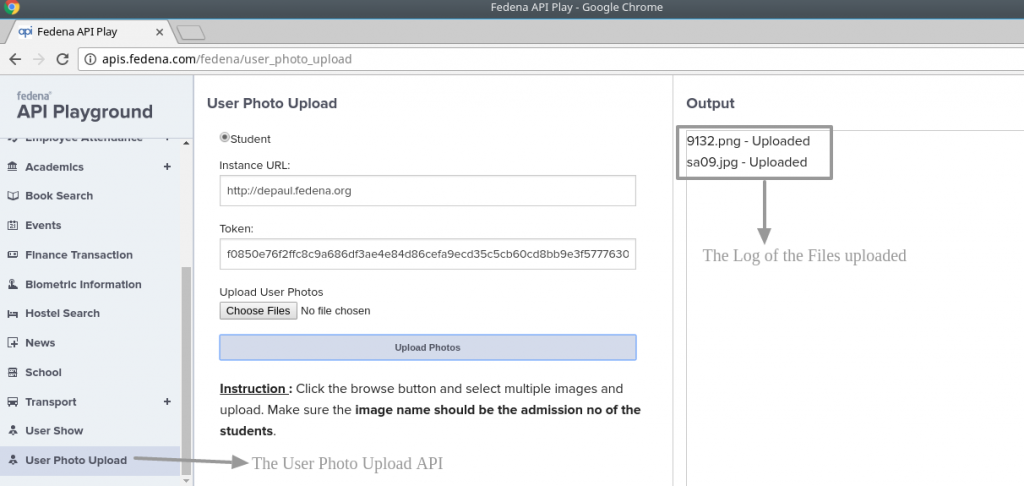
We tried to make it as simple as possible by asking the user to replace the filenames of the images with the relevant Username(or Admission number) of the students. Once done, it’s a cake walk.


  1. Go to our API Playground
  2. Enter the Instance URL and the Authentication token generated  and start uploading your Photos all at-one-go.


Fedena school ERP photo upload API


We have a video to help you start with student photo upload here along with the Other APIs available. The admins save a lot of time and effort in uploading student photos, event photos etc in just  a matter of clicks, making Fedena the number one ERP for schools. So keep visiting our blog for more everyday hacks for your school management using Fedena.


Gandhi Jayanti Fedena ERP

Is Attendance equivalent to engagement in online education?

Gandhi Jayanti Fedena ERP
 
Mahatma Gandhi once said “Those who know how to think need no teachers.” Unfortunately this holds as a poor standard to measure student progress or their development.
 
We have always had classmates who sat at the back of the classroom, reading a comic or novel, doodling on their notebooks, anything which provided refuge from the learning environment which did not-could not engage them. A very common description which our teachers used was, “Physically present but mentally absent”.
 
Students today have choices when it comes to their education; education technology has enabled various schools and institutions to develop new models of learning and teaching. A growing number of students are finding academic success via personalized means. But in our society, the definition of school space is the traditional idea of learning in a school building and suburban landscape, involving physical attendance which is rooted deeply in our institutions.
 
Adopting online education requires a very different and comparatively new mindset, a new criteria which could be used to measure academic success, something which includes the nature of teaching, learning, the diverse set of students online education serves and all the unique ways in which they learn. There are many good debates on the advantages of online classrooms and education, it’s also true that not all online courses serve the best interests of the students, mismanagement of courses, server crashes etc.
 
But, one could also argue about all the problems traditional schools have faced and how they have failed not just a few but generations of students, the yearly pass percentages dropping in every board, some schools/institutions being reported as dropout factories, teacher absenteeism being one of the major concerns in our rural areas (even technology is finding it hard to solve this).
 
The average Indian teacher is in charge of 40 or more students at a time, each with a different learning capacity, level of engagement and rate of mastery. Now if the teacher were to address the middle of this group its very easy for him/her to lose the students who are at the ends, the fast learners and the slow ones and that’s only if the teacher is present for the day or the term.
 
Whenever there is a change in ideas that threaten those who are hardwired to existing ones, there is a lot of resistance. Questions such as, how does one know if the student is playing games while he is logged in an online class? How does learning actually happen? What accountability does the teacher have or the student have? Power shortages are common here, how do we maintain flow?
 
Addressing attendance and engagement, must take into consideration the characteristics of students who attend online courses. Online education works particularly well for students who face unique challenges in traditional academic processes. Some are far ahead of their classmates academically; others lag. Both sets benefit from the self-driven pacing that is a particular advantage of online education. Online schools also serve to provide an uninterrupted education to students who live with illnesses or are otherwise unable to attend a local school. Still others choose online education because it saves them from bullying or other social pressures found in traditional schools.
 
The online teaching space is a collaborative space where teachers have the access to a wealth of data that helps them develop asynchronous lessons, adaptive ideas and practices that are discussed and iterated on, and help inspire both learning and teaching. If anything, online education is a complement to traditional learning spaces. One of the first steps institutions, schools and teachers can take is to digitize. A student management system is a good place to start for schools institutions and teachers who want to try online education. Fedena school ERP is one such software, which helps provide live analytics to help you understand all your teachers’ needs, schools’ needs and take definitive action on time.
 
As today is Mahatma Gandhi’s jayanti, and as he once said, “Co-operating with the good is as much one’s duty as much as not co-operating with the bad is”, let’s hope that we can explore both traditional and online learning spaces in equal opportunities to help build a better system for our children’s academic success.

Image for online education

5 Features which are a must for any online education platform

Image for online education

Online education has seen a steady rise in the number of learners in the past few years and is slowly replacing the traditional methods of learning. The same trend is now true for instructors who want to reach out to more learners but aren’t able to due to many constraints. This increased adoption of online education can be associated with the various features online teaching platforms have to offer, some of them being

Ease of use

Flexibility

to both instructors and learners.

In the words of Bill Gates, “ Technology is just the tool. In terms of getting the kids to working together and motivating them, the teacher is the most important”
With many education technology solutions available to teachers, it becomes time consuming for them to choose the right solution for their teaching and training needs. Nothing disparages a teacher’s enthusiasm and drive than a software which is made without keeping them in mind. Undoubtedly, the right software or platform should in all it’s capacity enable the teacher and enrich the learner in every way possible rather than become another cause to worry.

Every online platform comes with different features and capabilities and each of them boast about being built both for the teacher as well as the student. Which makes the process of choosing the right platform a difficult and time consuming task and thus discouraging teachers or students to open a world of possibilities.

So here are six must-have features that an online teaching or training software should satisfy before you decide on adding technology to your existing methods.

Global Reach

One of the significant factors behind the multifold increase in teachers choosing to go online is the wider reach offered by online platforms and well, the internet. Using the internet, teachers can reach out to students across the planet, which isn’t possible with traditional teaching platforms. There are many online teaching platforms with a varying number of users. As a teacher, the right online platform to start with would be one with a good number of active users worldwide or in the geography of your choice and features that compliment the diverse set of students who might be opting for your course. Moreover, a platform with support for foreign languages is also a very important feature, which means that you can teach students without worrying about the language barrier.

Measurement of teaching effectiveness

Effective teaching can simply be defined as a set of activities that cultivates learning. Having an in-depth knowledge is just not enough to be an effective teacher. In addition to having a deep understanding of the subject matter, a teacher also needs to be aware of the factors that affect the learning process, which might include how content is delivered, course ware design, student engagement, and more. It is crucial for teachers to be cognizant of the students’ abilities and specific learning needs as a teacher’s effectiveness can be quantified by measuring the degree of student engagement and the understanding of content consumption.

Online platforms that allow teachers to build their online academies and get actionable information about their courses, classes, and content delivery. Such powerful features enable teachers to get insights into students’ activities through informative reports which cover information, such as content consumed by each student, live classes attended, and the percentage of the course completed to keep a tab on the number of dropouts. Teachers can use this information to refine their course content or courseware design, improve their teaching approach or methodology, and do a lot more to increase student engagement to enhance learning outcomes.

Fedena School ERP is one such online platform which provides these reports to teachers and schools who are still following the traditional methods of teaching. A journey of a thousand miles begins with one step and Fedena is that one step which your school can make to ease the transition from traditional teaching to online.

Content Security

Teachers work very hard to create their instructional content making it their intellectual property. It is natural for them to be concerned about the security of their content as information on the web can be accessed and used by everyone. Content security remains one of the biggest concerns of teachers looking to teach online or offline. One of the ways to claim content ownership is by controlling the dissemination and access of content so that it’s accessible to only the intended students. Server security, encryption types and other such technologies are used to keep your data safe on online platforms, so before deciding on which one you are going with, make sure to get a good understanding of who gets to access your data and how they get to do it.

Versatility

The versatility of the software or platform decides the type of online teaching or training activities that you can do. You need to take into consideration the level and type of interaction that you normally have with your students and choose the software accordingly.

Sometimes, you may need to include polls or quizzes, and other interactive elements in your course to engage students. You may also need to have live audio and video communication with students during your class. The platform you choose must be versatile enough to provide you with access to such features, and in an effective way.

In addition, since instructional content comes in various formats, you need to make sure that the software or platform supports content in all the widely-used formats, such as PDF, Microsoft Word, presentation, audio, and video, just to name a few.

Fedena School ERP, an award-winning student management system, has useful and innovative features, such as Polls, online examinations and moodle integrations, text chat, blogs, and content sharing, among others. These features enable teachers to engage learners and deliver a holistic learning experience be it online or offline.

Mobile learning

Smartphones and tablets are radically transforming how we access content and stay connected. We have instant access to information and expertise – from informal electronics lessons on YouTube to online courses. Data is being consumed at a rapid pace on mobile devices and education is getting infused with our daily routine. Mobile learning takes online education right to the student, making it their choice and not the teacher’s choice.

As pedagogy and learning needs change, learning tools evolve. With the online education landscape changing rapidly, teachers and students are adapting to new technologies. As more and more people join the online community owing to ease of use, scalability, flexibility, affordability and choosing the right platform or software continues to remain a crucial factor in the success of your teaching, training or business.

Fedena school erp information sharing

How Fedena Helps in Information Sharing

Fedena school erp information sharing
 

An ERP aims to associate the structure across an organization in a way of systemizing the workflow, sharing information among departments and providing an insight into various business operations. The traditional methods of handling data and tracking information seems more comfortable and familiar that we tend to forget there are better alternatives. Every institute and organisation have valuable data that needs to be handled efficiently.  There are better ways to bring in efficacy and it starts with innovation in technology.
 
School ERP softwares like Fedena provide the end user to retrieve, manage, analyse and share data in a user-friendly way. Any college or school ERP will streamline all the common activities of the organization to increase productivity, but Fedena takes a step ahead to help you share information among various members of the organization with ease. The benefit of getting an erp implemented in your organization is the ability to allow your users to utilize the data they need at the right time. The need to reply to others in the organization causes a great delay, which further causes a dip in productivity.
 
Multiple users input data and access it via various modules in Fedena, which allows them to share information with ease. The Fedena dashboard is one such valuable asset of Fedena allowing users to perform multiple tasks and at the same time acts as a central point to begin various tasks. It has a collection of dashlets that provides a quick overview of the information that matters most to the user. Fedena also provides the user with a lot more features.


  • Optimize Your Human resource department

Multiple departments can be setup and communications are a breeze. The HR admin generates payslips and every employee has access to it through their profiles. Employees can also apply for leaves using Fedena while the managers approve/deny them at their leisure.


  • Improve Inventory Management  

Fedena allows you to build a greater control and automation in your inventory to save time, money and provide your students and teachers with stationaries, study materials etc on time. Multiple users can use the module to run the inventory efficiently.


  • Maintain Financial transparency

Fedena also enables you to control your accounts, cash management, donations, payroll, assets, liabilities and tax management. Allowing you to maintain transparency and privacy with the admins, teachers, students and parents.


  • Library Management

Most library managers are very concerned with the need for management of information about the books in the library. All students and staff get instant access to check the availability of books and reserve them. The Library manager can get meaningful information about movement of the books and easily manage the library efficiently.


  • Effective User-to-user Communication

You can choose to send internal messages, SMS or Emails to all the users in your organization. You can keep your employees, students and parents updated with the latest events and information. This task of mass communication is easily accomplished with Fedena and allows the school admin to message teachers, students and parents individually or setup automatic messages for various events like holiday reminders, event reminders, fee payment reminders, attendance reminders etc.


Having a high stack of spreadsheets and reports on your desk and trying to make sense of all the data you need to review? It’s time to tidy up and organize all your data using Fedena.
 
This article is written by : Aarthi Paramasivam
 
Aarthi Paramasivam Fedena Trainer photo

 
Somebody who is a naturally articulate speaker and taskmaster, Aarthi is an industry expert in Fedena. Her idea of fun is engaging customers and helping them succeed at understanding Fedena and improving institution processes.

Fedena Multi School ERP system – Analytics, Multiple Admins and SMS Settings

The most important part of any School ERP system are the analytics and the ease of access by multiple users of the system. Last week we discussed how you could setup your payment gateways, white-label Fedena to your institution’s name and assign multiple plugins to various institutions in your group. Most institutions function by setting up a communication with their teachers and parents via SMS notifications of various activities, ranging from attendance to event dates, payment reminders to refund of fees paid, to set this up let’s learn how to setup SMS packages in Fedena for your group of Institutions.


Fedena multi school erp system


Create and assign SMS packages to group of Institutions


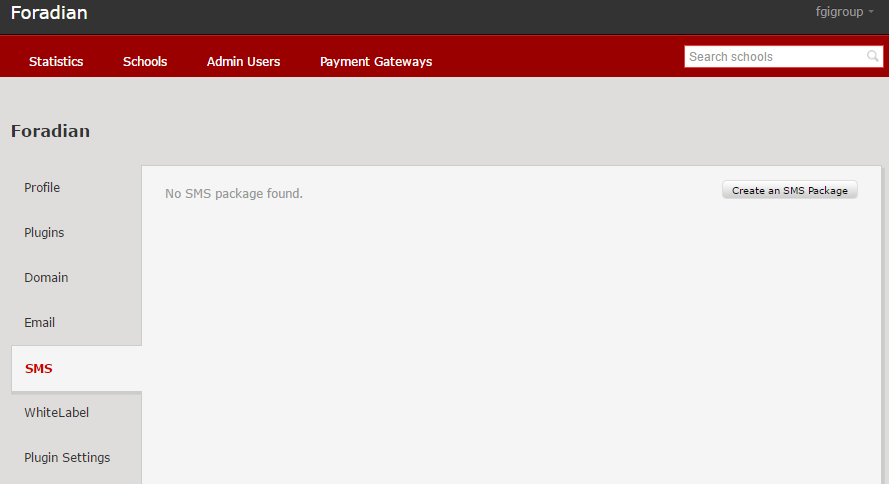
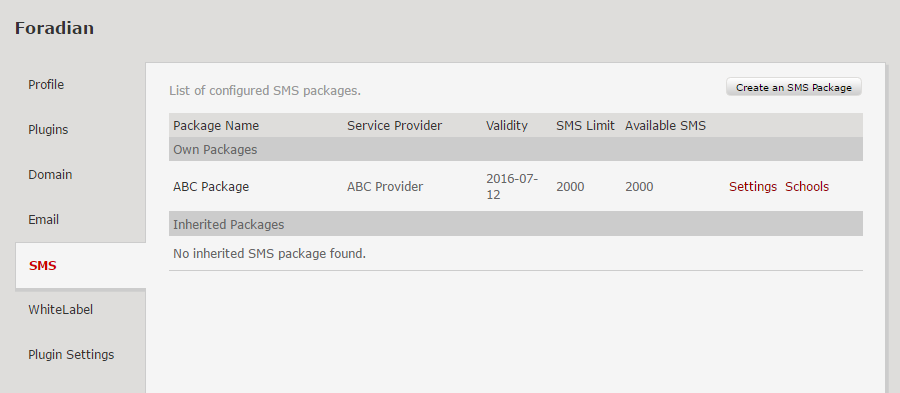
Your SMS Package can be configured in ‘SMS Setting’ option under company details of the multischool panel. On clicking ‘Create SMS Package’, the details can be entered into Fedena.  SMS package details and parameter mapping details are required to go to the next step.
Fedena Multi school erp system screenshot


Fedena multi school erp system screenshot 2


The SMS package details include the following :


  1. Package Name – Enter the name of the SMS package.
  2. Service Provider – Enter the name of the SMS service provider.
  3. Message Limit – Enter the total number of messages that can be sent. If a message limit is not provided, it will be considered as ‘Unlimited’ SMS.
  4. Valid Till – Select the package validity date. When the date passes the validity date, messages cannot be sent. If a date is not provided, it will be considered as ‘Lifetime’ validity.
  5. Character Limit – Enter the total number of characters that make up one message. If left blank, the character limit per message is taken as 160. In some cases, service providers may include a few characters of their own as part of the messages being sent, in such cases, specify the character limit accordingly.


Enter the parameter mapping details provided by the service provider. The ‘sender name’ is the name the recipients will see when they receive an SMS. If you enter a sender name and enable Sender name modification, the sender name can be changed when assigning the package to any institution. If you disable Sender name modification, the sender name cannot be changed.


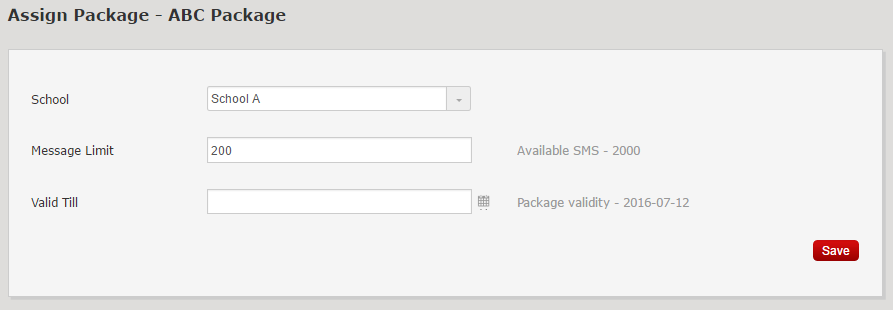
After you have entered all the details, click the Create button. You can assign this package to the institution by clicking on the option ‘Add a school’.


Multi school Fedena erp system screen 4


This count will now be reflected in the institution’s login.


That’s how easy setting up your SMS for your group of institutions is. Now let’s get into the analytics Fedena School ERP system provides.


Analytics and the overall data of your group of institutions, all under one roof, Fedena


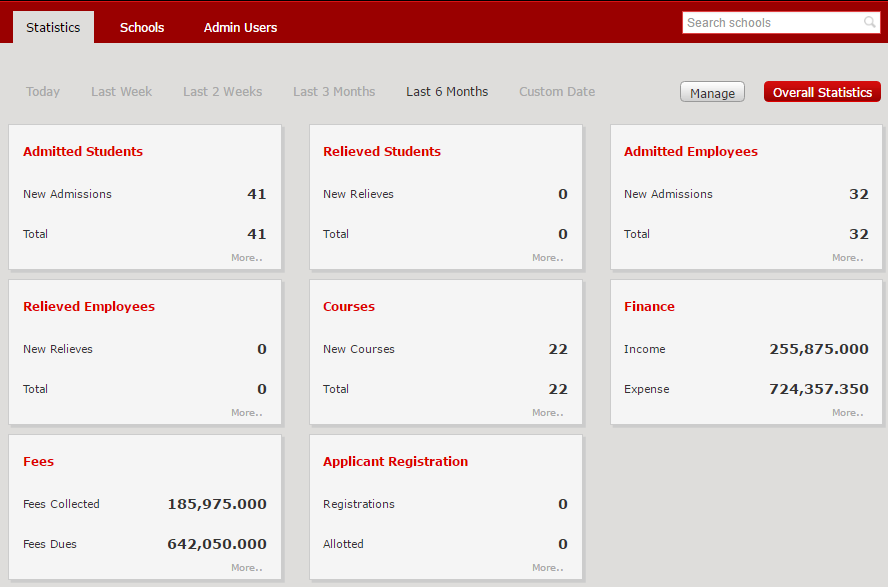
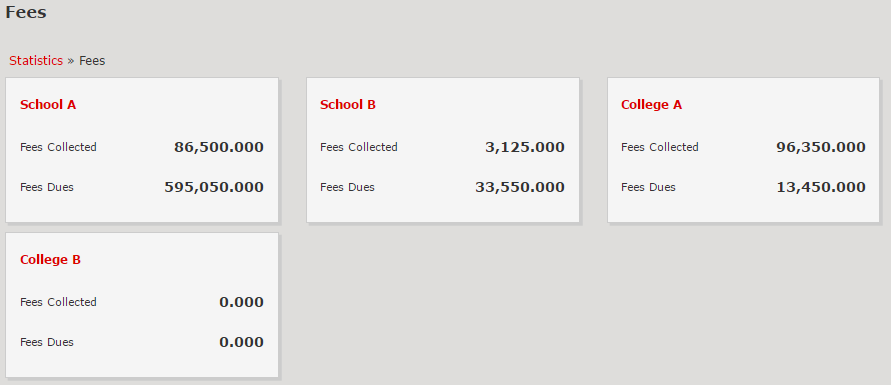
The statistics option gives you the reports for the multischool group institutions. The dashboard shown below is an example of how you can see the information.

Fedena multi school erp system screenshot 5


To check the details of each institution, click on ‘More..’ under each module. In our example, for the 4 institutions under the multischool group, data is shown as follows : 


Multi School fedena school erp system screenshot 6


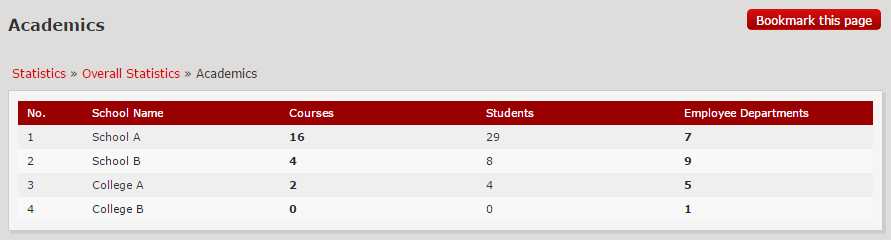
Overall statistics can also be checked and is shown below for each institution.

Fedena multi school erp system screeshot 7


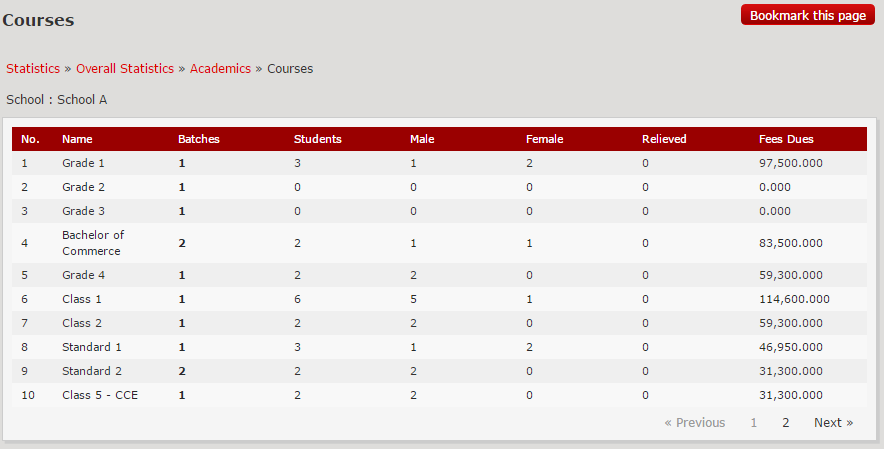
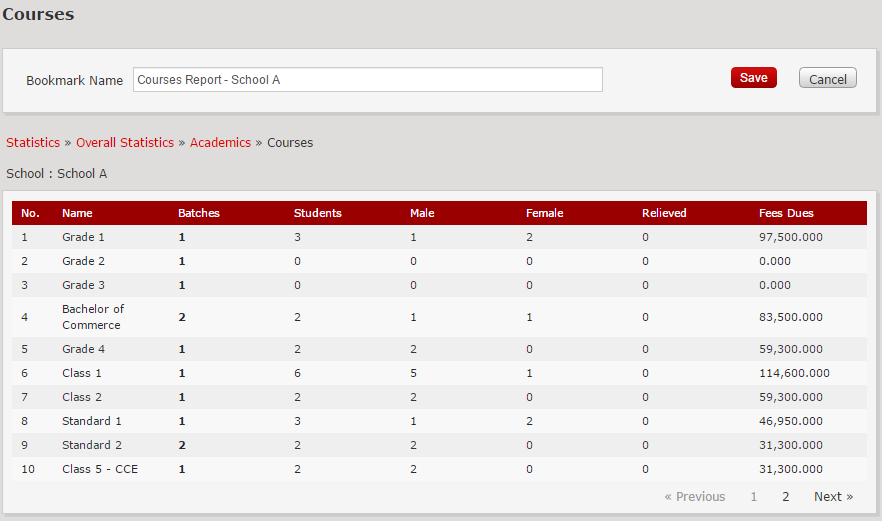
To further check the courses or departments, click on the number. The following details appear : 

Fedena multi school erp system screenshot 8


If these details need to be seen frequently, they can be bookmarked, using the‘Bookmark this page’ option.

Fedena multi school erp system screenshot 9


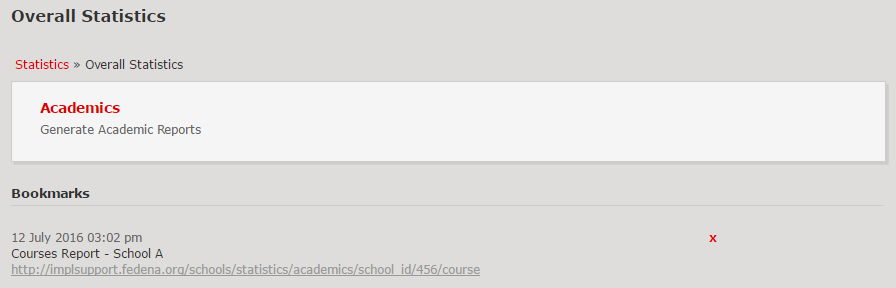
When you revisit the ‘Overall Statistics’ page, the bookmarks can be checked and visited.


Fedena multi school erp system screenshot 10


To get an indepth understanding of the Analytics page you can always get in touch with us. Now let’s see how you can assign multiple admins for your multiple institutions.


Easy management through multiple admin users


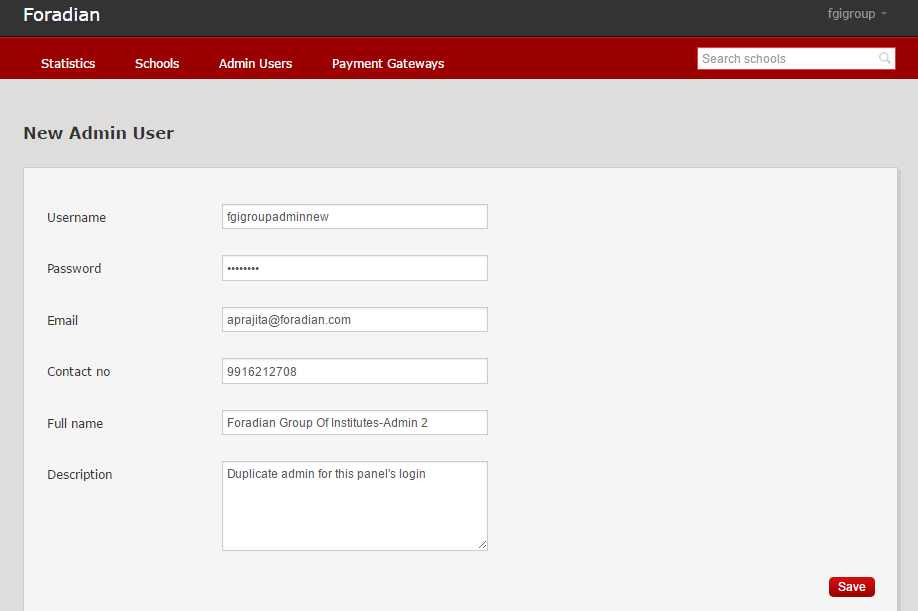
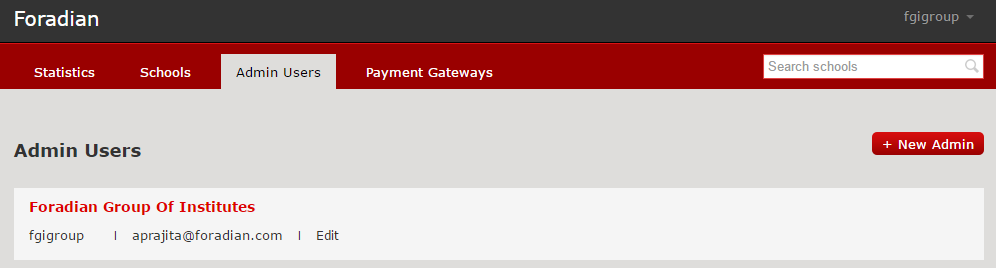
Multiple admins can be created in your Fedena Multischool Panel. For this, use the option ‘Admin Users’ and click on ‘New Admin’. Enter the new admin details and Save.

Fedena Multi school erp system screenshot 11


fedena multi school erp system screenshot 12


These credentials can be used to login to the panel along with the already created credentials, you can repeat this process for any number of admins you require and you are done.


This brings us to an end of the Multischool Panel blog series. We hope this information will help you understand how Fedena School ERP system helps automates all of your institutions’ processes and gives you actionable insights into growing your institutions, teachers, and students.

Fedena school erp system payment gateway

Payment Gateways, White-labeling & Plugins in the Multi-School Fedena School ERP system

In our previous blog, we discussed how you can setup your group of institutions and institutions in Fedena. Today we will learn how to assign the various plugins you have purchased to each group, assign payment gateways to them and how to white-label Fedena to the name of your organization or group of institutions.

 
Assign multiple plugins to your multischool group

 
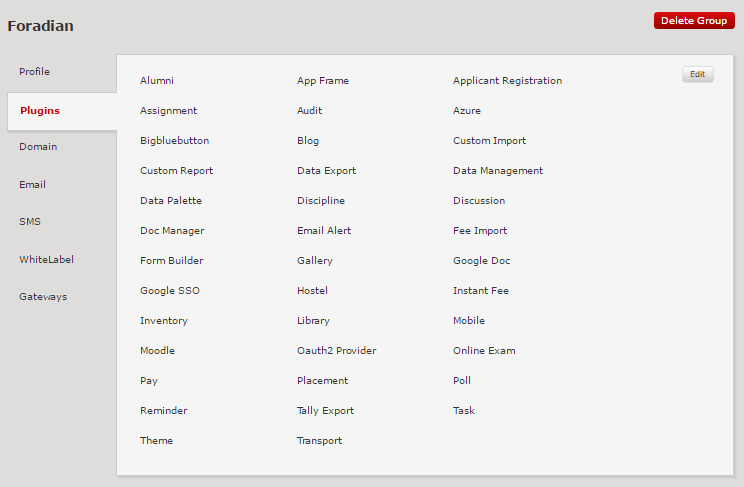
Plugins are basically the different modules of Fedena which handle various processes of your institutions, for example, the Library plugin will handle your library operations and processes, the Hostel plugin manages your hostel fees, room allocations etc. The institutions under the multischool group can have access to the plugins of your choosing or the admin you have assigned. These plugins can be assigned/removed under the option ‘Plugins’.
 
Fedena Multischool screenshot

 
Create and assign multiple payment gateways for smooth online transactions

 
Using the payment gateway, Fedena users, like parents, teachers and admins can perform secure online fee payments by methods such as credit cards, debit cards, net banking, and so on. These online transactions with Fedena are handled securely through encrypted channels. The payment gateways can be configured under the option ‘Payment Gateways’.
 .
Fedena multischool screenshot 2
 
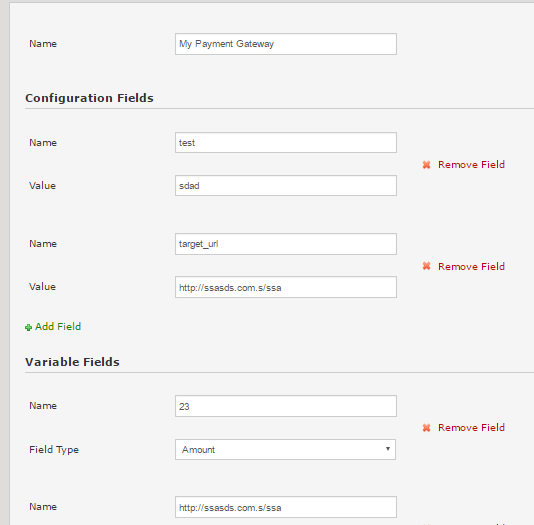
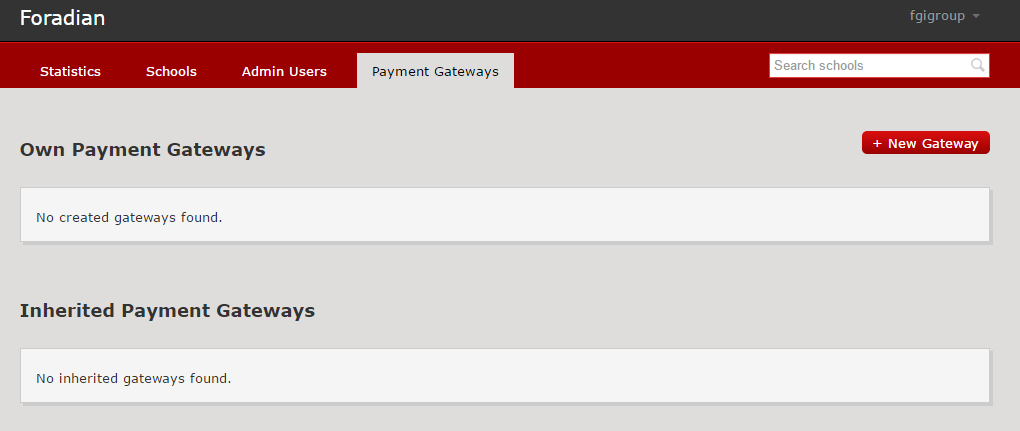
While creating a new gateway, you will need the configuration parameters from the payment gateway provider you have hired. These parameters must be entered in Fedena and will be used to map to your payment gateway provider. Multiple payment gateways can be configured and assigned to the multischool group.
 
Fedena multi school screenshot 3
 
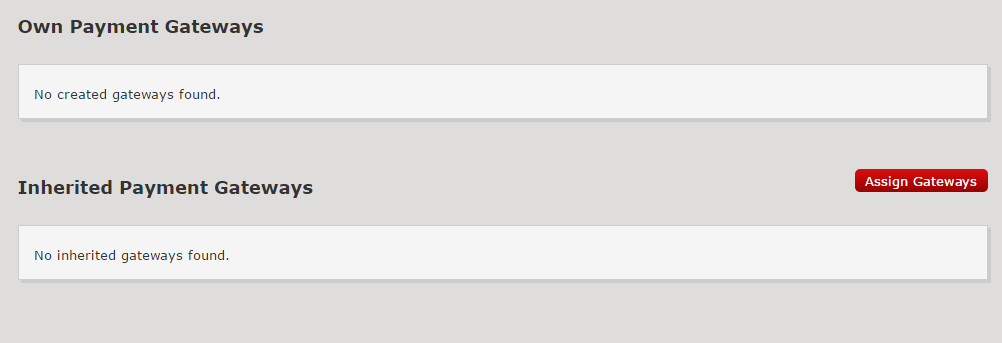
To assign, see the ‘Multischool Groups’ option and click on the group title to check its details. Select the option ‘Gateways’ and select option ‘Assign Gateways’.
 
Fedena multi school part 4
 
This will allow you to assign the gateways for multiple institutions for this group.
 
Fedena multi school 5
 
Later, when you create institutions in this group, each institution will have the gateways which  have been assigned.
 
Whitelabel your group of institutions
 
This option allows you to do the following for the institutions under the group :

  1. Customize the “Powered by Fedena” statement at the bottom of the page
  2. Customize the word Fedena

 
Fedena multi school screenshot 6
 
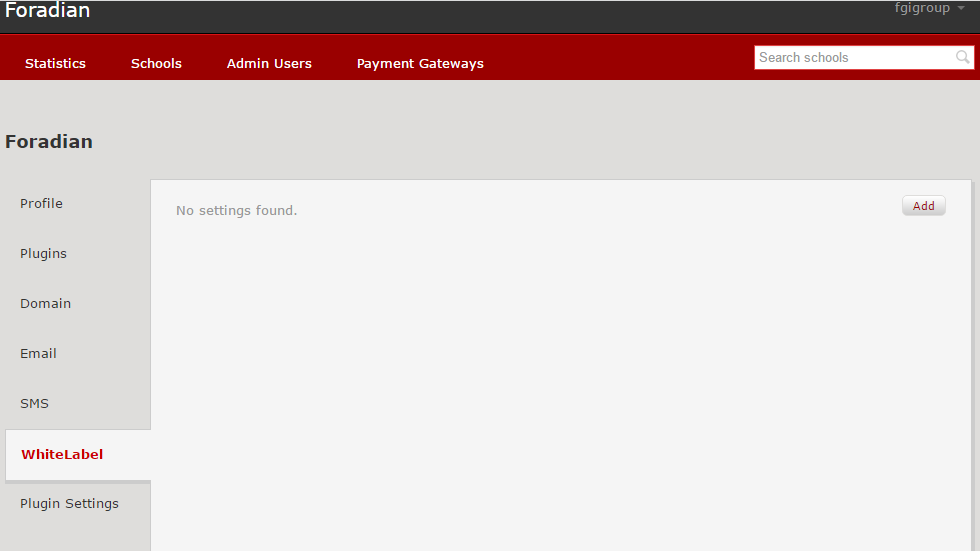
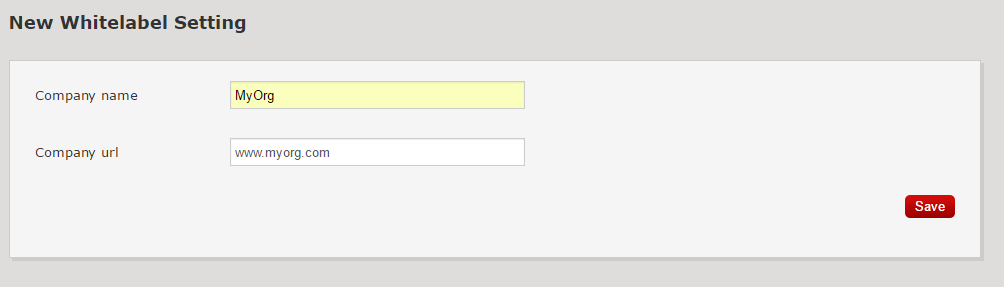
This can be done when you login into the multi-school panel and check the company details. After saving the changes, the same will reflect in the organizations under this group.
 
Fedena multi school screenshot 7
 
This covers assigning plugins to your institutions and groups in Fedena school ERP system along with assigning multiple payment gateways and white-labeling Fedena with your custom institution names. Next week we will learn how to setup your SMS provider settings, assign multiple admins to your institutions and groups and understand all the analytics Fedena provides you at the Multi-school level.