Fedena School ERP system biointegration

Biometric Integration – To help you keep track with minimum effort.

Students and Teachers are the core of your institution, so all data relative to them should be paramount. But documenting such data is a time-consuming task. After all, you don’t want to be misinformed about the students and teachers in your institution or have no idea if a teacher is absent or not for the day.


Fedena Biometric integration


Biometric devices take the complexity and time consumption out of collecting the attendance data of teachers and students in your institution. It’s a technology that lets your institution create data ids connected to the biometric print of every teacher and student. There are a world of possibilities with biometric devices, you can also start using these devices to allow students to automatically pay fees or generate their receipts, you can generate teacher leave applications and reports, allow access to institution infrastructure by just taking a scan of their fingerprints – all with just one device!


The biometric device becomes a lot more powerful when integrated with your local database you use for your institution. By integrating your biometric devices with Fedena, a school ERP system, it instantly connects all the data of the teachers and students in your institution.


Build a seamless attendance tracking feature for your institution, generate fees, leave applications and even attendance reports, without hours of additional work on a daily basis by adopting the biometric technology.


How to setup a biometric integration with Fedena School ERP software


Your biometric device helps you gather and attribute specific data to specific biometric ids of teachers and students while Fedena allows you to populate, maintain and edit the data attributed to every teacher and student, here is a basic setup of your biometric device with Fedena.


  • Each user(students/teachers) in your institution will get a unique hardware ID from the biometric device.
  • You can enter this unique ID in the hardware ID field of the student/teacher profile in Fedena.
  • Install a simple software provided by Fedena school ERP software in the local PC where the biometric device is connected.
  • Once this is done. This software will communicate with Fedena through the internet using Fedena’s attendance API.


Step by step instructions

Step 1
Get the Fedena installation ready. Undergo Fedena training. Enter student and teacher data in Fedena.
Step 2
Get the biometric device installed and connected to your local PC. Make sure the software that came along with the hardware is installed on the local PC.
Step 3
Install the hardware integration app provided by Fedena in the same local PC where the biometric device is connected and the software is running.
Step 4
Enroll the students and teachers in the biometric device as per the instructions received from hardware provider. The biometric device will assign a unique ID to every user.
Step 5
Store the unique ID of students and teachers in Fedena in the hardware ID field.


You are done! You can now track your teachers and students data by just taking their biometric prints. Get started with biometric integration with Fedena for your institution today, just hit the contact button on the top and leave a message and we’ll take it from there.

Fedena School ERP system Multischool

Setting up Fedena School ERP Software – Multi-school panel

For today, let’s begin with logging in to your accounts panel and creating a group and creating an institution. In our previous blog we discussed the advantages of using Fedena school ERP software for your group of institutions.


Fedena School ERP system Multischool


Creating a Group of Institutions as well as Groups of Institutions

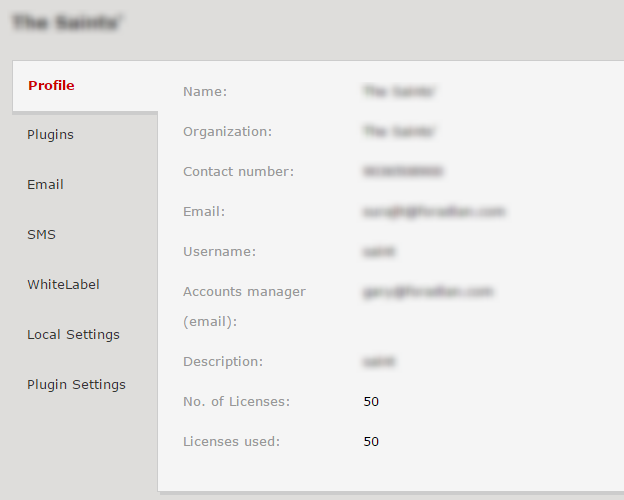
Log-in as an admin to the Fedena accounts panel. You can confirm your institution’s details and the number of licences purchased. The number of institutions you can create depend on the number of licenses you have purchased for Fedena. If you have purchased 10, you can create 10 institutions and any number of groups.  


Fedena school erp screenshot multischool


More than one license allows you to create a multi school group with a list of institutions under it. For Example : If you have five licenses, you can create a multischool group called ABC Group of Institutions, and assign any number of institutions you desire as long as it doesn’t exceed five. The remaining licenses can remain as independent institutions or another group or can be added to the same group at a later stage. This way you have multiple groups and each group has multiple institutions. To create the group, click on ‘Multischool groups’ option and select ‘New Multischool Group’, as shown below.


fedena school erp multischool screenshot 2


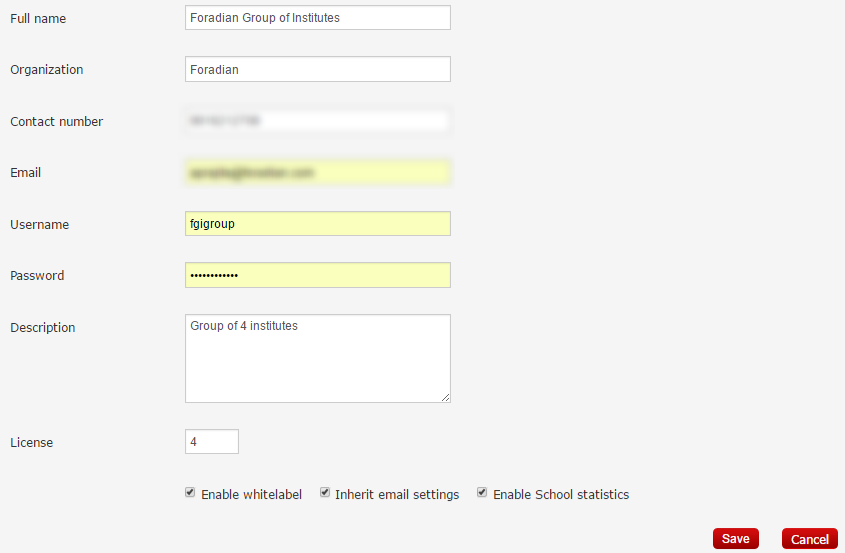
Enter the details about this group.

fedena school erp multischool screenshot3


The username and password fields are the credentials to the new Fedena school panel which will be created automatically. The Fedena accounts panel now acts as your multischool admin panel for the group of institutes. The number of institutions which should be a part of this group, can be entered in the field ‘License’.


Give a custom name to your multischool panel domain       


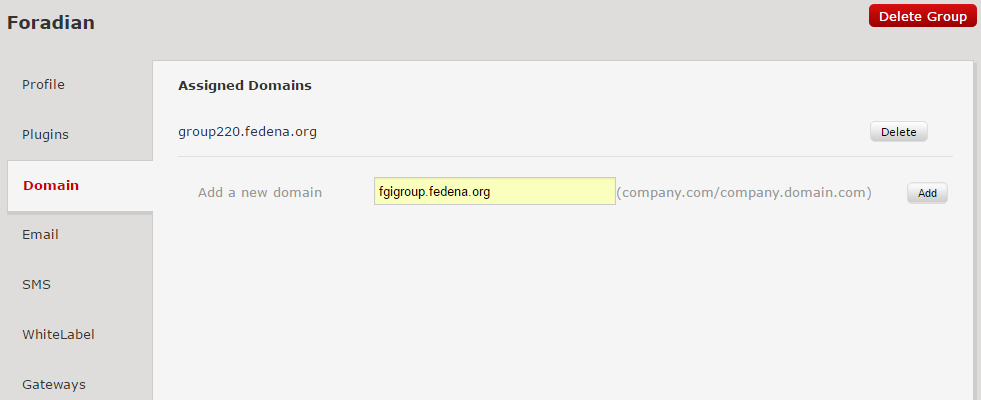
After Saving the above settings, the group will be listed under ‘Multischool Groups’ option. To check the details, click on the title of the group. To access the group, check the ‘Domain’ option. A default domain name for this panel will already be assigned. Accessing this domain, you can create institutions (based on the ‘Licence’ field, as entered in the above steps). You can also add a custom domain for this group by creating a cname and pointing the new domain to the server where Fedena is installed.


fedena school erp screenshot 4

Creating institutions under each group


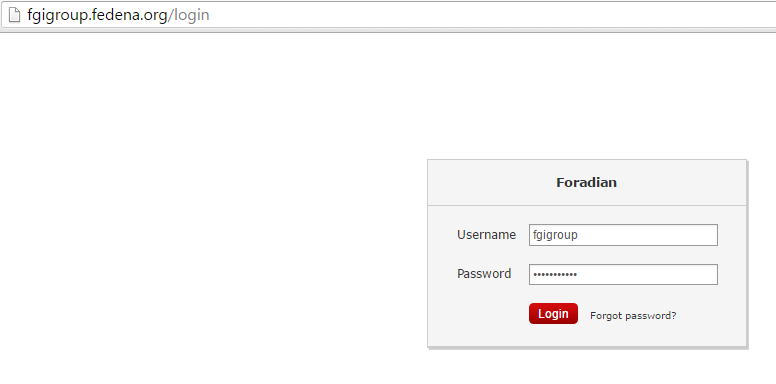
Under the group, multiple institutions can be created. To create these institutions, log-in to the domain of the group using the credentials we just setup while creating the group.


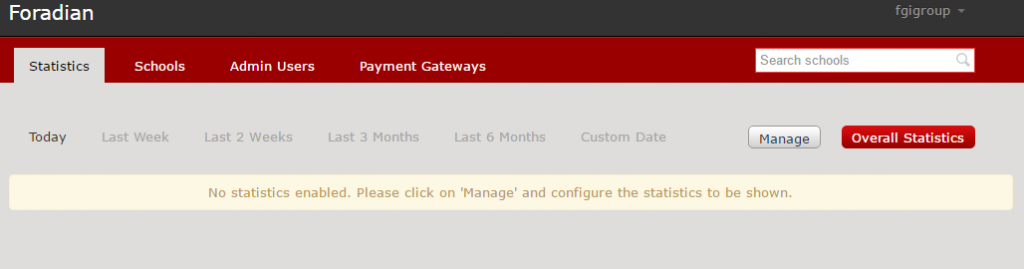
fedena school erp screenshot 5


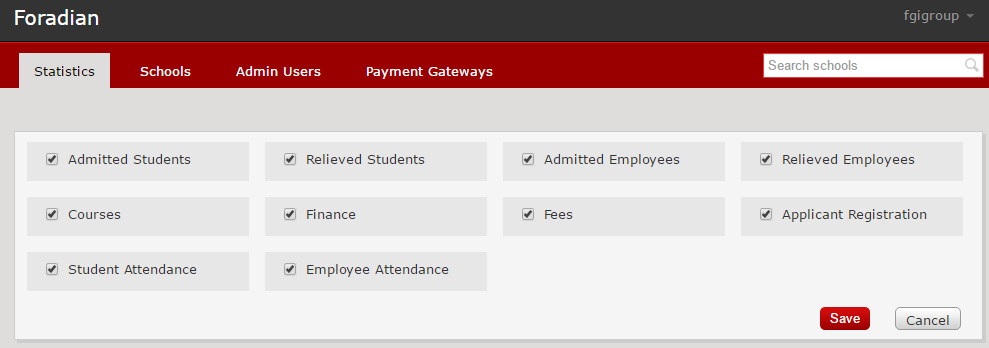
Statistics are enabled by default for this panel, manage what you want to see, by clicking on the ‘Manage’ button and the information you need will appear on your dashboard.


fedena school erp screenshot 6


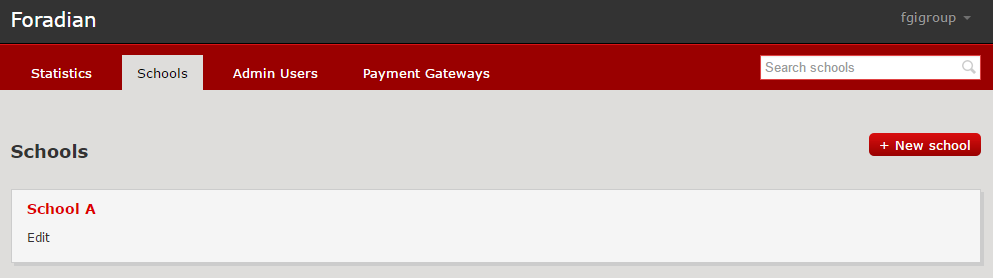
To create an institution under this group, click the option ‘Schools’ and click on ‘New School’.


fedena school erp screenshot 7


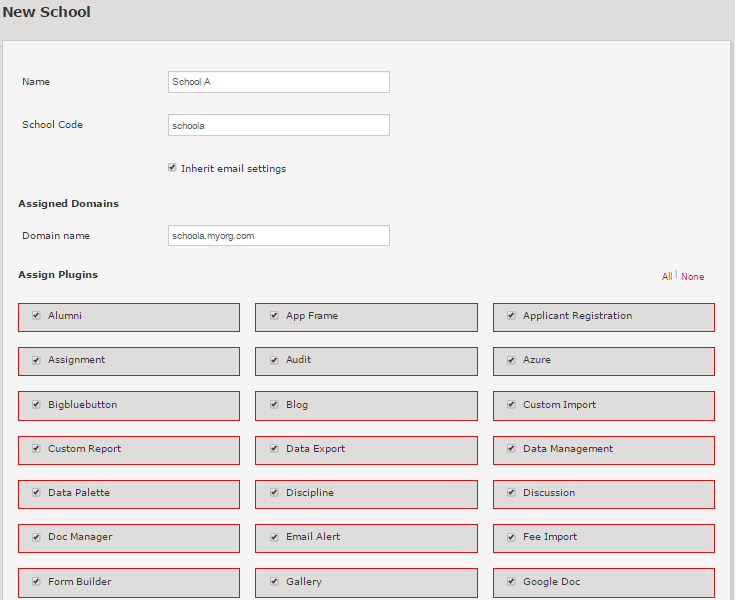
Enter relevant details in the form.


fedena school erp screenshot 9


Check that the school code is prefixed to the domain name. This domain name is shown as per the white label settings which we will be seeing later in the series of blogs. Using this domain, the institution’s users like admins, employees, students and parents will be able to access Fedena The list of plugins shown here are dependent on the assigned plugins for this group. Assign plugins that are required by this institution and don’t forget to save before you exit this menu.


multischoolpart2-10


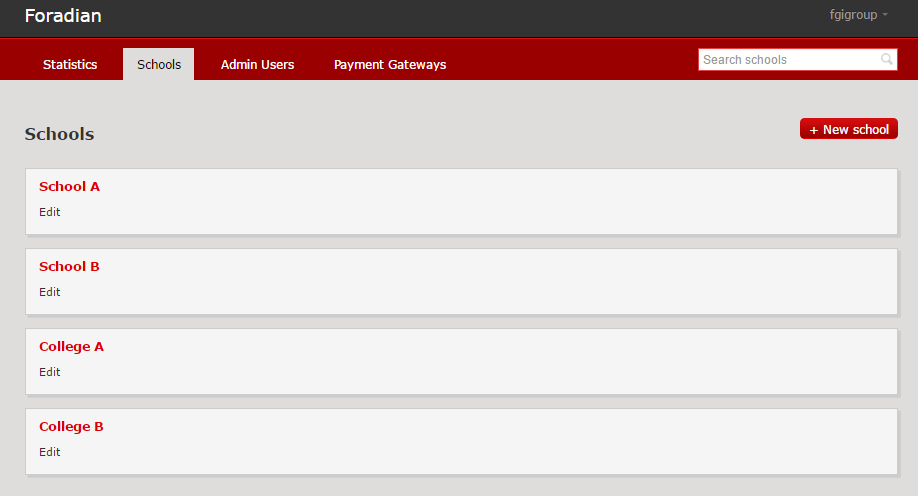
The institution created will now appear under the ‘Schools’ option in the dashboard. To view/edit the details, click on the School’s title. You can assign payment gateways to this school by checking the option ‘Gateways’. If email settings are not inherited, the same can be entered under ‘Email’ option which we cover in our next blog.


To create another institution, just follow the above procedure to create multiple institutions and all of them will be listed under the ‘Schools’ tab in your group dashboard. In the image below, the multischool group has 4 organizations – 2 schools and 2 colleges.


multischoolpart2-11


This should help you get started with setting up your group of institutions. The advantage of using Fedena as a multi school platform is to have all your data in one place with actionable insights to your finances, resources as well as important institution metrics.


Fedena School ERP Chat Support

Fedena Chat Support is here!

August 15, The Indian Independence day, what better occasion to unveil a new feature for our very successful Fedena School ERP partners and clients. We have always striven to give you the best possible support, our support team is constantly engaging with your institution’s admins and Fedena users via multiple support channels like our dedicated support portal, Email support, phone support, video conferences etc. To add to this list, today, we are proud to be introducing a chat support. Our aim with developing the Fedena support experience is to provide a completely seamless and efficient support to everybody.


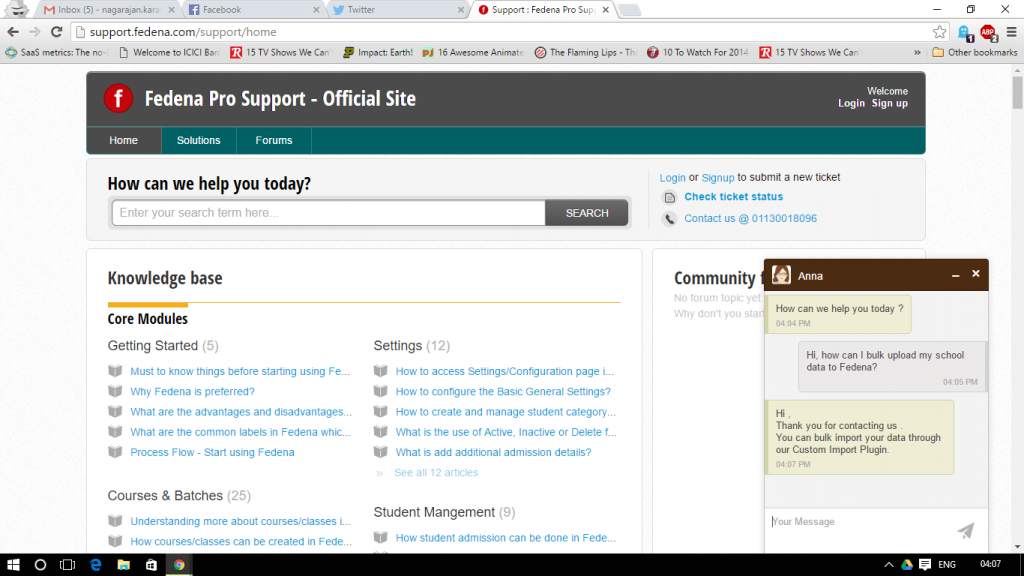
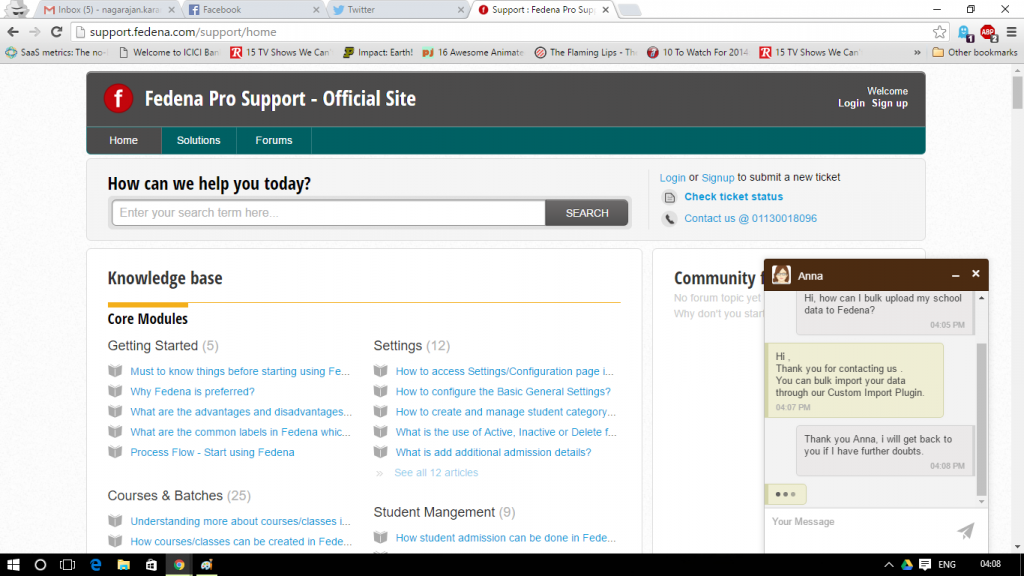
As a pilot run, Fedena chat support will be available throughout the week (Monday – Friday) from 9:00 AM – 6:00 PM IST (3:30 AM – 12:30 PM GMT). You can access it by visiting our support portal. If you are worried about ticket raises and other processes, the live chat is integrated with our support portal and these chats can easily be converted to tickets, helping us as well as you to resolve any issue at lightening fast speeds. We have also made sure that the chat is routed to the same support agent you were already in contact with, helping us make the partner – agent communication seamless.


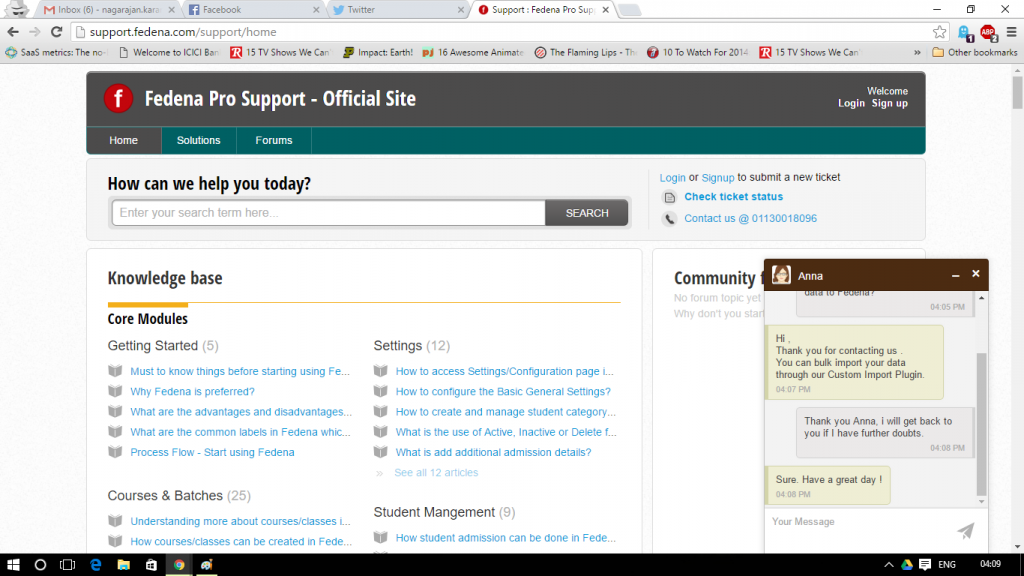
Here’s a peek at the new Chat on our support portal :

Fedena School ERP screenshot support


Fedena chat support screenshot


Fedena school ERP support chat screenshot


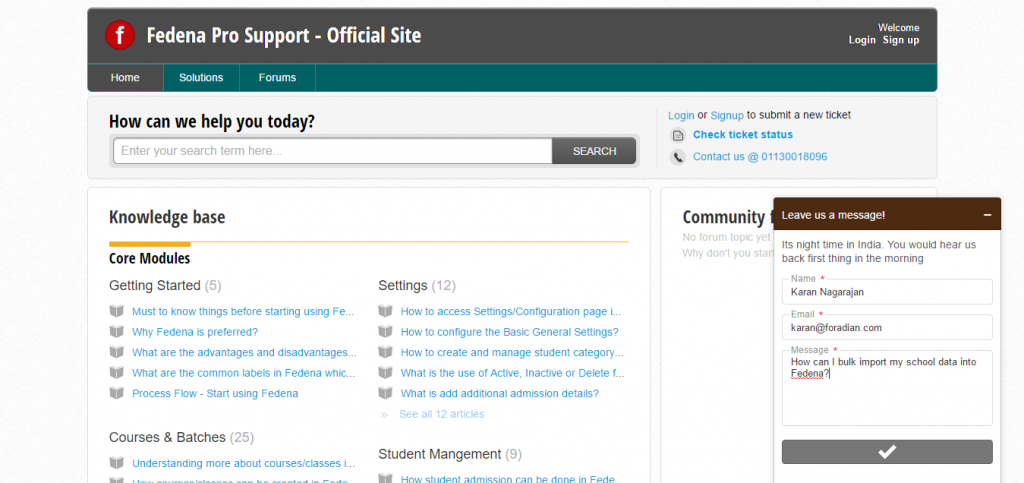
If nobody is online, we’ll get back to you as soon as possible :


Fedena School ERP Support Chat


We feel that this will greatly benefit our partners & clients who need immediate support. Partners who need quick clarification or encounter a showstopper bug can use this feature to resolve the issue at the earliest rather than writing an E-Mail and waiting for a response. The introduction of chat to our support arsenal will greatly enhance customer experience and make it an independent, seamless and easy process.


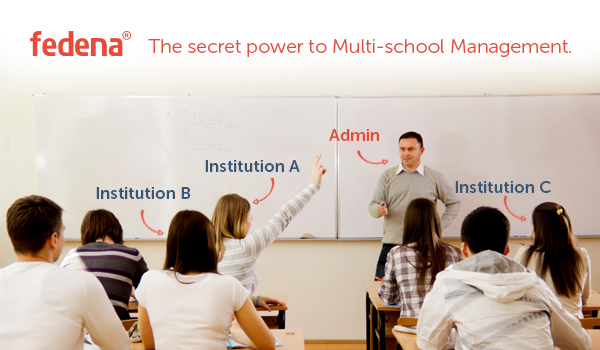
Fedena School erp multi school system

Fedena School ERP System – The secret power to Multi-school management.

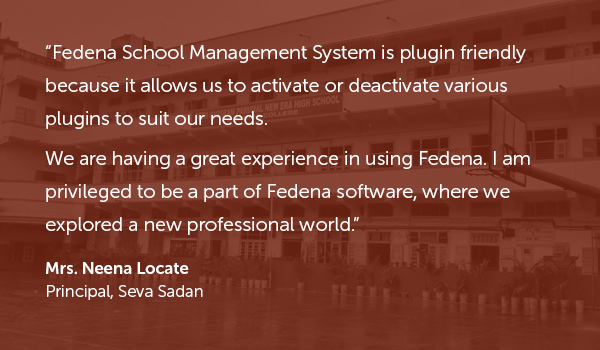
Fedena School ERP Seva Sadan Testimonial


Managing a school/institution is equivalent to running a tight ship, but managing a group of schools/institutions is just the tip of the iceberg. After constantly taking feedback and updating our Fedena accounts panel, we are glad to say that we have successfully identified key features that admins for a group of institutions would find very helpful. To give you a better understanding of the features in the accounts panel and how they can be applied, we will be releasing a series of blog posts describing features and their applications to your institutions’ administration.


In today’s blog, we give you an overview of the Fedena accounts panel to our school ERP system, access to it, the list of features and it’s advantages. If you have already subscribed to the Fedena demo ( If you haven’t yet, you should!) or made a purchase, you would have got an email with various links and their respective login credentials. To access the Fedena accounts panel, you will have to click on the link below :


    accounts.fedena.com


Before we go ahead and log in, let’s first list down all the different features and the links to their functionalities below
 
Fedena Multi school management system
Creating a Group of Institutions as well as Groups of Institutions.
Creating institutions under each group.
 

Fedena multi school management system part 3
Plugin assignment for institutions.

Rebranding Fedena.

Configuring Payment Gateways.
 

Fedena multi school management system part 4
Setting up your SMS settings and Assignment.

Analytics and Reports.

Multiple Admin profiles with customized accessibility.


The Fedena accounts panel comes with a useful feature that allows you to rebrand your platform to show customized branding elements for each institution. We will discuss all of these features in detail with examples and screenshots over the next few weeks. For today, let’s discuss


The advantages of Fedena School ERP system for Multi-school management
  • One dashboard to manage and track all your institutions.
  • Track what you want, when you want, how you want.
  • Rebrand Fedena to your Institution’s Brand.
  • Easily configure online payment options for independent as well as a group of institutions.
  • Involve more admins at different levels by allocating accessibility to the Fedena accounts panel.
  • Choose SMS settings as well as email settings easily for all the institutions in your group without the hassle of setting them up separately for every institution.


If these reasons aren’t enough to get you started with Fedena School ERP system for your group of Institutions, look out further for this space as we go in-depth into describing the various features the Multi-school management panel from Fedena offers and how it best fits and automates your group of Institutions.

Namaka : Fedena 3.5.1

Namaka

Fedena 3.5.1 is all geared to be the number one school management software. Namaka, our latest update on Fedena is finally out today! Though it’s a small release it’s loaded with a tonne of powerful updates and fixes. These updates and fixes come from your generous feedback. Let’s dive into the updates that are rolling out today and also see what’s brewing in our labs for release up ahead.
 
In this age, we might find it hard to imagine a time where girls were forced to stay at home and married off at a young age, but it is due to a few forgotten heroes who brought about change in the society by small yet powerful steps against many odds. We remember the trailblazer who made this happen and dedicate this release – Fedena 3.5.1 to her,  Savitribai Phule . She was born in 1831 in Maharashtra and was an early social reformer and poet. A lifetime educationist, she championed the cause of education for young girls and widows by opening India’s first women’s school at Bhide Wada near Pune, India around 1848. She used poems to get her message of education and equal rights across the country and the world.
 
What’s New in Namaka

  1. Examination Report Settings
  2. Auto Logout Feature
  3. Inventory Tax Settings

 
What’s Updated in Namaka

  1. Menu text link beside the Menu icon
  2. Finance module
  3. ICSE Report Card Design

 
Examination Report Settings

After integrating all the feedback we have received, we decided to bring in customizability to the reports.  You can now assign the settings for the exam reports using the Report Settings in Fedena. This option allows an admin or a privileged employee to manage & customize fields, header sections, grading levels and the signature section in a report. The report settings can be assigned to courses following Normal, GPA, CWA, CCE and ICSE type of grading system, basically all the grading systems Fedena supports.  


Auto Logout Feature

A feature which is the most important for the security of your institution’s data is finally up for release with Namaka. The Auto logout feature in Fedena, automatically logs the user out depending on the time of inactivity within Fedena. This feature can be enabled from the General settings tab of the admin with the admin having the privileges of determining the amount of time of inactivity after which Fedena will automatically logout the user.
 
Inventory Tax Settings

You can now apply discounts to your school/institution inventory purchases making it easier to calculate the taxes and discounts. The update comes as two modes :

  1. Before Discount mode
  2. After Discount mode


These modes help in calculating discounts on Invoices, GRNs and Purchase Orders either before calculating tax on them or after calculating tax on them, allowing you to apply and manage the tax calculations easily.
 
Menu Text Link in Fedena  

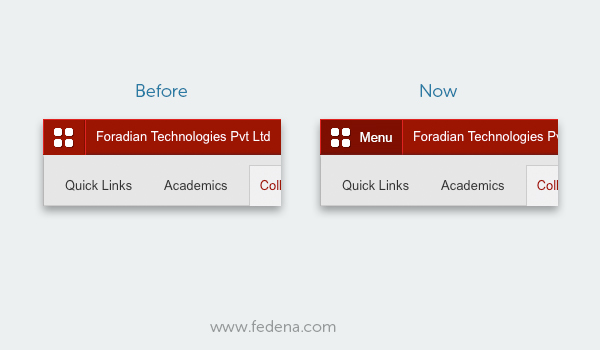
The menu icon in Fedena has always been on the top left hand corner and more often than not from your feedback about there being no markers as to it being a button or not, it has often gone unnoticed at the first glance for many users including admins. To erase this confusion and enhance your experience with Fedena we decided to that a text “Menu” should be accompanying the menu icon. Here is a look at before and after :

Menu


Finance Module Update – Fee Revert Reason

The update in the finance module is a much awaited one as it was high on the feature requests in the feedback. With this new update we have included a text box to record the reason for the revert of the fees. You can also track the reasons for reverts in the reports section.


ICSE Report Card Redesign

The old ICSE report card in Fedena wasn’t really the optimal use of space and couldn’t include all the subjects in one sheet and looked a little too cluttered. The new update brings a change in layout accommodating all the various subjects, overall scores and reducing the space used to print these, this gives you a better viewing as well as saving paper on printing the reports.

ICSE Fedena school management system report card
 
Sneak Peak into what’s up ahead!

Our team is already working on a host of new features that will enhance your experience with Fedena. A customizable Transfer Certificate Generator, Automatic Timetable Generator and a powerful HR Reports module are some of features that are getting primed in our labs. The features you have requested will soon be live in Fedena, the number one school management system.

Fedena 3.5.1: Namaka – Release Notes

Fedena 3.5.1 Release note

What’s new in Fedena

Here is the list of new features included with this release of Fedena 3.5.1

Feature Description User Role Module
Examination Report Settings Examination Reports can now have custom fields in the report card like Roll Number, Father’s or Mother’s name, Date of Birth etc. Institutions can now choose between the default Fedena header and a pre-printed letterhead. The signature labels can also be customized and institutions can choose upto 3 labels. This is applicable to student wise reports in Normal, GPA, CWA, CCE and ICSE reports. Administrator, Privileged Employee Examination
Auto Logout You can enable auto logout on inactivity from the general settings page. When selected, you can specify the time after which inactive users should be logged out and the user roles for which it should be enabled. Administrator, Privileged Employee All modules
Inventory Tax Settings Now you can select if discount is to be applied before or after the tax is calculated using the modes -Discount before tax or Discount after Tax. Administrator, Privileged Employee Inventory

What’s enhanced in Fedena

Here is the list of enhanced features included with this release of Fedena 3.5.1

Feature Description User Role Module
Revert Reason in Finance In order to track the reason for reverting all finance transactions – Income, Expense, Donation, Academic Fees, Transport, Hostel, Instant Fees and Library, a text field has been added. This reason is shown in the reverted transactions report page with option to take export as PDF and CSV reports. Administrator, Privileged Employee Fees, Finance, Transport, Hostel, Instant Fees, Library
Menu Link Text The text ‘Menu’ has been added near the menu button to provide more clarity to users. Administrator, Privileged Employee, Student, Parent All modules
ICSE Report Card Redesign The ICSE student report is redesigned to hold many subjects in one sheet of paper. Administrator, Privileged Employee, Student, Parent Examination

Issues Fixed

Here is the list of issues fixed in this release of Fedena 3.5.1


Examination

  • No validation for maximum and minimum marks in examination
  • Assign IA group and assign IA weightages shows subjects from inactive batches
  • ‘Select All’ option not available in ICSE generate report


Timetable

  • Manage subjects: Show timetable class slots instead of subject weekly class
  • Work allotment shows subject hours instead of total employee working hours


Finance

  • Finance income report does not show the category name
  • Finance expense report does not show the category name
  • Wrong date in inventory transactions finance report
  • Incorrect fee shown in the profile.


Library

  • No validation in library manage tags page.


Blog

  • Pagination not working in blog comments


Instant Fees

  • Error while reverting instant fee transactions


News

  • News comments show blank pages with pagination links for students


Reports

  • No data shown in course/batch report on sorting by student wise.

Technology in Education : In conversation with Will Richardson

willpicsmall
 
Could you tell us a little about yourself?

I’m a former 22-year public school educator who has two teenagers and who started blogging about education way back in 2001. You can see all 3500+ blog posts on my site at willrichardson.com.
 
How did you first get involved in education?

I was originally a journalist but always had a calling for the classroom to work with kids. As with many people, I had a great English teacher in high school who inspired me to pursue teaching.
 
What keeps you interested in Education and Edtech?

I think this is one of the most interesting and fascinating moments in history when it comes to learning and education. For the last 15 years, I’ve been totally absorbed with the questions of how schools must change in the era of the Web. I don’t see a clear answer to that, but trying to figure that out is what keeps me reading and writing and connecting.
 
How do you keep your listeners engaged while giving a speech?

I really try to push their thinking, get them out of their comfort zones (without scaring them) and challenge them to reflect on their work and the new contexts for learning in the modern world. I think we in education have been too complacent to accept past practices, and we need to shift that. I also try to use humor and stories to cut the tension a bit. But, I’m trying to push people, no question.
 
Could you tell us about your upcoming workshop “Creating a Modern Vision for Teaching and Learning With Technology”?

Too often, schools buy technology without any real understanding of the potentials for amplifying the agency of the learner to learn. This workshop takes participants through a process of developing a vision for teaching and learning with technology that embraces the new contexts for learning in the networked world.
 
How important do you think technologies like ERP, LMS are for a school or an institution?

I think these technologies can help teachers and students to learn more powerfully if used in ways that, again, move agency over learning to the learners, whether adults or kids. Too often, however, they are used to support a more traditional story of education in schools.
 
How important is it for present day educators to be informed about new emerging technologies in the education space?

I think it’s absolutely crucial that educators are fluent and comfortable with technologies for learning. But they must also stay abreast of changes in the future of work, the shifts in post-secondary education, and the larger impacts on the modern world, (environmental, political, etc.) School is not now so much about knowledge as it is preparing kids to live in a fast-changing world where access to knowledge, teachers, and technologies to learn are increasingly ubiquitous.
 
In “Freedom to Learn” you discuss how students sometimes or at most times are not engaged in the classroom, how do you think technology has helped overcome this problem?

I think technology in and of itself is a poor response to the “engagement problem” in schools. Engagement comes when kids are doing work that matters, work that has a real purpose in the world, work that is of a personal interest. Without that, no amount of technology can truly raise engagement in classrooms.

Easing your Finances with the new Fedena 3.5

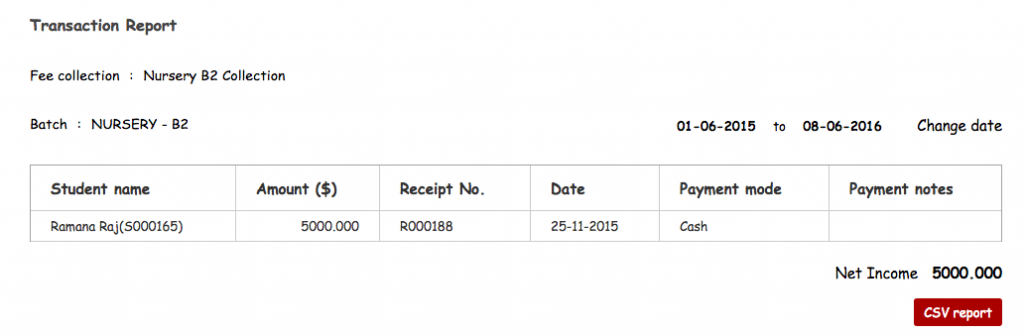
3.5 version of Fedena brings you a new redesigned Finance reports section. Functionality wise, the reports are the same, but the report’s design has been updated for better usability. The user can now see the various incomes and expenses of the institute, under multiple layers. For Example, let’s suppose the accounts manager wants to know the total expenses in the month of May, or the total expenses of the Mathematics department in the month of August, or the Total income generated in the first 10 days of January from a particular batch, or say the Accounts manager wants to compare the income – expense for two different time periods, all of the above are now possible in the Finance reports section of the new Fedena 3.5 school management system.

To see how we have enhanced the Finance reports section, let’s take a few scenarios and see it’s benefits for your finance department.
 
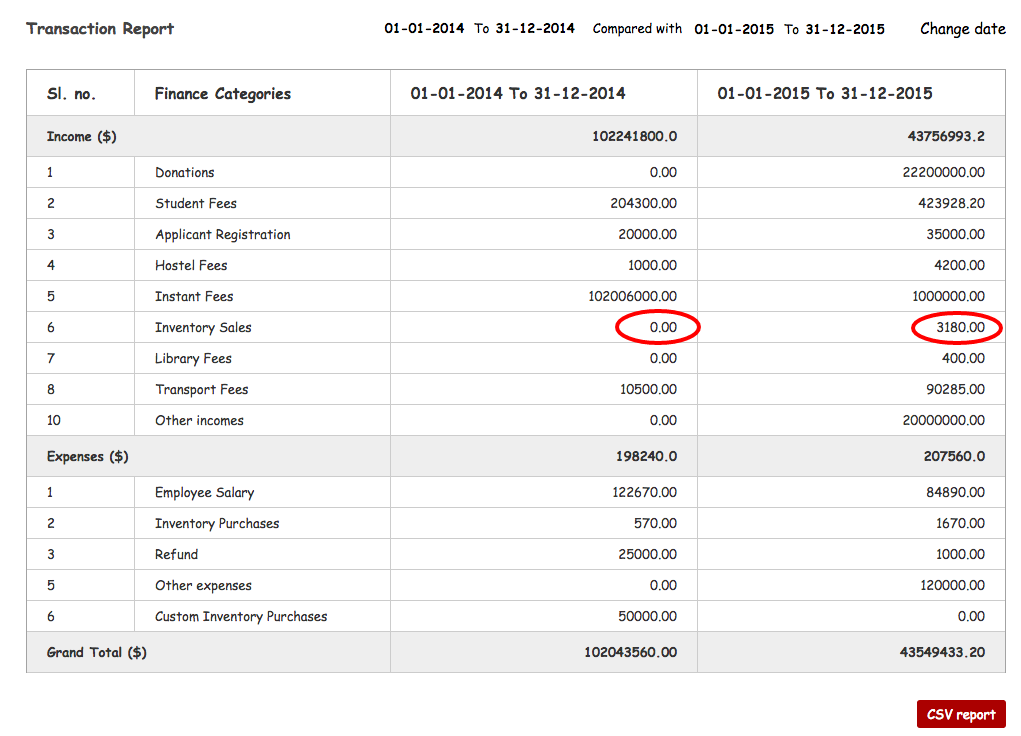
Scenario 1: Management wants a report from the Accounts department on how much is the Income from the sales of Inventory (Books, Sports goods, stationery) this year is compared to the last.

Now this can be easily obtained from the compare transactions section under Finance reports in Fedena.
• Go to Compare transactions and give the date range (last Financial year and This financial year).
• Report comparing income and expense under different categories is generated like the one below

Fedena school management system finance module


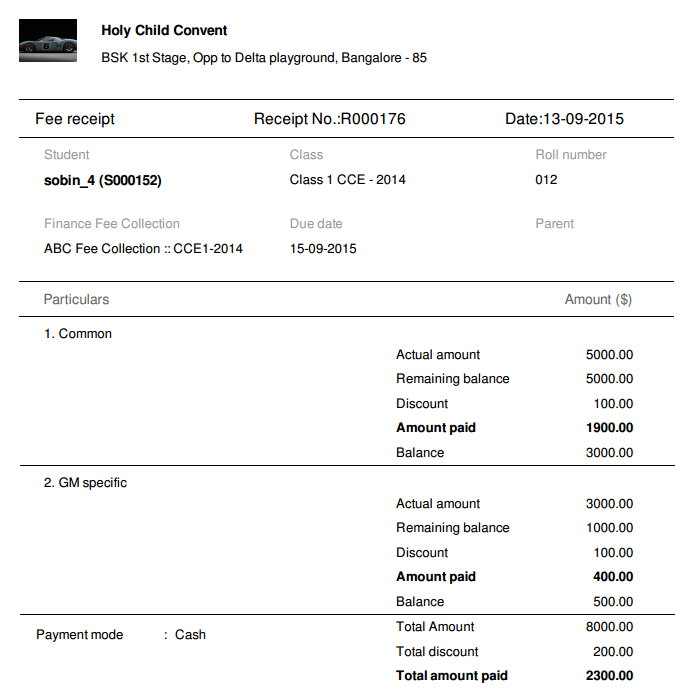
Scenario 2 : There is dispute on one of the Fees collected, the guardian raises this issue after a period of three months to the school management. School management needs to show the details to the parent/guardian.

  • Go to ‘Fee Receipt’ section under Finance reports
  • Search for the Fee receipt number for which the dispute has been raised.
  • All the details related to that Fee paid will be available on the page.

These details can be printed or taken as a PDF and can be shown to the parents/guardians to discuss on who collected it, the calculation done to compute the fee and all the other details collected at the time of Fee collection.

Fedena school management system finance module screenshot
 
Scenario 3 : The account manager is not sure about the mismatch with the income and expense for a particular month.

  • Just navigate to the transactions section under Finance reports
  • Give the month or time period for which the details seem mismatched.
  • Once the time period is given, all the income and expense to the institute will be shown.
  • Not just that, but every income and expense will be shown under different heads. Say Income can be from student fee, donation, selling of stationery and books etc. Expense can be salary, buying furniture for the institute etc.
  • So once this report is generated, the accounts manager can pinpoint exactly where the mismatch happened.
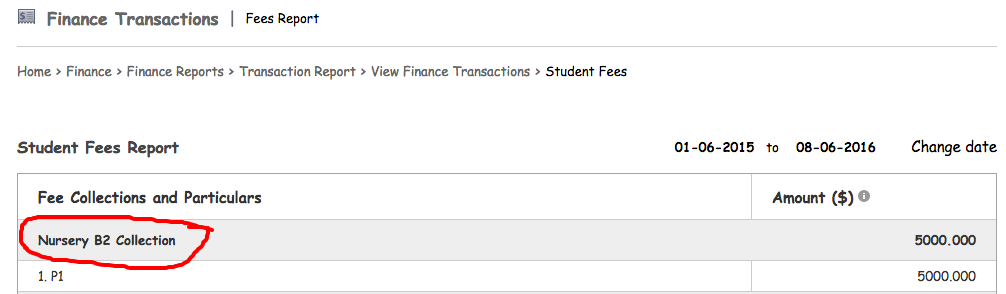
  • Suppose the income from Fee collection is not matching the actual income, the accounts manager can also go deeper into each fee collection and check where the mismatch happened. This helps in finding the exact mismatch fee collection.

Fedena school management system finance module screenshot


Fedena school management system finance module screenshot 4


These basic scenarios are just a few examples of how the finance reports are handy for the Management or the Accounts department or even for the students/parents, you can always find other benefits of the new upgraded finances in Fedena 3.5 school management system. These readily available transparent finance interactions are one of the best ways to ease communications for institutions with parents/guardians, sellers in financial matters.

Managing Leaves and Payslips in the new Fedena 3.5

Human Resources module has undergone a major revamp in 3.5 version of Fedena to enhance usability and user experience to continue being the number one school management system. The main changes are in the leave management and payslip processing modules.

Leave Management Update

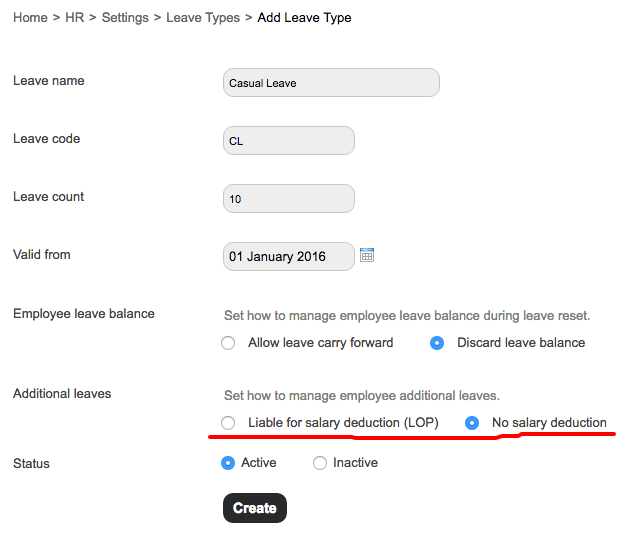
Earlier version of Fedena did not support applying extra leaves apart from the leaves applicable for a particular employee. Suppose if the employee has taken 10 out of the 10 sick leaves available and no more leaves are available, earlier it had to be marked manually by the HR manager. Now the employee can apply for additional leaves which can be accounted as either paid leave or Loss of Pay. The additional leaves applied by the employee will be notified as additional leaves to the manager.
 
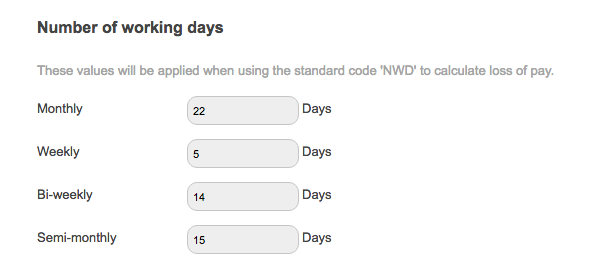
The new version of Fedena gives the flexibility of defining the number of working days in a month or in a week or bi-weekly. This helps in generating payslip for a particular period. In the previous versions, payslips could only be generated monthly. With the enhancements, an institute can calculate and generate weekly, bi-weekly or monthly payslips. The days can be defined by the institute as per their policies.
 
School management system leave dash - Fedena
 
Different types of leave can be defined in Fedena and for each of them different attributes can be given. When a leave type is added, the admin/HR Manager can define if the employee exceeds that particular leave type, and is counted as loss of pay or not. Admin can define the total number of leaves in that particular leave type. Whether this leave can be carried forward or not can also be defined in the leave settings.
 
School management system leave dash
 

Payslips Management Update

One of the other major changes that was implemented in 3.5 version of Fedena was the multiple type of payslips. In an institute, different categories of employees can be working on an hourly basis, on a weekly or monthly basis. The payroll for them will differ based on the type and category in which they fall into. All these factors were taken into account and multiple categories of payroll/payslips was implemented in the newest version of Fedena.
 
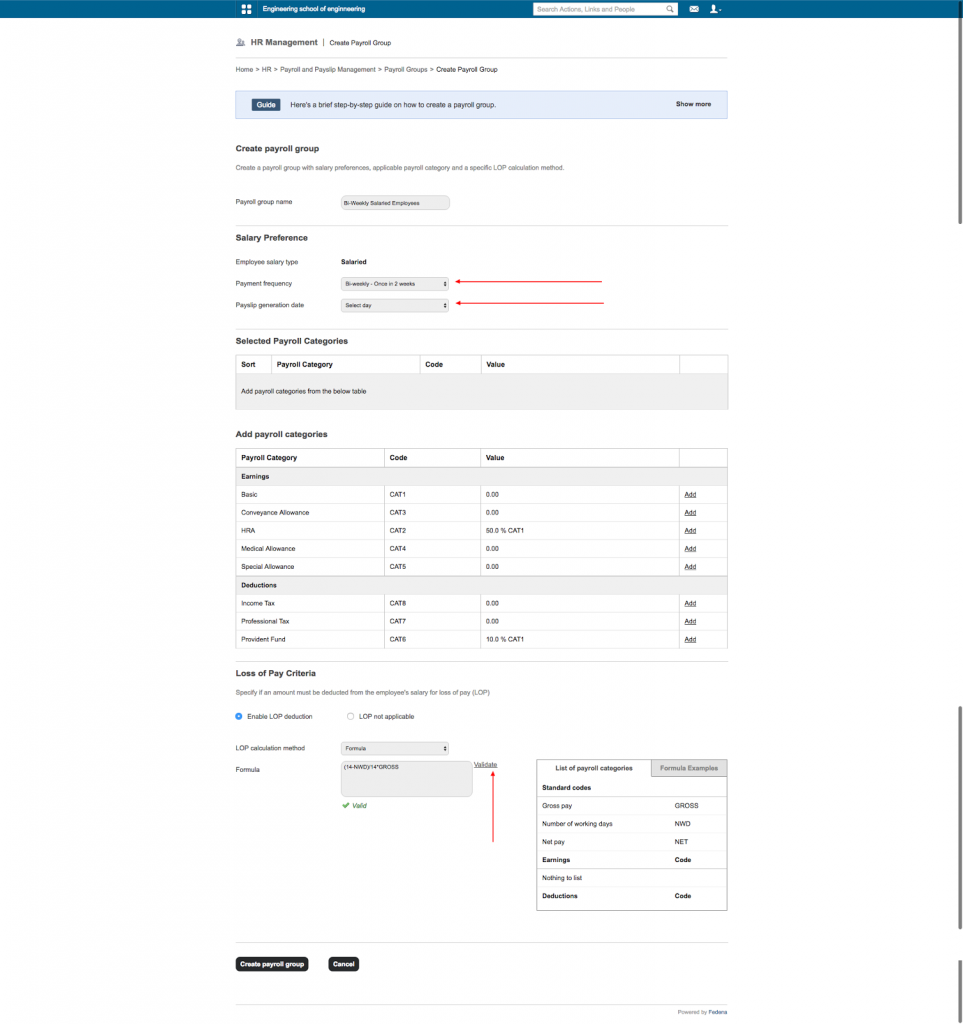
When defining a payroll group, these different complicated aspects are taken into account. The administrator of the institute can define the Payroll group name. For an example, The administrator wants to put all the Bi-Weekly salaried employees into one payroll group. Admin can create a payroll group ‘Bi-Weekly Employees’ and define the values applicable to those employees. Admin can select the frequency of payslips (in this case Bi-Weekly), The payslip generation date (Any day on the week can be selected). If Loss of Pay is applicable for this payroll group; it can be defined. The admin has different options to define the LoP. This can be defined as a particular numeric value or a part of different component of salary etc.
 
School Management system payslip dash
 
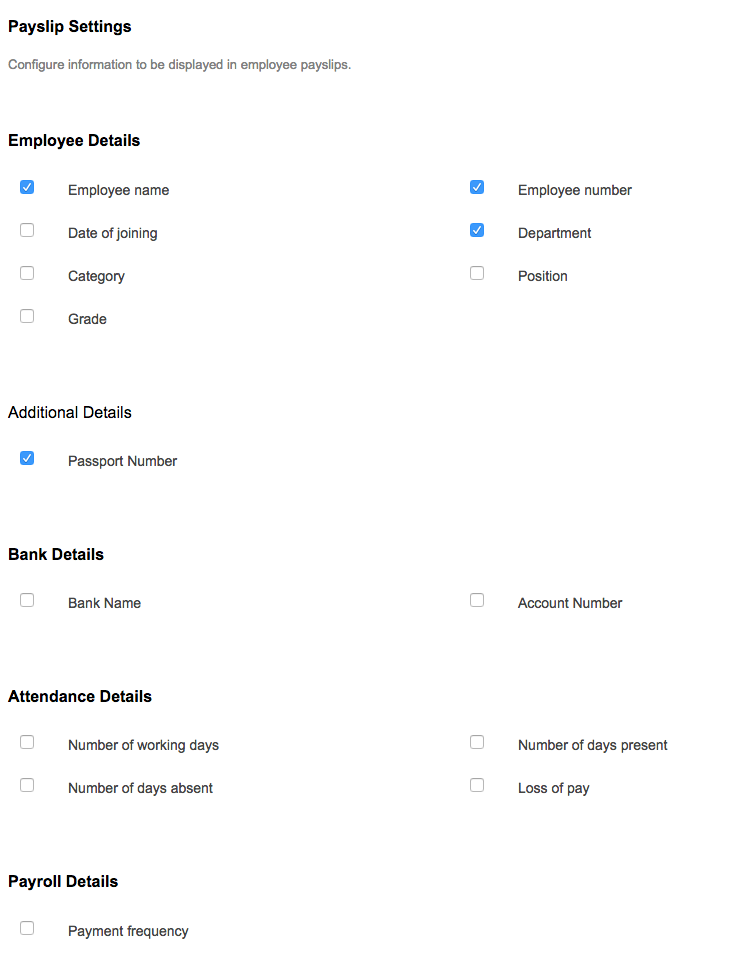
The fields to be shown in the payslip can be defined by the Admin or privileged employee (those who have access to HR module payslip settings). The details to be printed can be selected as per the need of the institution. Whichever field is not needed to be printed can be deselected.
 
School management system payslip dash
 
With the new enhancements users will find it easy to administer most of the HR processes in an institute. Working days, Payslips, Extra leaves etc can be easily defined and processed with the new 3.5 version of Fedena.

Fedena student records

Fedena 3.5 : The New Student Records

In this new age, education is not only about academics and grades, it’s also about the overall development of a student. Many aspects are taken into account when analyzing the growth of a student. These can be their academic records, behaviour, extracurricular activity, health status etc. With the integration of ‘Student Records’ module, Fedena helps get the overall consolidated report of a student. In the study, Using Data to Improve Student Achievement, published by the Association for Supervision and Curriculum development, ASCD, “Teachers who develop useful assessments, provide corrective instruction, and give students second chances to demonstrate success can improve their instruction and help students learn”.
 
Any kind of records can be created in the ‘Student Records’ module and this can be easily accessed from the student profile page. Let’s consider the availability of the health records of students. The health record can be added as record in Fedena. Most schools/institutions also track the behaviour or attitude of the student, this too can be done. CCE reports (CBSE India) for example, mandatorily need the health records of students to be captured along with their academic records.
 
Working with Student Record in Fedena
 
Student record in Fedena needs to be configured in three steps.
 
Record Groups
Record Labels
Assignment of Record Groups
 
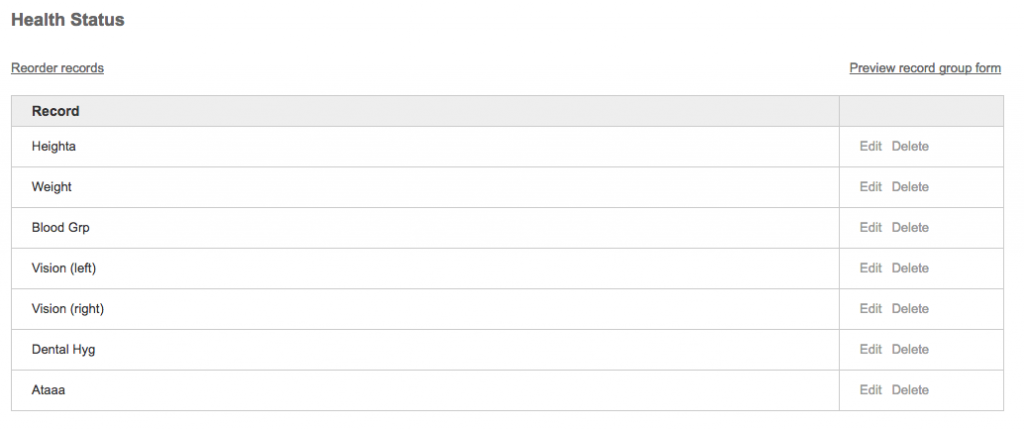
Record group is simply the group under which certain records need to be put. For example, Health status or Extracurricular activity can be a Record Group. Once various groups are created, the admin can add the various record labels each group needs. For example, labels like Vision, Height, Weight, Dental hygiene etc come under the Health status record group.
 
Fedena Student Records screenshot
 
Once the record groups and labels are created, these record groups can be assigned to student batches in Fedena. The record data can then be added under each student.
 
It’s important to note that record groups and labels need only be created once while the implementation of Fedena in your school/institution.
 
Fedena Student Records Screenshot 2
 
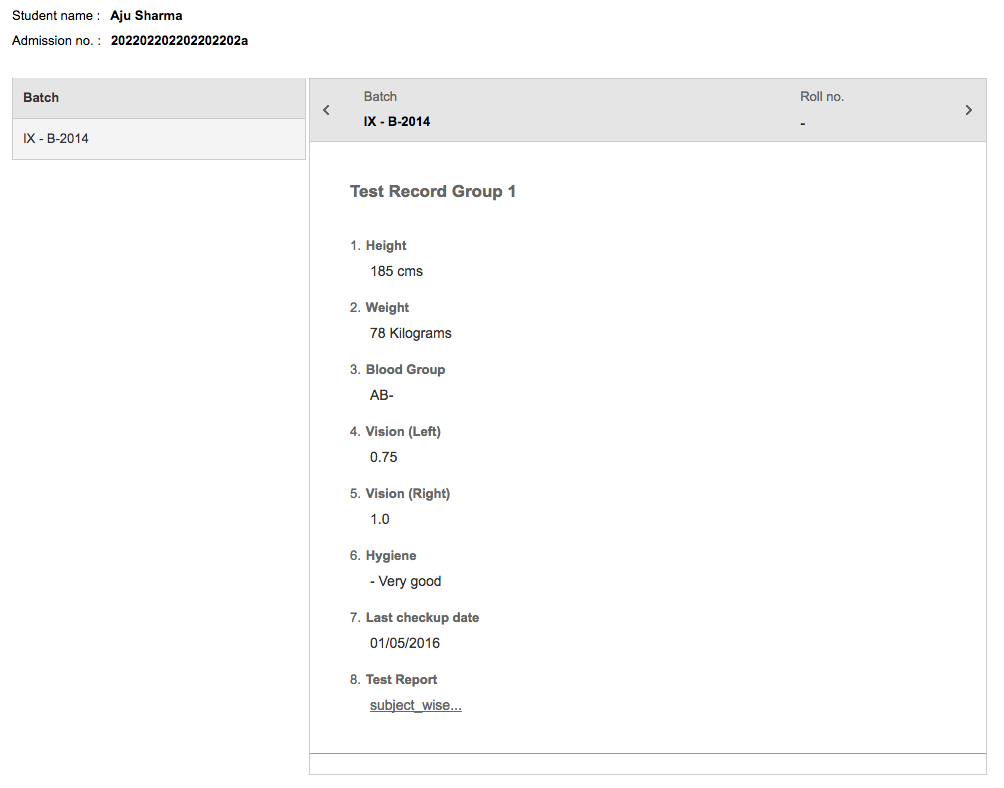
Once the data is entered, the record can be accessed from the student profile. This makes it easy for the parent/teacher/principal to access the extra records of that student easily. The records will be available across all the batches the student studied.
 
Fedena Student Records Screenshot 3
 
With more information of every student parents & teachers can take a holistic approach to the student’s development. This makes the overall progress of each and every student much better.

Virtual Classroom changing Fedena

Are Virtual Classrooms Changing How We Study?

The rapid progress in technology has changed a wide number of aspects in human lives. The effect of this change is getting more apparent each day. The education sector is one of the areas that had received a significant impact on such progress in the form of information technology. And it’s become such that without information technology education and learning today is quite a difficult task.
Thus, came about the advent of virtual classrooms, a private online space. Virtual classrooms do not require a physical presence in the classroom and students can take classes in terms of geographical distribution where information can easily be exchanged through the internet. Many of the activities that take place in virtual classrooms, are similar to traditional classroom programs but the nature in which such activities are performed, are different. In virtual classrooms, Students can have access to a vast amount of educational content at any time day in a variety of formats (text, video, audio).


The Need for Virtual Classrooms

 
Times have changed drastically over the course of 10-15 years. This change has brought about a much different perspective in various aspects of human life. Technology has grown to certain degree even becoming easily accessible to all. It was only a matter of time before classrooms and lectures experienced the effects of it. With time and convenience becoming a major factor in people’s lives, the very ideation of virtual classrooms has become a necessity especially with those seeking cheaper educational facilities that are otherwise unavailable.


The Components

 
Fedena Virtual Classroom
 
The idea of a virtual Classroom isn’t that difficult to conceptualize but the very things that make up the ecosystem aren’t always discussed. There are quite a few components that help understanding the concept of virtual classrooms better:
 
1. Sharing
With the advent and rise of internet technology, people can now share content at breakneck speeds. Instead of having to go all the way to a library and find your favorite book, you could have someone send you a virtual edition of the same. Sharing documents is one of the most commonly used features in a virtual classroom experience. It follows a trainer sharing documents and study material to students in the form of PDFs, PowerPoint Presentations and so on.

What makes this unique is that some programs have privilege settings that give the participants free control over viewing these shared documents. This means that they could move to a different slide than the one everyone else is viewing. Other programs give you control over whether or not participants can print the shared document to name a few. This allows for classrooms to stay in “sync” for most of the part.


2. Chat
The idea of chatting enables one to communicate on a real time basis with others with the virtual space. Sometimes, these facilities can be both private based in a virtual classroom sphere or even private. This allows for more engagement in a live virtual classroom in that the trainer can invite participants to send feedback, ask questions, and make comments during the program. The chat window can be a running commentary throughout the session.

This brings a different dimension as there is a sense of interaction similar to that of a traditional classroom.


3. Whiteboard
A virtual whiteboard is similar to a classroom whiteboard. It’s a blank screen that can be typed, written, or drawn upon using various annotation tools if need be. The idea behind whiteboards in a virtual classroom is to create brainstorming sessions that invite active participation among the students.

It provides more of a collaborative classroom experience for both learners and lecturers. Messages can be made on a common whiteboard and shared in real time among all present with the virtual classroom space. This is useful as the information presented on this board can be erased and rewritten much like a normal whiteboard allowing for more interactive sessions.


4. Presentational Functions
The presentation function allows creating a presentation for the class. This allows for entire lessons or chapters to be thought over time. The function usually comes in two modes. The first mode is lecturer mode where the lecturer can fully control the presentation and learners can see the same frame simultaneously.

The second mode is learner mode where the learner can navigate the presentation by using next and back buttons in order to view the presentation. They are however, not allowed to control the presentation that the lecturer has corresponded.


5. Audio/Visual
Another dynamic to the virtual classroom space. It allows for both lecturers and learners to communicate with the help of audio and visual aids. This allows for more advanced sessions to be conducted. Video and audio tutorials can be used to communicate ideas more efficiently as compared to basic presentations.

The idea of interaction also changes as group discussions can take place through voice chats. The lecturer can communicate ideas and have learners respond through real time within the space of the lesson.


Methods in Virtual Education

Fedena Virtual Classroom methods


There is no doubt that the internet brings a very different notion and perception as to how we educate ourselves. But the methods in which these are made possible can vary. There are usually two methods to consider here:


1. Synchronous Learning
This is the most recognized method one would consider in terms of being associated with a virtual classroom. In this way, the learners and teachers communicate with each other directly during the learning process. These processes bring human interaction into the virtual classroom through facial expressions, vocal intonations, hand gesticulation, and real-time discussion in the form of chats, videos and audio conference.


2. Asynchronous Learning
While the idea to learn may be the same, the method differs from the previous. With this method, students can participate at any point in time through the internet in the learning experience. This does not necessarily mean within a virtual classroom space, but being able to access learning based assets through the ecosystem. For instance, being able to access video tutorials, documents within a specified folder having been created by the lecturer.


Virtual vs Traditional


While many still consider more conventional or rather traditional methods in terms of education, it’s hard to just brush aside the differences between the two approaches


Factor Virtual Classrooms Traditional Classrooms
Time Learning times are flexible in terms of a virtual classroom. Lectures can be conducted at any point in time from any part of the world. Learning times are always fixed and therefore, students are to study at the same time.
Place There isn’t a real designated place for learning to happen. Instead, the learning process takes place in a virtual space on the internet. There is a designated place common to all students. They must be present physically for a collective learning process.
Process The process can be both synchronous and asynchronous. The learning process is therefore customized for every individual learner. The learning process is more collective in nature. All students learn the same thing.


The Benefits


The growing need for information at one’s convenience continues and technology facilitates it. And with technology bound to get better and better, the benefits of a virtual classroom will only seek to grow.


1. Non-Restricting
A virtual classroom allows both learners and instructors around the world to participate in live classes to collaborate and interact. There are no restrictions in terms of interactions and access to information


2. Affordable
While studying in a designated classroom the traditional way can prove to be costly, a virtual classroom experience is cost effective in comparison. The low costs of virtual classrooms are considered to be a major advantage. Learners can save money by not having to worry about travel expenses and so on. Participants also save time since all that is needed is an internet connection.


3. A Flexible Experience
As mentioned previously, the virtual classroom experience is more flexible in nature in terms of its learning process. Students have the liberty to record their sessions for later references. This means that the content is accessible even after being delivered, an added benefit for those who want a quick refresher, or perhaps did not fully understand the first time.


4. Ease of Accessibility
Virtual classrooms can be used to deliver lectures and tutorials online. They are also useful for impromptu meetings and group projects where members need to check-in on progress and bounce ideas of one-another. With the virtual environment, ideas and collaborators are never far away.


The Challenge: A Matter of Security


As with any internet database, a virtual classroom faces similar challenges and threats with regards to security. Like other internet based systems, virtual classrooms face threats such as penetration from external sources. In spite of data authentication and encryption codes, cyber-crimes cannot be entirely prevented.

Another issue could be in the form of synchronous classes. While it’s one thing to have a full attendance, it may be difficult to determine if the person behind the system is true to the registered identity. One may never be able to fully understand how to bypass such issues. Measures have been taken such as biometric methods, but these challenges will still remain.


Virtual Learning in Numbers
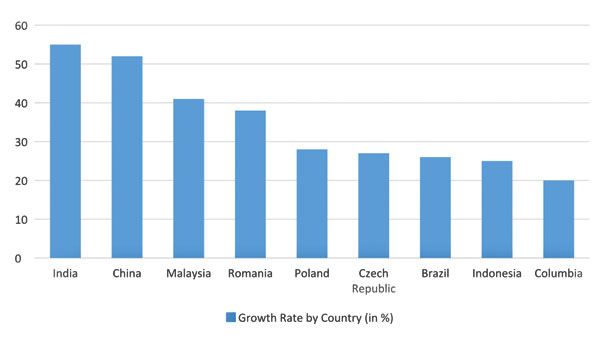
Growth graph of virtual classrooms


1. The global eLearning Market has reached approx. $107 billion at the end of 2015.
2. Large companies are the main purchasers of eLearning products and services and make up roughly 30% of all eLearning buyers.
3. The worldwide market for Mobile Learning products reached $5.3 billion back in 2012. It crossed 8.7 billion in 2015 and is expected to reach 12.2 billion by 2017.
4. Currently, up to approx. 77% of companies based in the US use online corporate training to improve employee development.
5. This online training is expected to grow by roughly 13% in the year 2017.
6. The growth rates of eLearning adopters is quite significant with the leaders being India, China and Malaysia.


Conclusion: A Big Future


With the advances and changes in technology, comes a huge change in lifestyle. Electronic education has seen a steady growth which only seems to get more significant as time passes by. If the statistics are any indication, the future of eLearning and virtual classrooms will only play a bigger role in the educational sector.


10 Things you can do with your kids during the summer break

“In the summer, the days were long, stretching into each other. Out of school, everything was on pause and yet happening at the same time, this collection of weeks when anything was possible.”

 – Sarah Dessen


This quote is apt because it is that time of the year when you just want to relax, but your kids are bouncing off the walls or shrieking at the top of their voice about how bored they are. These are moments when they look up to you and hope you could help them overcome their boredom. Parenting can be difficult, we understand! Hence, before the kids come running to you shrieking about how bored they are, here are a few activities we have lined up that you can engage your kids with during the summer break.


  1. Help your little ones make new friends
  2. We know that you have a lot of work to attend to and you may not be able to pay complete attention to what your kid wants to do. So, the best thing would be to let your kids go make new friends at the playground or your neighborhood. New friends will help keep them engaged. You could also have the kids over to your place, like a playdate.


  3. Educate yourself with their video games
  4. Now we know that some of you may be handicapped when it comes to video games. On the other hand, your kids love them. We urge you to think of it as a little bonding time with the kids.  We all want to give the kids what they want and hence make the appropriate choices. Consult your kids on what are the best video games. This may seem ridiculous, but they are the best decision makers when it comes to video games!


  5. Sign up your toddlers for music lessons
  6. Between soccer and scouts, your kids’ schedule is loaded with many fun activities. But learning to play an instrument can help your kid fine tune their ears and enhance skills needed for social interaction. Learning an instrument can also help them understand what delayed gratification is. It would also introduce your kid to new cultures. It is important to familiarize kids with other cultures at a young age because it fosters open-mindedness about all the different traditions around the world.


  7. Let the kids learn to swim
  8. The temperature is rising, school is out of session and all your kid wants to do is sit inside and play. This would be the ideal time to teach your kids to swim. Lots of children love water and this would be a fun way to bond and help your kids become comfortable with water as they grow up. You could laze in the pool with them to beat the summer heat as well.


  9. Camp At Home
  10. This should be really fun. It is not only indulging for your children, it can also act as a stress buster for you. Here’s what you need; a tent, sleeping bags, blankets, pillows, and flashlights. Pitch a tent in your living room or yard and the kids get to enjoy the fun of camping without the hassle of a vacation.


  11. Movies and popcorn on a rainy day
  12. One morning, you wake up and look out. You realize there is no chance of taking your kids to the pool or park because it’s the summer rains. Your kids are going to get cranky and restless. In this situation, gather everyone up on the couch, open the windows for some breeze and get the television ready for some movies.


  13. Bring your kids’ books alive
  14. Sitting and reading books may seem like the best idea for you. But the kids do not really like to sit in one place. We suggest making the summer reading fun! You could add audience or start a book club where you invite your kids’ friends to indulge in reading. You could also tempt them to create a scrapbook where your kid could keep tabs on what he/she is reading etc. Or the best yet, enact a few scenes from their favorite books!


  15. Indulge your kids in the world of colors
  16. There’s a saying; life is about using the whole box of colors. Whether you already have coloring books or you print out new coloring sheets, coloring is fun for kids. You could also help them color. Coloring books are after all a stress buster. Just make sure it’s not as bad as this.
     
    Fedena School ERP - Coloring book


  17. Let there be a dance party!
  18. Let your kids find their own rhythm or give them some fun dance moves to try out. Invite other kids to be a part of this party. This would let your kids break the monotony of the summer and have some fun.


  19. Let the construction with Legos begin!
  20. Legos are great for building anything your child can imagine. If they are feeling ready for a challenge try drawing a simple house and having them try to recreate it with their blocks. You could also help them build and this would be a bonding time for the both of you.


We are sure that there are a lot more things that you could do that would keep your kids busy this summer. It would be important to keep their interests and needs in mind. Summer, after all, is a time when wonderful things can happen to quiet people.