information and communication technology in schools

Importance of Information and Communication Technology in Schools

How to embrace ICT to get the best out of it

The internet has become an integral part of every individual’s life. Our nation has become known for it, Fedena’s current home is in a city that has been bolstered by the internet industry in the last few decades, and social relationships have revolutionized in its wake. So, it is no surprise that the use of the internet, even in school, has increased at a rapid rate. ICT, or Information and Communication Technology, has given wings to scholars, educators, and allied staff in a multitude of ways. Software in schools has empowered them to uplift their communities through the use of technology related activities in the world of education. But there still remains a negative image of management software in the minds of many people.

Educational institutions are key to eliminating these misconceptions through the reasonable implementation of educational management software in schools. They do this by implementing ICT to create positive outcomes for their most visible of stakeholders – their students.

Nowadays, when schools are increasingly transforming themselves into smart schools, the importance of educational technology also increases.

This rising ubiquity of ICT has meant that we must monitor its role in education. It is necessary for decision makers like education ministers, school administrators, and educational institutions to be sufficiently insightful about methodologies that enable the implementation of information and communication technology in schools. Latest technologies can sprout novel education activities in addition to enhancing existing education systems. At Fedena, this is what drives us. We have spoken extensively about the role of information technology in education.

Let’s take  a look on the challenge of information and Communication Technology in schools

The rapid rate of technology growth in schools means a shake-up of the educational framework it occupies space in. To take full advantage of school management software, like Fedena, it is important to understand how they work. It is not enough to merely show on paper that educational technology is an option offered to students – efforts must be made to integrate its use into the current way of doing things at your educational institution.

There is a huge impact of the internet on students’ lives. Learning exercises have to be reoriented and reformulated, shifting the focus from obsolete and constraining manual sources to dynamic open source ones. For this to be realized, the broad utilization of web access has to be a strategy that is thought through and implemented by the powers that be at school. Implementing a technology as simple as Fedena can make a world of difference. When you decide to take this step, Fedena integrates well into existing systems at your school while also playing well with others.

Information and Communication Technology in School – Boon or Bane?

There will always be detractors to the use of technology at school. After all, we have had a successful run without it so far. So is it not gimmicky or indulgent to claim that we must integrate the use of such technology in our schools? Do our students really need anything more than a pen, paper, and a determined teacher?

We have previously illuminated the uses of information and communication technology on the Fedena blog. And our argument stands. The use of technology is an opening of worlds through the increase of access students have to a world database of knowledge. Not taking advantage of educational technology is foolhardy. The goal of any educational institutions is to graduate
well-rounded individuals who can take on the challenges of the world they enter and remain future ready. To enable this, we must stop thinking of school software as a monster to be battled, but embrace this boon through dynamic cooperation, eager implementation activity and with an overarching positive attitude. This must emerge from the stakeholders that can make change possible – government and academic institutions.

Fedena, for instance, is a school management software that benefits all. Administrators notice that automating processes makes their lives easier while parents and students rest easy knowing that their teachers are enabled by 24/7 availability through private, personalized communication channels. These are only a few of the many advantages Fedena offers to the education ecosystem.

How To Manage the Use of Information and Communication Technology in Schools

The repetitive cry we at Fedena hear from teachers and parents alike is what a distraction some technologies can be to their students. This is an undeniable fact. The mere presence of interactive media recreations and engaging web amusements has been a time sink for otherwise hard-working students. Schools cannot afford to tiptoe around the issue – they must be boldly and firmly handle these issues, by realizing that the solution lies in choosing the right technology and not attempting to change human behavior. Frankly, schools do not have enough time and resources to stop students from engaging with technology. Nor do their guardians. A better solution would be to direct this interest into more constructive systems. Engaging a child through the use of dynamic content in the course readings shared on

School software helps in involving them in lively group discussions created according to subject matter interest, and providing one on one attention through personalized communication is likely to give us better results than outright banning of the inevitable.

Teachers Turn Information and Communication Technology from a Zero to a Hero

School establishments cannot deny their imperative part in overcome technological distractions. Their key is to engage students by encouraging the practice of edutainment through the use of information and communication technology in schools. Schools can give their students a chance to be acquainted with educational diversions monitored by their educators.

Simultaneously, instructors have to be the primary spark and directors of
information and communication technology execution at schools. They should be the operators of progress from the traditional technique towards present modern day techniques resulting in a worldwide change in learning. Teachers making advancements in this realm today might think this is just a supplementary aspect to the more formal parts of teaching, but they are the
architects who will establish how educational management system, will be utilized in new ways in the future.


8 reasons to be excited about Fedena ERP in 2016 – Rails 5.0, Analytics and more

It is the start of a new academic year and our engineering team is working on some highly useful features for Fedena that will enhance your productivity and save a lot of time for teachers. Some of these are in the design stage and some have already started development. Have a quick preview of what you can expect in the coming days from Fedena engineering team.
 
1. Analytics
 
Fedena Analytics
 
Are you finding it hard to take decisions at your institution due to lack of data? The analytics module is aimed at giving you graphical and analytical reports from the information in Fedena. Be it the administrator of the institution or the teacher of a course, every high-level report from the dashboard can be drilled down to give a granular look into your data.
 
2. Rails 5.0
 
Rails 5.0
 
We plan to move to the newer Ruby on Rails, version 5, to enhance functionality and performance of your favourite School Management System. Rails 5 will improve performance and enable the use of latest technologies, thus enhancing yourFedena experience. This also allows us to ship new features and updates faster to you. This will be a blessing to our technology partners who can develop new features quicker than ever before.
 
3. Enhanced Accounting Module
 
Fedena Accounting
 
An accounting module in Fedena that you can use to keep track of your income and expenses in your institution. All transactions in Fedena like fees and payslips will automatically get recorded in the respective accounts. Create and manage your cash, bank accounts and etc in Fedena and easily create your balance sheet or income statement with the click of a button.
 
4. Automatic Timetable Generation
 
Fedena Automatic Timetable Generator
 
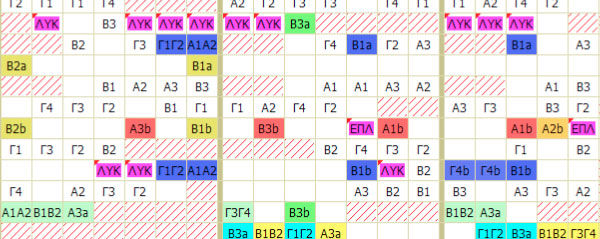
Speed up your timetable generation process with the Automatic Timetable Generator in Fedena. Whether you want to generate it for a batch or for your whole institution, enter subject or batch constraints, assign teachers, click on allocate and sit back while Fedena generates the best timetable for you. Don’t want ‘Mathematics’ on Mondays? Take control of your timetable manually at any time, without recreating it again.
 
5. Enhanced Applicant Registration(Admission) Module
 
Fedena Applicant Registration
 
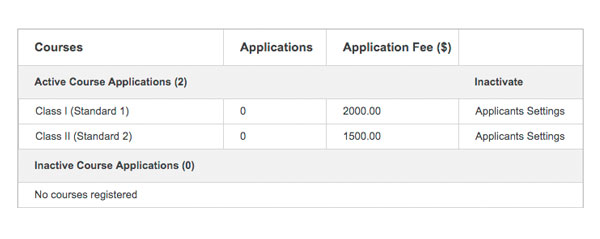
The Applicant Registration module you need in your institution to manage new admission requests. Now comes with features like customizable fields, status messages to record each stage of the admission process and the option to archive your applicants after the close of the admission process. We have super-charged the applicant registration module to super-charge your admissions process.
 
6. Advanced HR Reports
 
Fedena HR Reports
 
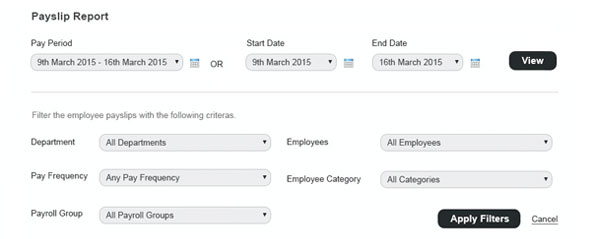
This feature brings advanced reporting abilities to the HR module like Payslip Reports, Employee Payroll category wise reports and payslip comparison reports. With predefined reports, you can start using them right away. These report formats can be customized to add or remove fields as per your needs and what’s more? Save them as templates and forget about making reports again.
 
7. Enhanced Tally Integration
 
Fedena Tally Integration
 
This enhancement brings a host of features to the Tally module. Now you can get fee collection wise amounts as well as particular wise amounts in Tally since all collections and particulars will have a ledger entry. Gross salary paid and payslip deductions made in Fedena will all get reflected in Tally. All Fedena related accounts and ledgers are created by default and all entries will be created only if they previously do not exist in Tally thus ensuring no duplicity.
 
8. Transfer Certificate Generator
 
Fedena TC Generator


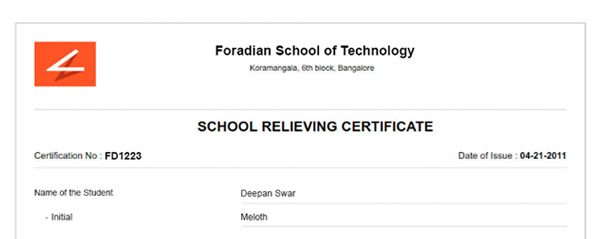
You asked for more options in generating the Transfer Certificate and we have heard you. With the all new TC generator, each of the three sections – header, student details, and footer have customizable fields, that you can choose to show or hide from the TC. Customize the header template or use your own preprinted header. Map to existing student details in Fedena or use custom fields to enter data. Define clauses and add up to 4 signature fields in the footer area. Create your own customized template for the Transfer Certificate of your institution.


What’s next?

Powering your institution with the all new Fedena is but one step towards providing the highest quality of education, let Fedena take care of your institution while you concentrate on what you do best and we understand that providing high quality education is a journey of a thousand miles which begins with one step, take that one step today.
 
Fedena Customer Success


Fedena 3.5 release

Fedena 3.5 – Our biggest release yet

3_5-Blog
 
What a week! A few days ago we released Uzity 2.0, our biggest update to Uzity—a learning management system for educational institutions and businesses—since the launch of Uzity itself. And here we are today announcing Fedena 3.5. It’s has been almost seven months since our last release. That’s because we’ve been working hard getting all the details right, and to bring you some big changes.
 
Fedena 3.5 is our biggest release yet and is jam packed with new and enhanced features to help you get the most out of Fedena. As always, we’ve listened to your feedback and made many of the improvements you asked for.
 
Automating and Simplifying Employee Leave & Payroll
By far the biggest change in this release is the completely revamped Human Resources module. We’ve taken the foundation of the module and built out more exciting capabilities:
 

  • Employees can apply for additional leave even after exhausting their leave credits.
  • For each Leave type, HR Administrators can define the leave carry forward settings and LOP calculation formula for additional leaves.
  • Managers get notified of additional leaves. They can then mark additional leaves as ‘Loss of Pay’ and the necessary deduction can be made when generating payroll.
  • Use Payroll Groups to organize employees based on their payroll. In addition to monthly payslips, payroll can also be processed Daily, Weekly, Bi-weekly, or Semi-Monthly.
  • Payroll Category amounts can contain not just plain numeric values but also be calculated based on formulas or conditional formulas.
  • Ability to generate and manage payslips of all employees from a single view.

 
Printer Support
Fedena now supports the use of Laser, Inkjet, Dot matrix, and Thermal printers, along with the ability to set the page size – A4, A5 Portrait, or A5 Landscape.
 
Fee payment through Fedena Mobile
 
Parents and Students can now conveniently check their fee details, pay fees, and download the fee receipts—all from their mobile phones.
 
More CCE compliant
 
To make life easier for institutions following the CCE grading system, we have made Fedena more CCE compliant, especially for classes IX and X.

  • Support for 6th subject and Assessment of Speaking and Listening (ASL) subject.
  • Simplified formulas and formative assessment (FA) calculation modes to suit your requirement.
  • Ability to upscale student grades in scholastic areas.
  • Ability to generate the student’s ‘Performance Profile’ report according to the CBSE norms.
  • Other reports as required to be uploaded to the CBSE portal.

 
Timetable management made more efficient
 
The way timetables are created and managed has been updated to ease timetable management. We’ve added a new feature called ‘Timetable Summary’ that will give you the subject-allocation status of each batch assigned to a timetable as well as the work hour utilization of employees assigned to a timetable. We’ve also redesigned the ‘Employee Work Allotment’ feature to help you easily manage employee-subject associations.
 
Exam management made easy
 
With a small UI redesign, the process of creating and managing exams for batches is now much simpler.
 
Finance Reports—more usable, more functional
 
When generating Finance Reports, you’ll notice the beautiful new UI. But it’s much more than just a cosmetic change. You can drill down to student/employee-level and transaction-level details. The report data is now more user-friendly and well organized.
 
These are just some of the major changes we’ve made to Fedena.
 
We hope you enjoy this release, and as always, we’d love to hear from you. Write to us at info@fedena.com and let us know your thoughts, questions, and feedback.
 

Salvaging Rural India with Virtual Classroom : An Introduction

ruralIndia
 
Rural India is still struggling with widespread poverty, limited opportunity, and low teacher attendance rates in school. What role can the virtual classroom play in improving the quality of education and life?
 
In June last year, the Madhya Pradesh government took a leap forward by introducing an attendance tracking application on smartphones to tackle teacher absenteeism. The situation had hit at an all time low when a study found that some teachers were absent for 23 of their 24 years of service. A study done by the University of California pegged the fiscal cost of such absenteeism at $1.5 billion a year. Districts like Dhar and Burhanpur are beautiful, river-side, and have great historical meaning in our heartland. They can also be a bleak place to live.
 
The virtual classroom presents us with a great opportunity to tackle this problem. Willing teachers from around the world and the country can be tapped without their physical presence with the help of the virtual classroom. This would enable the rural children to get the quality of education they should be getting and their parents expect from schools.
 
When teachers, pundits, and theorists analyze our Educational system, they usually focus on urban and suburban schools and colleges, but rural schools make up for more than 50% of our country.  Unlike many of the urban peers, students here fight with generational poverty, low quality of education, a lack of awareness and limited job opportunities. Virtual classrooms could easily help these children get a better quality of education and ensure a bright future ahead. Interactions with their urban peers, guest lectures by leading industry specialists, virtual tours of various places all over the world, would open their minds to the possibilities that exist through education all through the medium of virtual classrooms.
 
A report released by the World Bank last year in October suggested that India might be overestimating the number of it’s poor, but it still doesn’t change the fact that nearly 7% of the rural population of our country is still facing extreme poverty. The government taking an initiative towards virtual classrooms shows that they are trying to take a step ahead towards building awareness through higher quality of education.
 
With the Modi government allocating close to 100 Cr towards virtual classrooms, let us analyze what could possibly be the benefits of such a system and how we could salvage rural India through them. We will be taking an in-depth look at the classrooms and schools in rural India and tackling all the problems they face with the help of virtual classrooms.
 
In the coming months, we will study the number of states with the highest rural population facing poverty, the quality of education and life in such areas and how virtual classrooms could be effective in providing students with the quality of education they require to uplift their lives and break out of poverty.
 

How Software For Student Helps In Advanced Learning

How-Software-For-Student-Helps-In-Advanced-Learning
 
Ever since the first arrival of the computers, technology has always been seen as a den for scammers, cheaters and hackers. Within the education sector, technology is always treated suspiciously at the world of fake degrees, leaked exam papers and uncertified courses.
 
But education and technology don’t have to be separated-combining interactive software for student with other educational materials has proved to enhance the learning process and promote more effective and innovative ways of retention than textbooks can ever do. This article discusses how student software have transformed the learning process.
 
Students can record lectures
 
The software allow students to record their lecturers for future referencing. With these student software, students attending lectures will not have to spend their entire time scribbling tirelessly on notepads in order not to miss an important piece of information. With lecture recording software for student, students can record and listen back to all their classes without having to spend money on some expensive recording equipment. Most of these student software act as both notepads and audio recorders. Students can therefore, store a complete lecture in both audio and visual forms.
 
Assists students in revision
 
The revision software for student is now in big business and it appears like technology has finally achieved what we never thought possible-making revision enjoyable.This kind of student software uses revision notes to quiz users on what they have learnt from their revision. Other software uses some tools to hide and give clues for answers to revision topics, thereby making it possible for students to quiz themselves. Some of these software offer resources to create mind maps, revision charts, flash cards, quizzes and notes in colourful and fun programs.
 
Prepares students for exams
 
There are software for student available which prepare students for some exams such as GRE and LSAT tests used by graduate schools in their admission process. The software utilize a social networking style functionality that allows students to connect with fellow test takers. Students are able to peruse through unlimited revision material with notes, quizzes and more. Students are able to effectively keep track of their learning process which makes revision easier.Some student software feven keep track of the days and hours until each exam.
 
Allow students to plan
 
Organisation is a part and parcel of a healthy learning process, and this is the main reason why planner software for student is becoming more popular. The software not only saves on paper but also send alerts and remainders straight to your device.This type of student software features sharp and clean interfaces that allow students to map their timetables easily.
 
Wake up software
 
If you happen to be a sleepy student who always wakes up 30 minutes late for your lectures, then wake up software is for you. Some of this software will even give you weather updates such that you can know whether to carry an umbrella before leaving home. Other student software aims at correcting students’ sleeping patterns such that it wakes you up during your lightest sleep phase. This software does this by monitoring both your movement and the time you went to sleep. This will ensure you will wake up feeling fresh and sharp.
 
Software for student has enhanced learning by making the whole process both simple and enjoyable. Any student looking to elevate his/her grades should consider going for such student software.
 

Education Softwares: Learning Anytime, Anywhere

Education-Softwares--Learning-Anytime,-Anywhere
 
If you, a friend, or a loved one wants to learn something but isn’t inclined to take a formal class, or even if they are in a class and want to add to their classroom efforts, help can be just a mouse click away. In fact, not only is world class help available in the form of many different types of education softwares but in many cases, the educational software that’s available is free of charge.
 
What Would You Like to Learn Today?
 
Whether a student just wants to pick up a new skill or supplement a subject that they are already learning, education softwares are there to do the job, and very well too. From anatomy to zoology, educational software can be purchased or downloaded from a practically endless number of sources. And not only are these programs excellent, having been created by some of the most distinguished experts in any field but thanks to modern computer graphics, in many cases, they’re fun to use, not only for kids but adults as well.
 
Making a Game of It
 
Everybody knows that when you want to learn a normally staid subject, try making it into a game. That’s exactly the premise of many education softwares packages that make a normally dry subject such as anatomy into a computer game that is fun. A good example of this is Bodyworks Voyager–Mission into Anatomy, which takes students on a tour of the human body via a fighter ship that is shrunken and inserted into the human body. The object of the game is for the user to destroy certain types of microbes and save the life of the patient. Things get a lot of complicated when users discover that there are two types of microbes, one that tries to kill the patient, and the other that tries to kill the fighter ship. Need more ammo? Periodic questions about what the user has experienced must be answered in order to restore their weapons.
 
Fun and Learning for Everyone
 
As ubiquitous as computers have become in recent years, it should come as little surprise that education softwares are available that are not only excellent teaching tools but are also fun to use for virtually any age user. Children as young as four can use educational software tool such as The Clue Finders to learn such subjects as math and geography using the tools of fantasy and science fiction. Children can even learn such concepts as business by using Lemonade Stand, which teaches simple math via the real world of a child’s lemonade stand.
 
Even more mature students will enjoy and benefit from education softwares that teach such diverse subjects as math, languages, and even music in a fun and interactive ways. Role playing takes on a new meaning when students can become part of solving real world problems via the topics they learn in dealing with issues such as pollution, literacy, and much more. In fact, several educational software packages are available that will teach a student programming, which might lead to creating their own education softwares. When it comes to education softwares, the sky is the limit.
 

7 Ways Information Technology is Changing Education

Ways-Information-Technology-is-Changing-Education
 
Information technology has the power to create and enhance new proficiencies in the education arena. Information technology in education revolutionizes most of the approaches we view, receive and perceive information every day. There has been a paradigm shift from textbook based education system to a more interactive and virtual education system across the world.
 
Here are 7 ways information technology is changing the face of education all over the world.
 
Multimedia content: One of the major changes brought about by use of information technology in education is the introduction of multimedia content. Multimedia learning meets the needs of all types of learning styles. Learning through the use of videos, pictures, text and games offer a better understanding of concepts than learning in the traditional manner. Tutors can also use online learning resources and apps to present information in an easy-to-apprehend manner.
 
Access to quality content: Digital devices have resulted in a paradigm shift from limited information to a vast resource of quality content available online. They offer personalization, by providing direct access to all kinds of content, are interactive and mobile. The access to quality content is also at a lightning speed rather than spending hours browsing through books to pull out required content.
 
Mobile learning: Classroom learning has almost become a thing of the past. The use of information technology in education has led to a new concept termed as “mobile learning.” Student can move from their desks, walk around, and learn new concepts. Students can now access learning modules from the comfort of their home, skype with other classes and involve in various collaborations for project learning.
 
Self-Monitoring techniques: One of the most appreciated changes that has been fueled by use of information technology in education is the plethora of tools available for self-monitoring and evaluation. There are numerous mock tests and applications available online that can offer real-time evaluation of the students. There is no need for classroom evaluation tests as was the case earlier. Real-time and factual test results offer an easy insight into the performance of students.
 
Focus on practical skill training vis-à-vis soft skill training: The utilization of information technology in education has shifted the focus of education from monotonous soft-skill training techniques to practical skill training. Most universities now concentrate their activities and projects to areas that can help students to show a portfolio of work activities to their future employers.
 
Students with disabilities: Recent studies have shown how the use of information technology in education has helped students with various disabilities to learn at par with other students. Tablets have helped many students with autism to communicate effectively. e-Books with text-to-speech features have assisted blind students or children with dyslexia to gain access to all kinds of learning material.
 
Cost-effective education: Many people argue that the use of information technology in education involves huge costs. However, if you look at it closely, resources such as eBooks, free online resources and virtual outdoor trips are in fact promoting better learning at affordable prices across students of all strata and ages.
 
EBooks are often cheaper and are available with interactive learning sessions, worksheets and linked dictionary tools. Think of the days when every change in information involved purchase of new books and resources. Due to digital learning techniques, most schools that subscribe to eBooks have access to constantly updated content at almost nil cost.
 
The availability of online resources facilitated by use of information technology in education makes informative content easier to discover, access, to change and disseminate. All these stages are crucial for teaching, study or even research work. In a nutshell, information technology in education has paved the way for digital learning.
 

ERP the King of Smart School Software.

Fedena-Enterprise
 
Previously, we saw what a smart school is and it’s impact on Education, not only do these schools employ smart school softwares and technology but also provide the right learning environment for the modern student. Smart Schools are tasked with being up to date with the latest teaching practices and education administration processes so as to understand their students’ needs. There are many schools that are adapting and could be classified as a smart school; but a very few of them are actually in sync with what the next step for a smart school could be.
 
To integrate different sections of their diversified operations into a single, cohesive and easy-to-use system, many schools are now looking towards ERP software, Enterprise Resource Planning software. The main objective of these measures are to streamline the management processes and reduce operational costs. It is very well known that ERP systems are a part and parcel of any automation and smart industry; in this case, it only makes sense for smart schools to enter into purchasing the right ERP.
 
The Smart School Trend
 
Technology has invaded schools with a storm since the advent of the internet and the mobile phone. Smart schools have high quality audiovisuals in classrooms, location tracking of school buses, student tracking from the time of their admissions, automated timetable allotments and loads of other such optimizations. With ERP, the functions across the enterprise get integrated into a single system that supports the smart school’s finances, human resources, student service transactions and processes. These ERP solutions offer the advantage of being integrated with each other and being capable of tracking many things at the same time. For instance, when data is changed in one area, information automatically changes in all the related areas and functions. When ERP is being implemented, it can also lead to the redesigning of the standard systems according to the global best practices.
 
Challenges faced by Smart Schools
 
The challenges that smart schools face in implementing any software/technology are often related to technical and budget related issues. At times, the staff in the institution is not fully trained in the use of the smart school software being implemented. Also, the decision makers at the institutions want to have a clear view of how the software can help in reducing the cost of managing/running the institution. But the process of installing any smart school technology is never quick and easy, and the experience of implementation and installation is always different for every smart school. Although technologies like Youtube, Skype, & tablets are all easy technologies to implement in smart schools but are a little heavy on the infrastructure side of things. Smart school softwares like Skype, Youtube etc require the school to have a high speed broadband internet connection to actually allow the students to have the experience these technologies claim to provide; while tablets are an expensive affair in general. The Government has helped with the implementations of smart school softwares by initiating Digital India and other similar campaigns.
 
ERP the King of smart school softwares
 
Among all these various smart school softwares, the ERP still remains the most important as it is the only software which provides the platform for a school to integrate almost everything from operations to financial management to student tracking. Slowly but steadily, every school is realizing the potential of school ERPs and are making the change to a system that best suits them. Making ERP the king of smart school softwares.

Understanding types of Database software and their applications

databseSoftware
 
In our previous journey into the world of Database softwares, we defined what they are and the requirements your institution would have of them. Now, let’s discuss the different types of Database softwares and how they would fit for different institutions/enterprises. Let’s start by first classifying the various database management softwares.
 
Classification of Database Software:
 

  • Operational Database
  • External Database
  • End User Database
  • Distributed Database
  • Data Warehouse Database
  • Analytical Database
  • Hypermedia Database

 
Operational Database software
 
Otherwise called as OLTP ( On Line Transaction Processing ) Database software, are used to manage dynamic data in real time. This database software allows you to add, delete and modify the data in your database. Businesses find many uses of such databases, for example, customer relationship management transactions and financial operations. Operational database allows you to gather, enter and retrieve large amounts of data- be it specific or general, for example, legal notices, financial data, personal employee information, call logs etc. They can also be part of the purchasing process for an e-commerce business.
 
External Database software
 
An External Database software manages information gathered for use by different individuals or organizations, either via subscription or freely. External databases are accessed online by users to read privately owned data. The Internet Movie Database is one of the examples of an external database.
 
End user Database software
 
An end user database software is simply a software which helps store data created by an end user. Examples of such software could include, word processors, spreadsheet managers etc. Any database software which allows the end user to create and manage data comes under this category.
 
Distributed Database software
 
A Distributed Database software is a software distributed at various geographical locations. This type of database system works under the control of one central database management system and the storage devices of the distributed database are connected to  different CPUs. A distributed database can reside on LAN, WAN, internet, network servers or extranets. The advantage of distributing the database is the significant improvement in performance of data rates and the advantage of not losing all your data even if one of the locations fails.
 
Data Warehouse Database software
 
Data Warehouse is a database software containing a collection of information extracted from various other databases and stored in one place. Data Warehouse can be used by end users or management personnel, primarily for reporting purposes and drawing insights. There are many benefits of using a Data Warehouse, such as retrieval of information from a Data Warehouse doesn’t affect the performance of the operational system. Automatic identification and resolving of inconsistent data, etc are some of the database software’s key advantages.
 
Analytical Database software
 
An analytical database software  is used to store data from other databases for data analysis. The data in the analytical database software is edited, filtered and used by analysts of an organization. Businesses worldwide use analytical database softwares for the analysis of employees’ and organization’s performance.
 
Hypermedia Database software
 
The purpose of hypermedia database software is to store multimedia web pages. In a hypermedia database, data is stored online and it can be accessed by multiple users at the same time. In addition to the above database types, there can be other types of databases as well. For example, businesses in specific industries will have customized database solutions, targeted at the particular requirements and needs of the business, like Fedena ERP for Schools.
 

How to Manage Scheduling Software in a School?

How-to-manage-scheduling-software-in-a-school (1)
 
There are numerous advantages to using scheduling software for your school. It’s a great way to produce block scheduling, list scheduling, and other scheduling types, no matter what size your school may be. With an automatic or interactive scheduler, it’s easy to put together a great structure for your school.
 
Using Scheduling Software to Save Time
 
Scheduling software is an excellent way to save time. Scheduling all students at once by grade level or individually, you can produce walk-in scheduling, where students will enroll after most scheduling for other students has already been completed. You won’t need to disrupt previously enrolled students this way.
 
Group Management and Enrollment
 
In addition, scheduling software allows groups to schedule together. For example, if one group of students are involved in multiple activities, it’s easy to create groups for them and associate your group with each activity instead of having to do this individually. You can also do the same for instructors.
 
Sub-subjects are another excellent feature of scheduling software. By looking at a hierarchical view of top-level themes with other subjects broken down, you can look at Algebra, Calculus, and Geometry all at the same time. It’s an easy way to get a top down view of all related subjects for each area.
 
Room Capacity and Time Periods
 
Room capacity is an important consideration for scheduling software. You’ll need to determine the maximum number of students and instructors that can fit into each room.Say, the defaults for most rooms are 15, and if you schedule more than one group or activity at the same time, the software will alert you by creating a conflict. The capacity of students for each room is limited for each building, so the software won’t let you create a situation where multiple students would be enrolled in a problem scenario.
 
Flexibility of time periods is also critical in selecting good scheduling software for school. For example, you can define the layout of your schedule by the length of each period, such as half or quarter hours, or even break down by minute-based intervals. This makes scheduling school periods much easier.
 
Student/Instructor Database Management
 
Large capacity is another important key to look for in scheduling software. You should be sure your program can accommodate more than 100,000 students in the database, as you’re likely to grow in numbers as your student enrollment goes up. Be sure the system is capable of handling large group of students and organize them adequately without experiencing slowdowns or software hiccups.
 
You can continue to manage scheduling software by entering student ID number or typing in the first letters of their last name. By doing so, you can gain access to email features for schedules, such as emailing each student their scheduling in grid or line format. You can send these out to individuals or groups, based on homeroom and teacher.
 
Reporting Features of Scheduling Software
 
Another important feature of managing scheduling software is to look at basic built-in reports. You’ll need a way to see all the students who have signed up for specific classes by grade or school, and of course have a master list that shows each course offered as well as level, weight, GPA factor, size, and length. It’s helpful to include textbook integration and fees as well. By selecting the option to print details on each student’s schedule, it makes it easier for students — and for you — to see exactly what needs to be done for successful classroom management.
 
These are just a few basic ways to use scheduling software within the classroom. In addition to easy database management, convenience, flexibility, and reporting, scheduling software offers numerous benefits such as email integration and online views for each student to access their schedule from the comfort of their home.